page | 70
Upgrade Firmware
To upgrade the rmware for the 4x1 DVI KVM Multiview Switcher, use the Gefen
Syner-G™ Software Suite, which can be downloaded here: http://www.gefen.com/synerg/.
See Updating the Firmware (page 117) for more information. The following illustrations
are shown for documentation purposes only.
1. Enter the menu system. See Accessing the Menu System (page 39) for more
information.
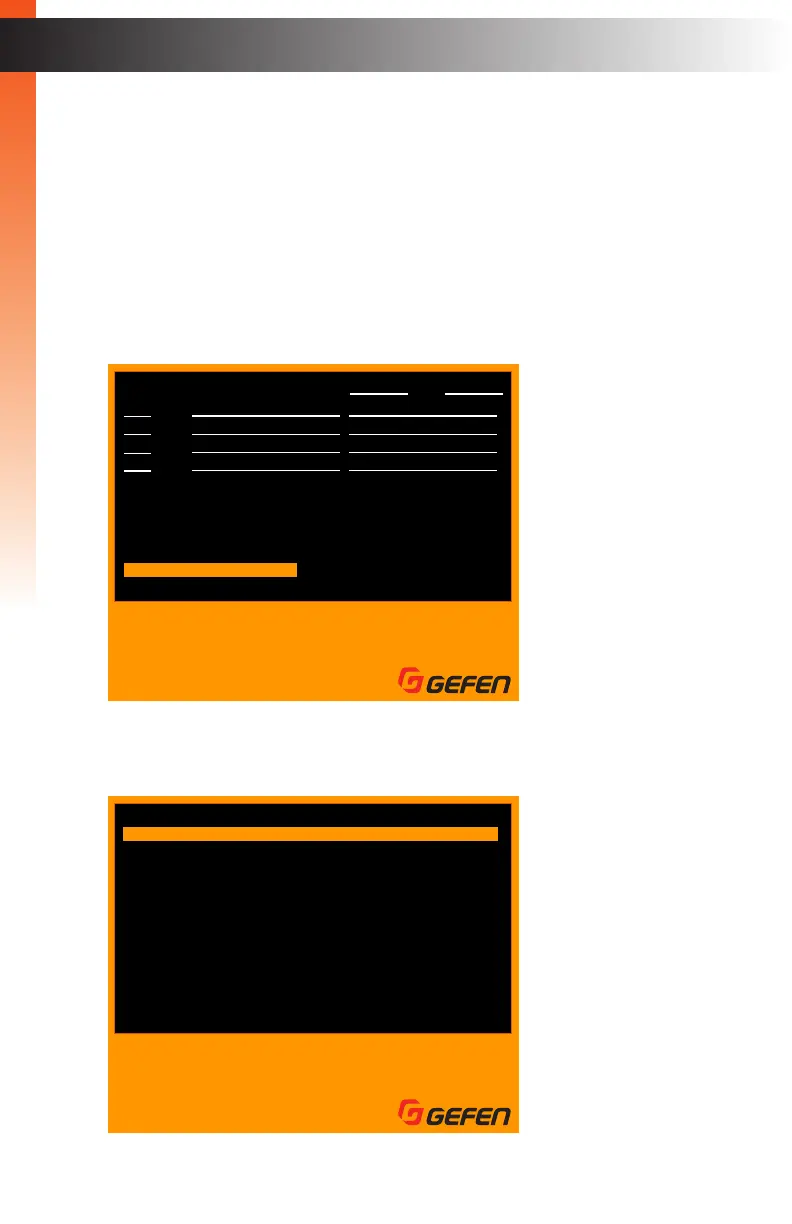
2. Select the Information option using the ▲ or ▼ keys on the computer keyboard.
3. Press the Enter key to display the following screen.
Basic Operation
Basic Operation
OSD Menu
F1
F2
F3
F4
Ins
Home
Main menu
Full view
PIP view
Quad view
PAP view
Edit
Video B
Esc
Enter
A
H
I
Exit
Select
Switch Audio
Switch USB
PIP display
Input
01
02
03
04
KVM ID: 01 / 02
AUD USB VID-A VID-B PIP
AUD USB VID-A VID-B
z
z
X
X
X
X
X
X
Select
Name VID USB
PC01
PC02
PC03
PC04
Settings
Information
Exit
Information
F1
F2
F3
F4
Full view
PIP view
Quad view
PAP view
Esc
Enter
W S
Exit
Select
Navigate
PanasonicTV0
1920x1080
FW 1.0.2
Read Monitor EDID
Upgrade Firmware
Monitor Model
Preferred Timing
Firmware Version
Main Menu
Information
Exit


 To Next Page