page | 75
Basic Operation
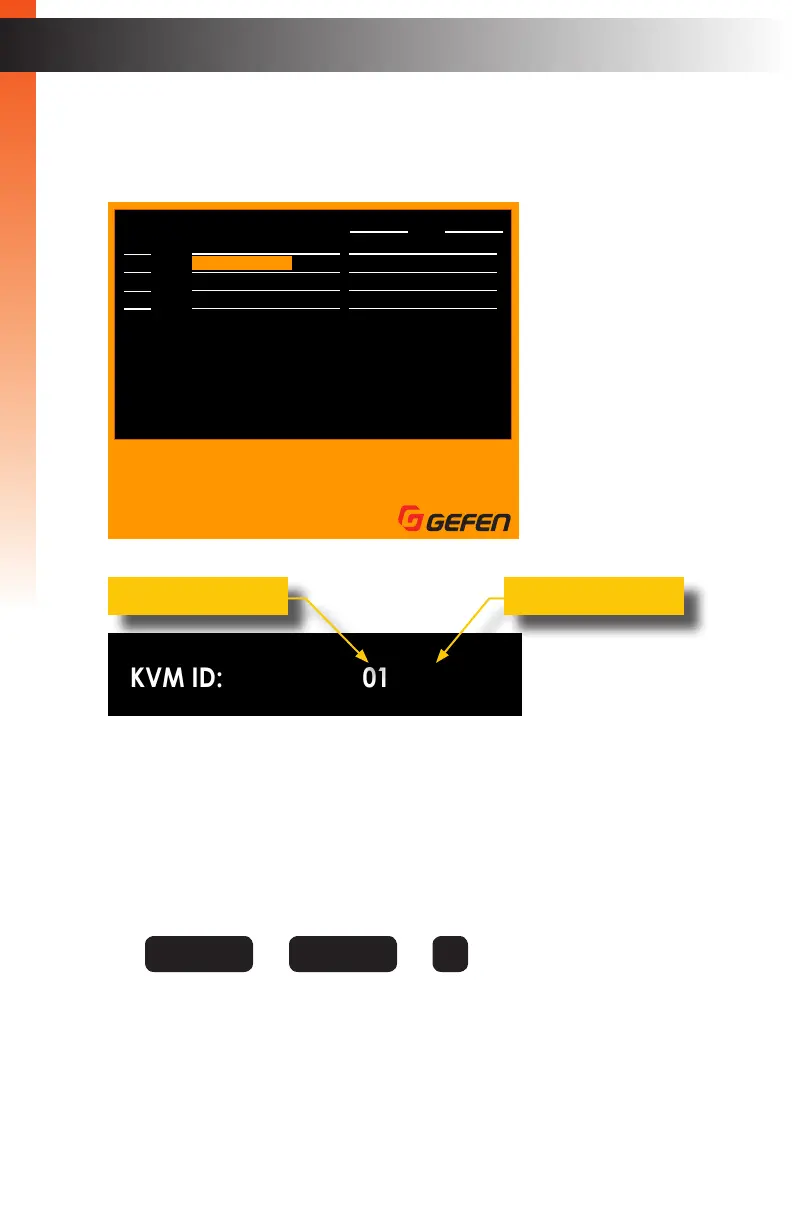
8. Next to KVM ID, there are two numbers. The rst number is the active switcher.
The second number is the total number of switchers in the chain.
In the example below, we have 01 / 03:
Because all the switchers are connected, we can control any of switches directly from
the keyboard and mouse that are connected to the rst switcher in the chain.
9. To move between switchers, use one of the following methods:
• Use the #kvm command to set the active switcher.
• Use the following hotkey combination:
Where X is a number on the keyboard from 1 to 8. This number represents the
switcher to be selected.
• Move the mouse cursor to the desired display of the switcher to be controlled.
Cascading
F1
F2
F3
F4
Ins
Home
Main menu
Full view
PIP view
Quad view
PAP view
Edit
Video B
Esc
Enter
A
H
I
Exit
Select
Switch Audio
Switch USB
PIP display
Input
01
02
03
04
KVM ID: 01 / 03
AUD USB VID-A VID-B PIP
AUD USB VID-A VID-B
z
z
X
X
X
X
X
X
Select
Settings
Information
Exit
Name VID USB
PC01
PC02
PC03
PC04
F1
F2
F3
F4
Ins
Home
Main menu
Full view
PIP view
Quad view
PAP view
Edit
Video B
Esc
Enter
A
H
I
Exit
Select
Switch Audio
Switch USB
PIP display
Input
01
02
03
04
KVM ID: 01 / 03
AUD USB VID-A VID-B PIP
AUD USB VID-A VID-B
PIP
z
z
X
X
X
X
X
X
Select
Settings
Information
Exit
Name VID USB
PC01
PC02
PC03
PC04
Active ID Total switchers
+ + + X
hotkey hotkey K


 To Next Page