English
-50-
TROUBLESHOOTING
Refer to the symptoms and solutions listed below before sending the camera for
repairs. If the problem persists, contact your local reseller or service center.
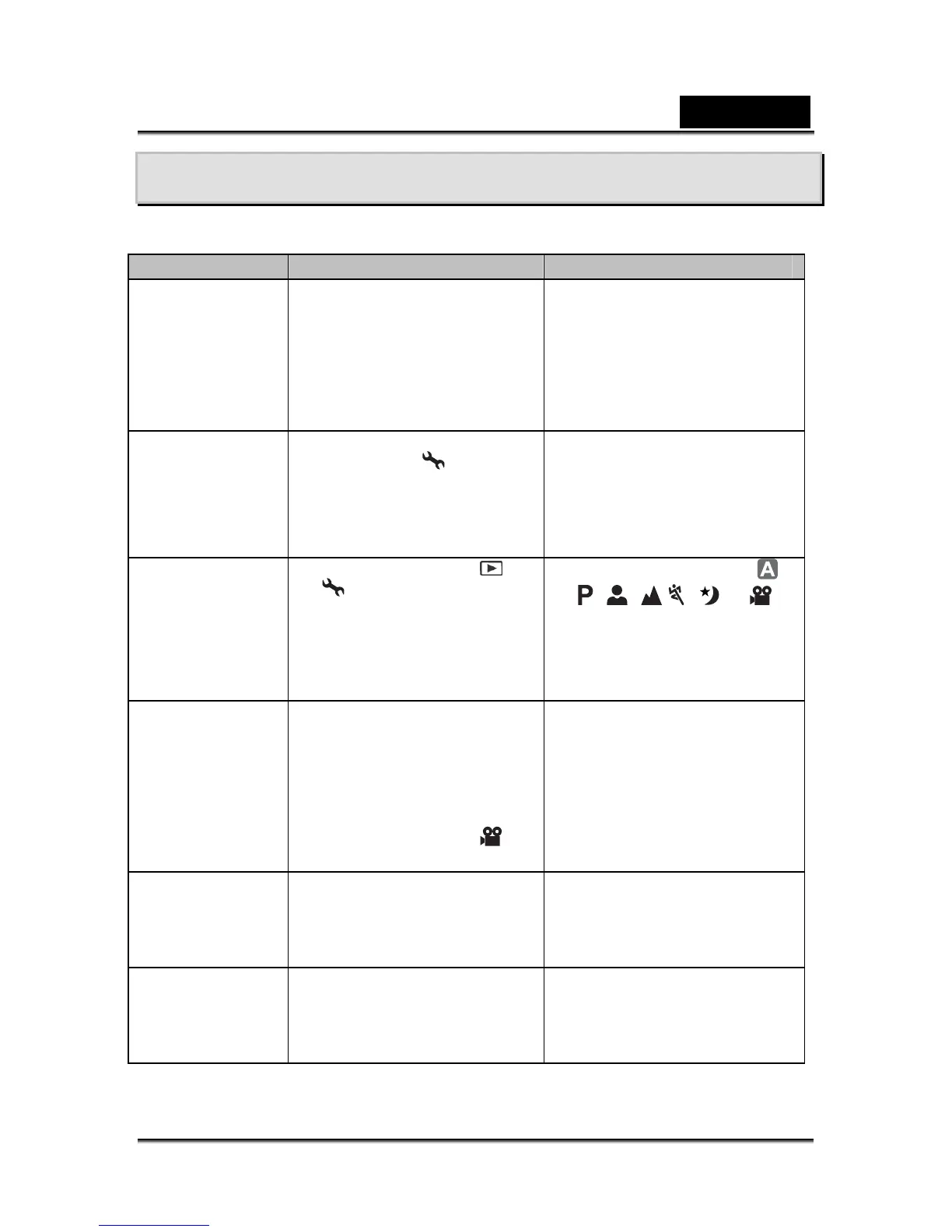
Symptom Cause Solution
Power does not
turn on.
The battery has run out.
The battery is not oriented
correctly.
The battery cover is not
closed properly.
Load new or fully charged
battery.
Load the battery in the
correct direction.
Close the battery cover
correctly.
Camera
suddenly powers
down.
The function of [Auto Shut
Down] in the
mode has
been activated.
The battery has run out.
Turn the power back on and
set the option of [Auto Shut
Down] to [Off].
Load new or fully charged
battery.
Image is not
captured when
the shutter
release button is
pressed.
The camera is in the or
mode.
Memory is full.
Rotate the mode dial to ,
, , , , or .
Transfer the desired files to
your computer and then
delete unnecessary files, or
use a different memory card.
Flash does not
fire.
Flash off is selected in flash
mode.
10+2 sec. Self-timer is
selected in self-timer mode.
The [Capture Mode] is set to
[Burst] or [AEB].
The camera is in the
(video) mode.
Select a different flash mode.
Select [Single] in the
[Capture Mode].
Switch the mode dial to
another mode.
Continuous
shooting is not
possible.
The capacity of the built-in
memory or SD memory card
is full.
Insert SD memory card with
available space or delete
unwanted images.
Cannot transfer
files over a USB
connection.
USB cable is not connected
securely.
USB driver is not installed.
Camera is turned off.
Check all connections.
Install the USB driver on your
computer.
Turn on the camera.



 To Previous Page