EasyManua.ls Logo

Geotech G200 - G210 Gas Measurement Process - Best Practice

Geotech G200
61 pages
Print Icon
To Next Page IconTo Next Page
To Previous Page IconTo Previous Page
Loading...
Page 37 of 61
Operating Manual
www.geotechuk.com
OMG200N Iss.04
© QED Environmental Systems Ltd.
G 2 00 R A N G E
If operating in ‘Person’ or ‘Area’ mode readings are continuously taken by the instrument. To
stop monitoring the operator must select the appropriate ‘soft-key’ and enter the required stop
code.
If operating in ‘Leak’ mode the operator may start and stop monitoring by selecting the
appropriate soft-key.
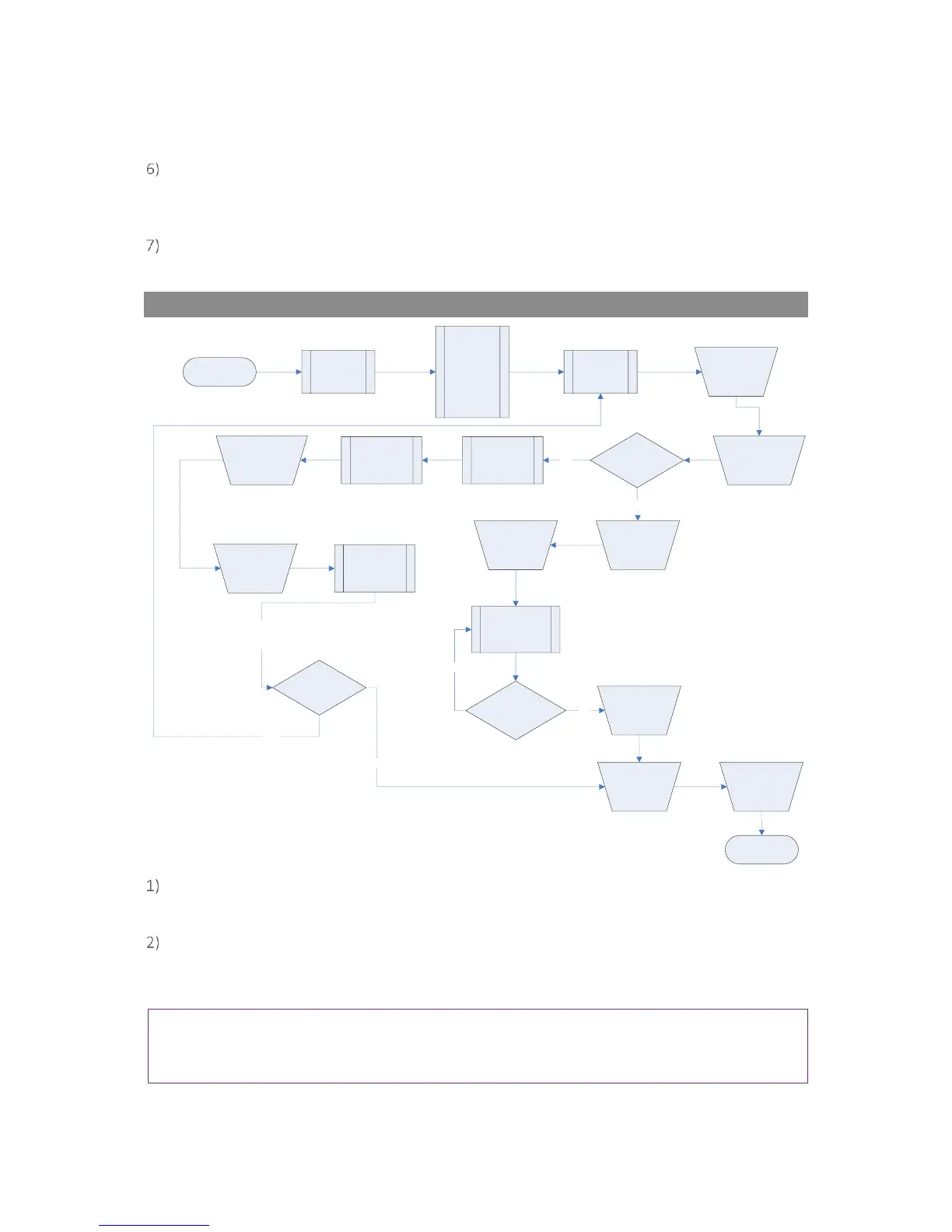
G210 Gas Measurement Process Best Practice
Gas Measurement Process
(G210 - Best Practice)
(Switch on)
Instrument
warm up
Main Read
Screen
Run a
Clean Air
Purge
Connect
Sample Tube
if required
Start
Reading Stored
(confirmation
message
displayed)
Enter ID
Code
& press
Enter
END
Press the
‘Store’ key
Disconnect
the Sample
Tube from
the inlet
port
Instrument automatically
returns to the
‘Main Read Screen’
Run a
Clean Air
Purge
Make sure
that you
have
carried out
all the
preliminary
checks prior
to taking a
reading
Is Auto-logging
required?
Set ID &
Logging
parameters
NO
YES
Readings are
taken
automatically
Start
Logging
Take another
reading?
Stop
Logging
Gas
measurement is
taken
automatically
Wait for Main
Gas Read
Screen to
stabilise
Take another
reading?
YES
NO
NO
YES
When the instrument is first switched on it should be purged with fresh air and allowed to
stabilise for a few minutes.
Make sure that you have carried out all the preliminary checks as listed in section ‘6.1
Preliminary Checks Best Practice’ and that the instrument is ready to take the first reading.
Always use a regulator pressure kit with the G210 instrument.
Note: Alternative methods of pressure reduction are available and could be used. However, to
avoid irreversible damage to the instrument, please seek guidance from the supplier/manufacturer
before using any other pressure device.


Table of Contents

Related product manuals