23
3.6.3 Auto Thread Function
a. Turn on the main power switch
b. Press “Start Button” to make machine self-detect
c. Make sure LCD display showing “REMOVE LAST STRAP, LOAD NEW STRAP”
d. Make sure no previous strap left in the chute
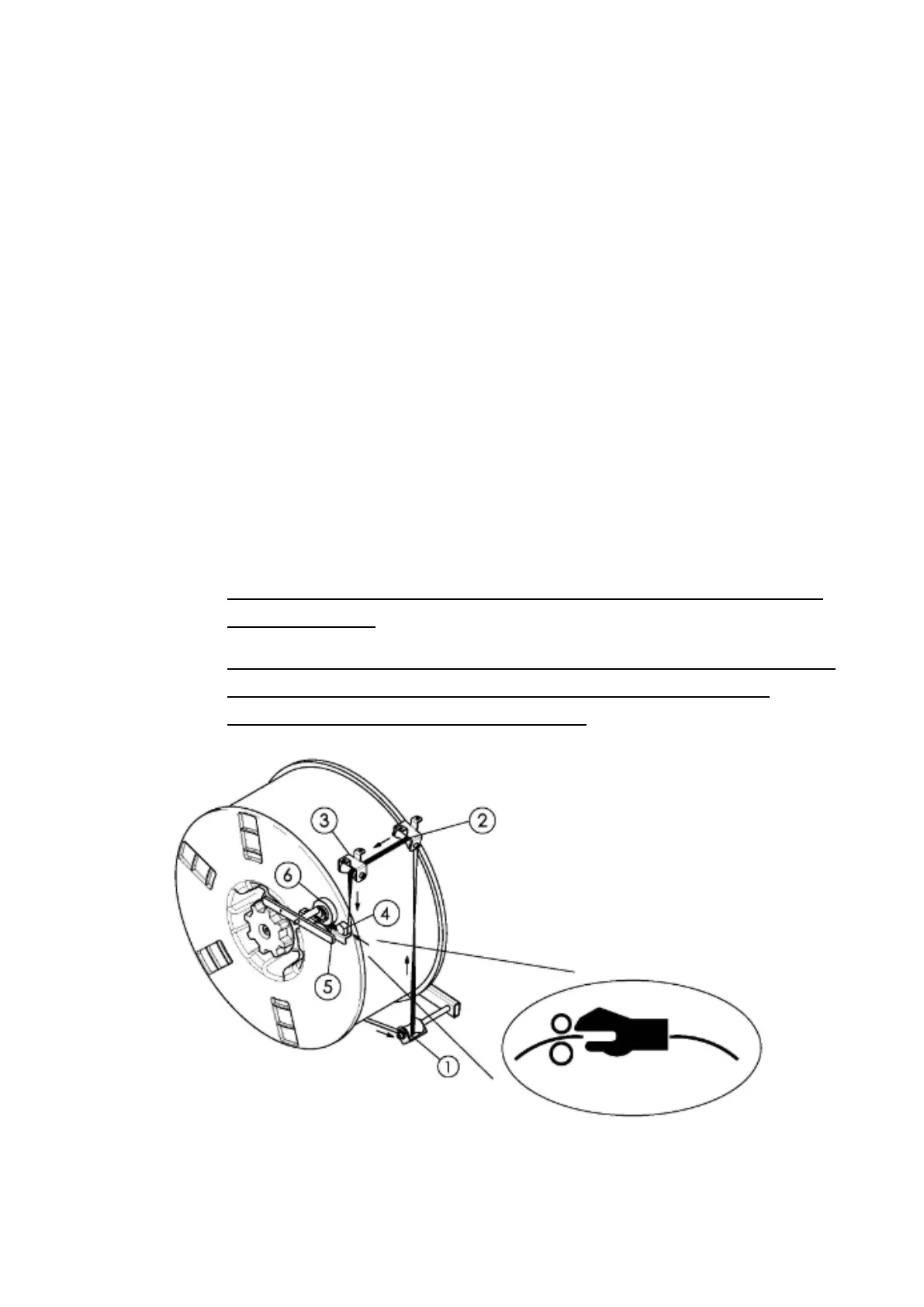
e. Thread strap as indicate picture/sticker through three guide rollers (1,2,3)
f. Keep threading strap until it hits the pool feed rollers (6), at this moment the
strap indicator (4) should be light off
g. Lift the lever (5) and further insert the strap around 2-3 cm ahead the rollers
h. Check LCD Display, it will show “AUTO THREAD, PUSH START BUTTON”
i. Press “Start Button” to start auto threading function
Note: If the strap is fed too much more than 5 cm ahead roller, it could cause
auto threading fail.
Note: Please make sure PP strap is in correct curve down direction, to have the
PP strap insert into machine in opposite direction, it might cause auto
threading, feed, refeed…functions not stable.


 To Next Page