Template Module, Version 2.1, 11.08.2020 / Template Basiseinstellungen: Version 3.1 - 07.07.2020
Overview
Gigaset easy E295-E295A / LUG-Kombi US en / A31008-M2901-R351-1-3S19 / overview_Kombi_ELO-Alhena.fm / 2/8/22
6
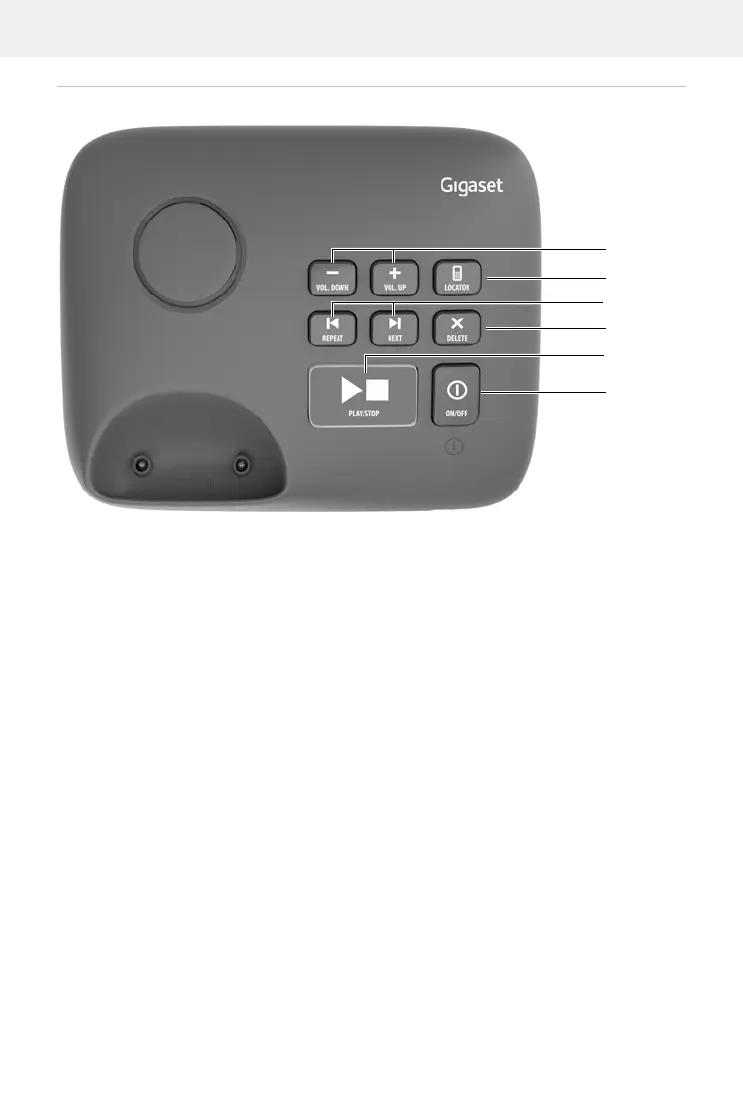
Base with answer machine
AVolume keys (– = quieter; + = louder)
During message playback: adjust the speech volume
While the phone is ringing: adjust the ringtone volume
B Registration/paging key
Locate a handset (paging):
Press briefly
Register the handset:
Press and hold
CBack key
During message playback:
Go to the start of the current message:
Press once
Go to the previous message:
Press twice
DForward key
During message playback: Skip to the next message
E Delete key
During message playback: Delete current message
FPlay/stop key
During message playback:
Play back messages:
Press briefly
Cancel playback:
Press briefly
Lights up: Answer machine switched on, no new messages
Flashes: New message; message is being played or recorded
Flashes very quickly: Memory full
GOn/Off key
Enabling/disabling the answer machine:
Press and hold



 To Next Page