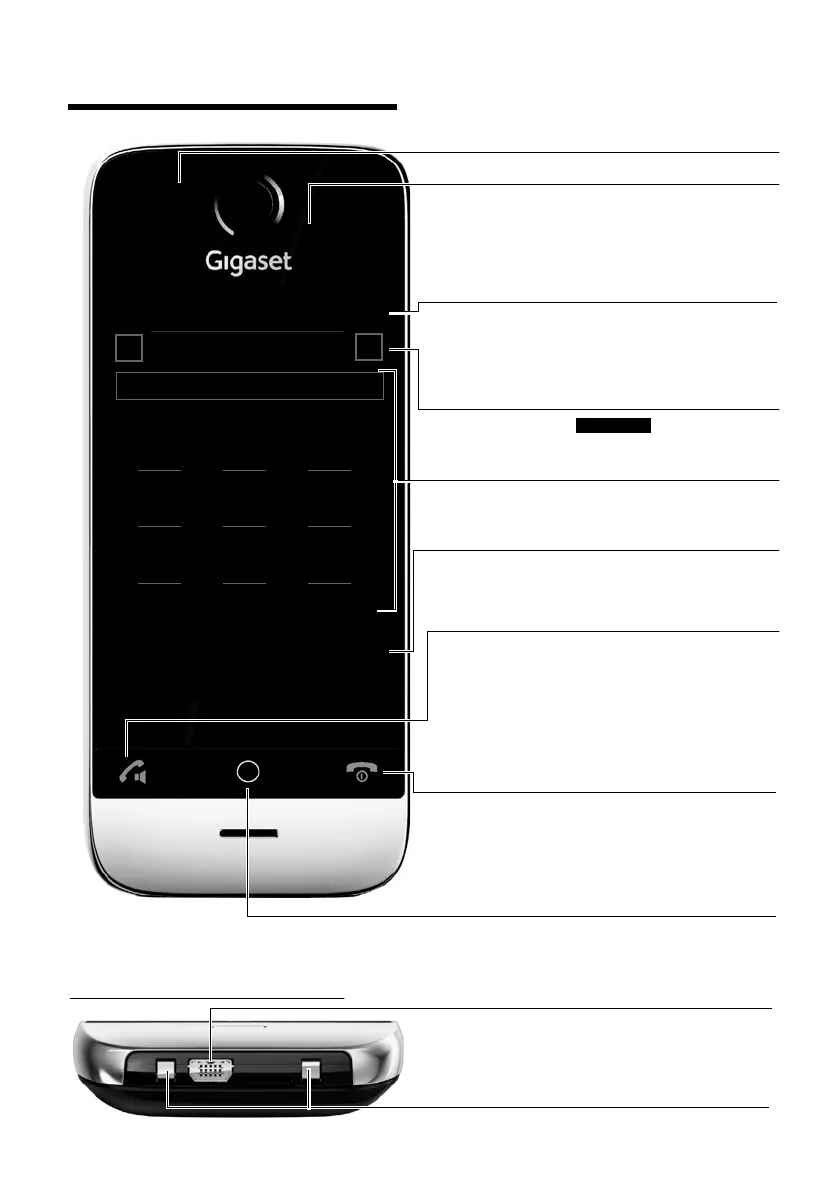
Status bar (¢page 23)
The internal handset name (e.g., INT 1) and icons
(¢page 7) that display the current settings and
the operating status of the phone
Touch the status bar to display the status page.
Navigation area (¢ page 22)
Page position marker ,
change page
ê/ë.
Keypad
Numerical keypad to enter phone numbers
v Menu key
Press briefly: open main menus (¢ page 24)
Press and hold: activate/deactivate key and display
lock (
¢page 29)
Handset keys:
c Talk key
Dial displayed number, accept call
During a call/during playback of messages from
answering machine/when establishing a connec-
tion: switch between earpiece and handsfree mode
In idle status: open redial list (press briefly)
a End call/end key
Press briefly: end (active) call/paging call, reject
internal call
Switch off ringtone for external call
Otherwise: return to idle status
Press and hold: activate/deactivate handset
Touchscreen/display (¢ page 21)
Sample display: "dial page" for entering phone num-
bers in idle mode (one of three idle display pages;
¢page 22).
Option slider (¢ page 27)
Displays the possible actions
Ð INT 1
à òô
ó
¼
06:00
V
<
Å Ä Ä
>
ç
1 2 3
ABC DEF
4 5 6
GHI JKL MNO
7 8 9
PQRS TUV wxyz
*
0
#
˜
Âí å
Calls Contacts QuickDial Internal
Underside of the handset:
Mini USB connection socket
Connect wire-bound headset or handset to your PC
(Gigaset QuickSync)
Charging contacts
Message LED (¢page 44)
Proximity sensor (¢ page 29)



 To Next Page