81
Updating the base firmware
Gigaset SL910/910A / GBR/IRL / A31008-M2300-L101-1-7619 / settings-pabx.fm / 23.08.2011
Version 4.1, 21.11.2007
Updating the base firmware
Whenever there are new or improved functions for your Gigaset base, firmware
updates are made available on the Internet for you to download directly (without a
PC) to your base.
You need a router to connect the base to the Internet, which is connected via a
modem (may be integrated in the router) to the Internet, and an Ethernet cable
(Cat 5 with 2 RJ45 Western modular plugs).
Connecting the base to the router/Internet (optional)
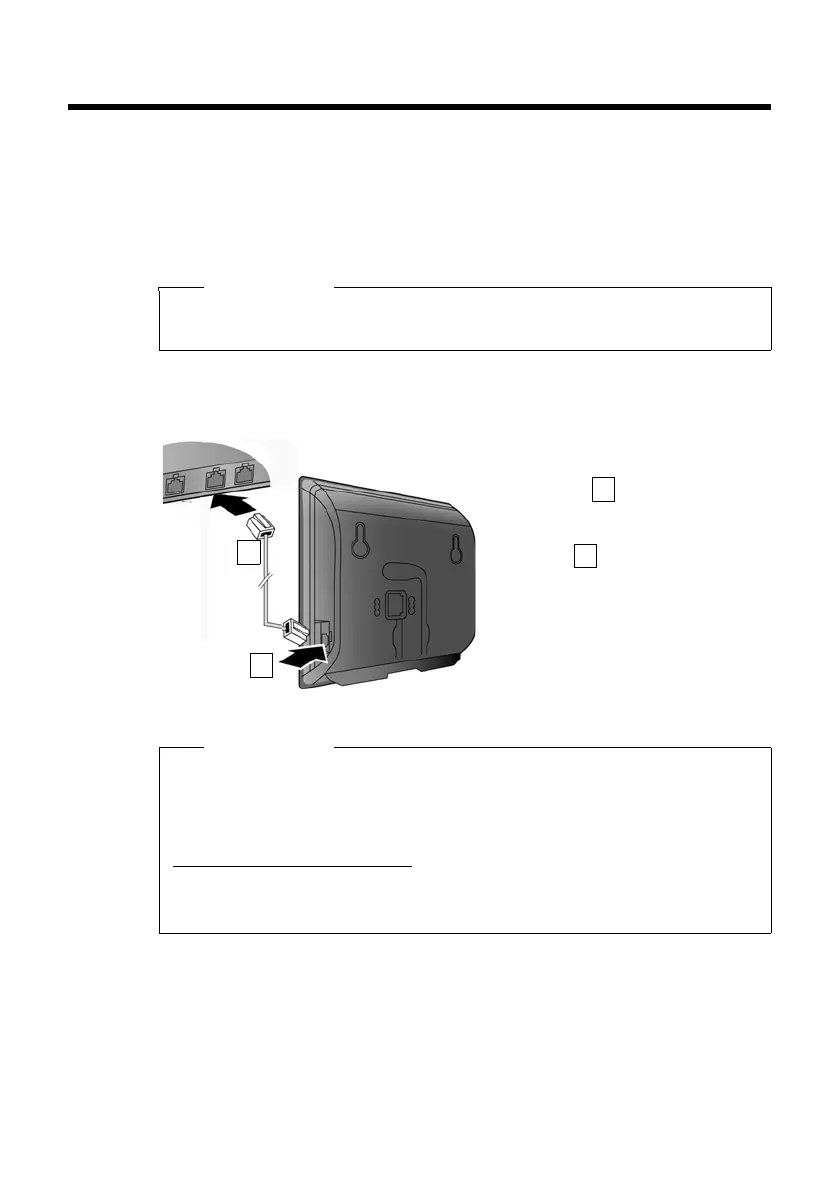
Your base has a LAN connection that you can use to connect the base to a router.
Connecting the base to the local network (router)
For this, your base requires an IP address in the local network. There are two possi-
bilities.
u Dynamic assignment: The router's DHCP server automatically assigns an
IP address to the phone. This may change depending on router settings.
The DHCP server on the router must be activated;
Please note
New versions of the handset firmware can be loaded onto your handset using
the "Gigaset QuickSync" program for your PC (
¢ page 96).
¤ Connect one Ethernet cable plug
into the LAN socket at the side of
the base .
¤ Insert the second Ethernet cable
plug into a LAN socket on the
router .
Please note
This user guide describes the functions for the SL910/SL910A as supplied (other
functions may be added later through firmware updates).
If the firmware update results in operational changes, a new version of this user
manual or the necessary amendments will be published on the Internet at:
www.gigaset.com./gigasetsl910
where you will find a link to the user manual.
About the version of the firmware currently loaded (¢ page 89).



 To Next Page