765041938 Rev. 002 19
Setting of clock (time)
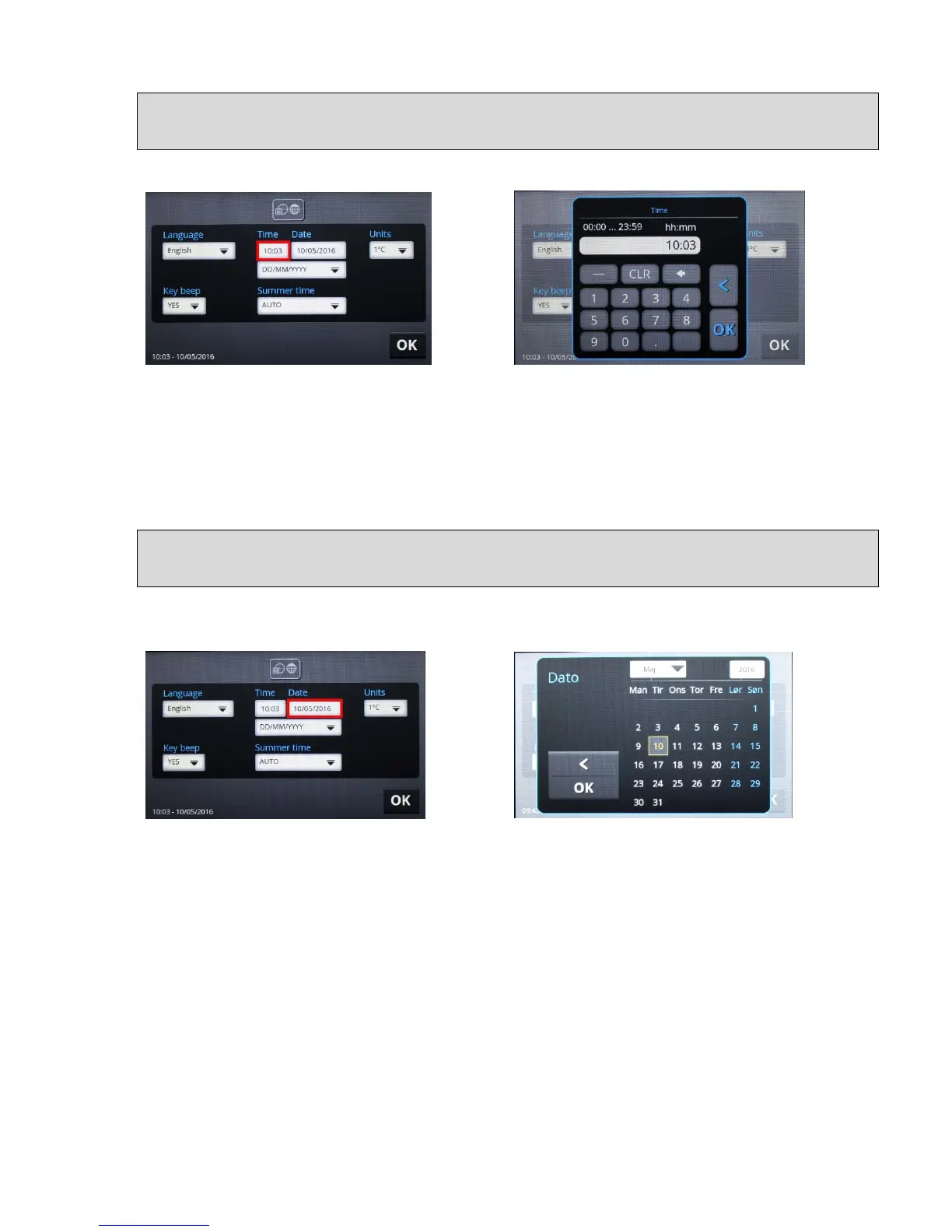
The clock is set by touching the field with the time under the text "Time" (fig. 7):
Fig. 7 Fig. 8
Enter the desired time directly using the numerical keypad and confirm with the "OK" button
(fig. 8). The clock works with days in 24-hour format. It is not possible to use a 12-hour
format ("am"/"pm"). After pressing the "OK" button, the time is saved and the display returns
to the previous menu (fig. 5). Exit the menu without making any changes by selecting "<".
Setting the date
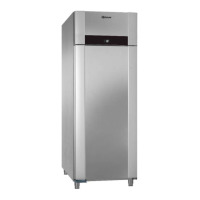
The date is set by pressing on the date field under the text "Date"
(Fig. 9)
Fig. 9 Fig. 10
A calendar menu will be displayed (fig.10). Here, you must select the month, year and day,
and then confirm with "OK". Exit the menu without making any changes by selecting "<". The
previous menu is then displayed (fig. 5).


 To Next Page