765041938 Rev. 002 20
Setting of date format
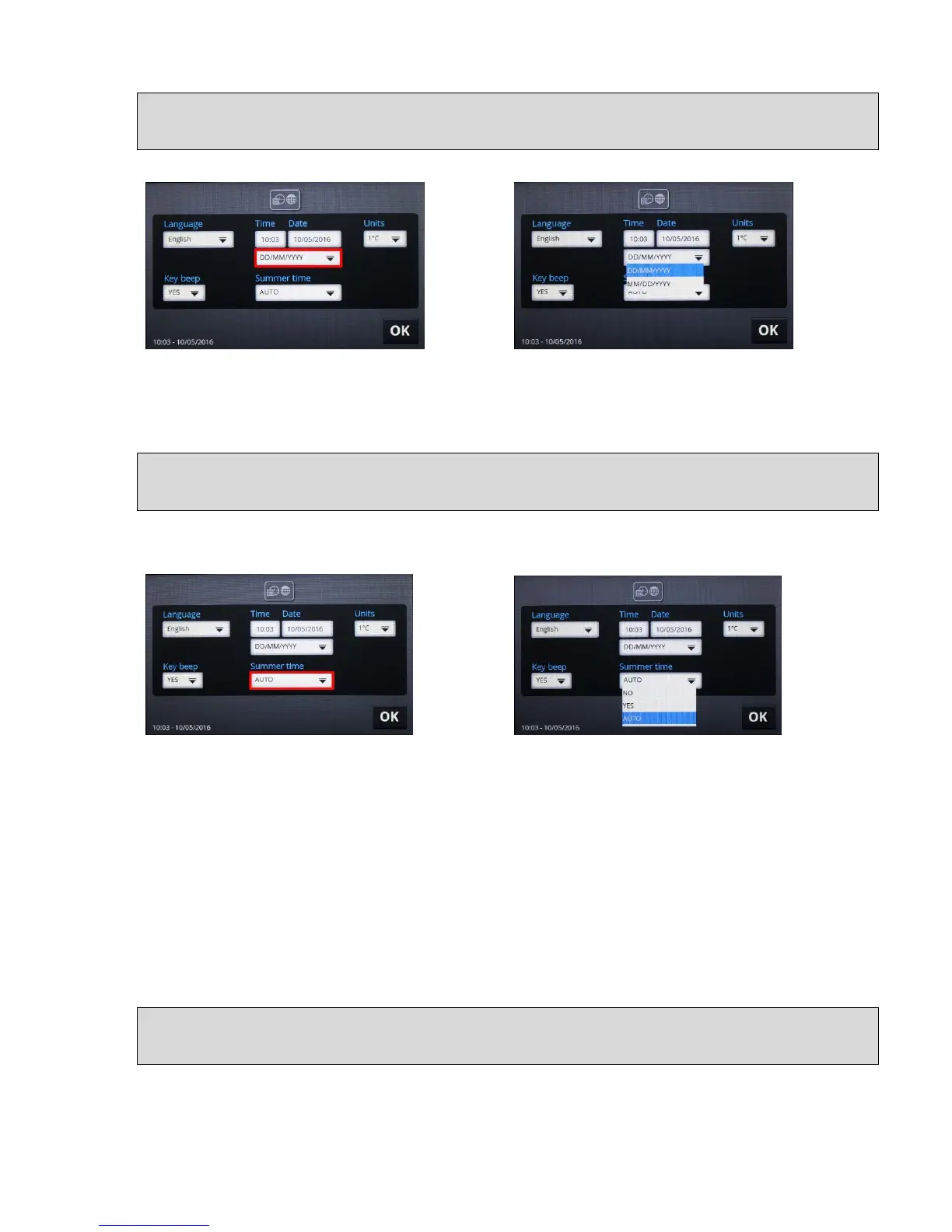
Set the date format by pressing the "DD/MM/YYYY" field (fig. 11).
Fig. 11 Fig. 12
The choice between the sequence day/month/year and month/day/year is now shown (fig.
12): Select by pressing.
Season: summer time/winter time
Setting of the season, i.e. the setting of winter/summer time is done by pressing on the field
under the text "Summer time" (fig. 13):
Fig. 13 Fig. 14
Possible choices:
"NO"
= manual selection of winter time (system time)
"YES"
= manual selection of summer time (system time + 1 hour)
"AUTO"
= automatic switching to Central European Summer Time, CEST:
Start on summer time: last Sunday in March
End of summer time: last Sunday in October
The factory setting is "AUTO". Select by pressing.
Temperature measurement, units of Celsius or Fahrenheit.
Setting the unit to display temperatures in Celsius or Fahrenheit is done by pressing the field
under "Units" (fig. 15):


 To Next Page