Supplement
"loupe"is out of sale.
Next page
5
Press the POSITION (
▲
) key.
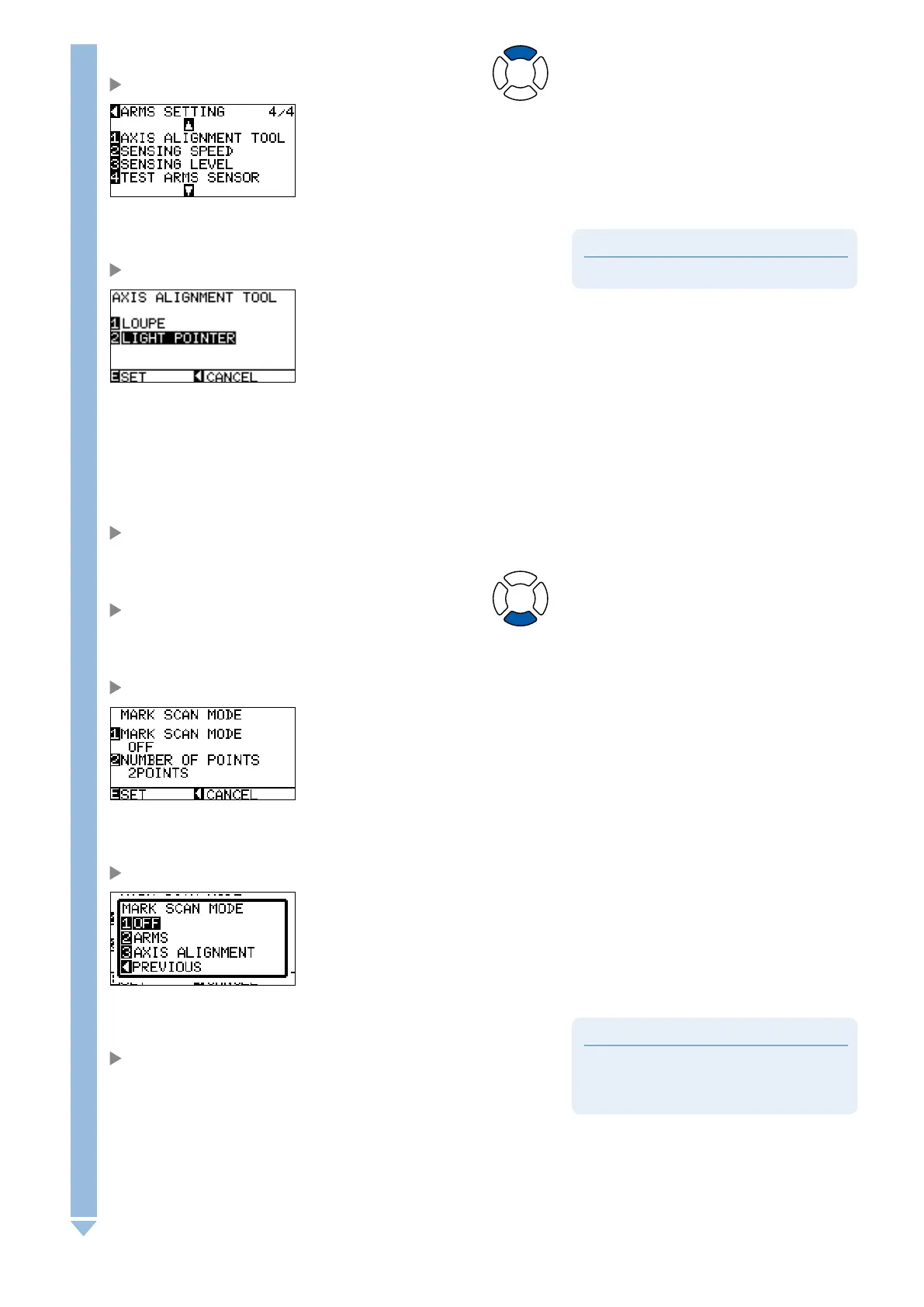
ARMS SETTING screen (4/4) is displayed.
6
Press the [1] key (AXIS ALIGNMENT TOOL).
AXIS ALIGNMENT TOOL selection screen is displayed.
7
Press the [2] key (LIGHT POINTER).
8
Confirm the setting and press the [ENTER] key (SET).
Setting will be set, and it will return to ARMS setting screen (4/4).
9
Press the POSITION (
▼
) key.
ARMS setting screen (1/4) is displayed.
10
Press the [3] key (MARK SCAN MODE).
MARK SCAN MODE screen is displayed.
11
Press the [1] key (MARK SCAN MODE).
MARK SCAN MODE setting screen is displayed.
Supplement
It will return to MARK SCAN MODE screen
without changing the settings when you press the
POSITION (
◄
) key (PREVIOUS).
12
Press the [3] key (AXIS ALIGNMENT).
AXIS ALIGNMENT mode is selected and it will return to MARK
SCAN MODE screen.










 To Next Page