18
Press the [MENU] key.
It will return to the default screen.
Connecting with RS-232C
4 different settings for RS-232C can be set to 1-4, and any can be called out arbitrarily. See "Switching Setting
Numbers"
P.9-6
to call out the settings to use, and see "Changing and Storing RS-232C Settings"
P.9-7
to change and save the settings.
Switching Setting Numbers
Next page
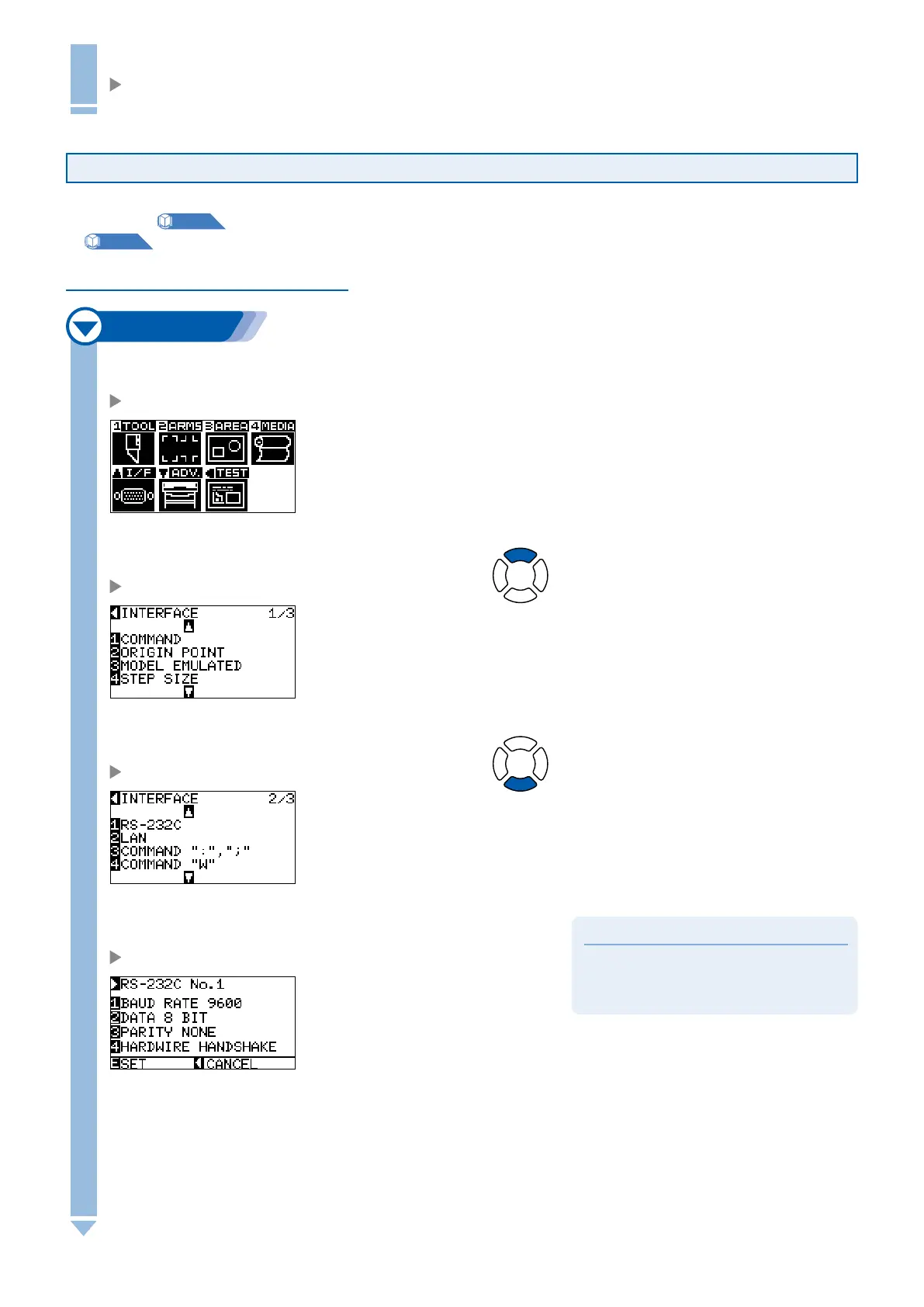
1
Press the [MENU] key in the default screen.
MENU screen is displayed.
2
Press the POSITION (
▲
) key (I/F).
INTERFACE setting screen (1/3) is displayed.
3
Press the POSITION (
▼
) key.
INTERFACE setting screen (2/3) is displayed.
Supplement
It will return to INTERFACE setting screen (2/3)
without changing the settings when you press the
POSITION (
◄
) key (CANCEL).
4
Press the [1] key (RS-232C).
RS-232C setting screen is displayed.










 To Next Page