21 / 48
S1042_sh_V1
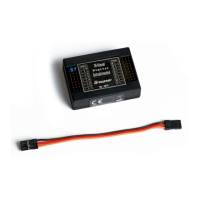
LED panel and keys
After switching on the transmitter the LEDs on the LED panel blink
or light for approx. 5 seconds to indicate the actual correct settings.
1 MODE button
1. Push and hold while switching on the transmitter ...
... starts the firmware-update
... activates the Fail-safe setting
2. Transmitter switched on
Binding transmitter and receiver
2 Servo reverse channel (CH) 1 - 5
red LED blinking = normal direction
red LED solid on = reverse
3 BIND LED
indicates if transmitter and receiver are bound
(lights only by active receiver's back channel)
4 2AILE, DELTA or V-Tail
2AILE- and DELTA-LED blink = no mixer active
2AILE LED solid on, DELTA LED blinks = Aileron mixer active (2AILE)
2AILE LED blinks, DELTA LED solid on = Delta mixer active
2AILE- and DELTA LED solid on = V-Tail mixer active (V-TAIL)
5 Arrow button
Changes in the programming mode and pages between different settings in rotation at
each pression


 To Next Page
 Loading...