43
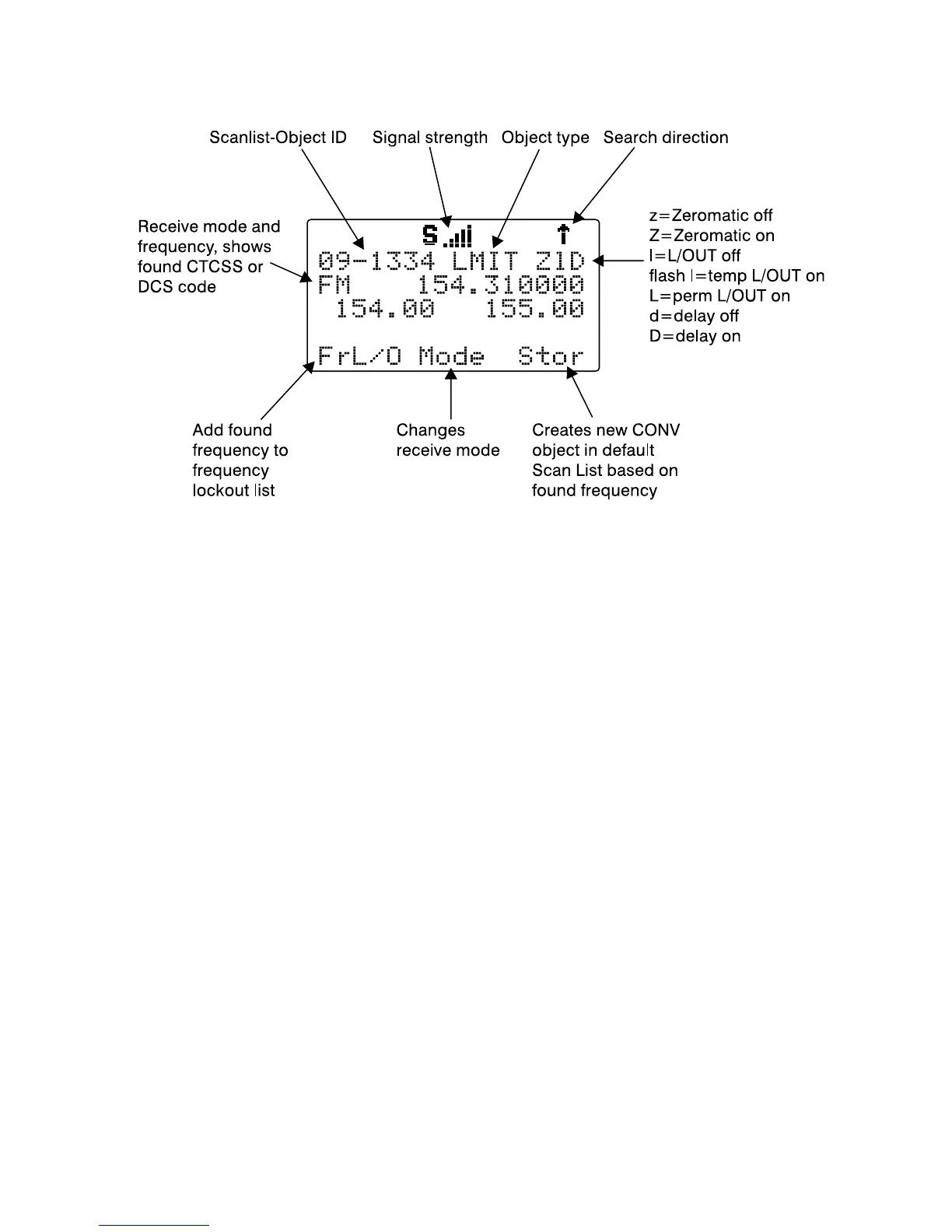
When the LMIT search stops on an active frequency, the display will appear
as follows:
Press the PAUSE key to hold on the active frequency. To resume, press the
PAUSE key again.
HINT: It can take some time for the PSR-410 to process all of the
frequencies in a LMIT search. You can experiment with different size
frequency ranges to find a LMIT search setup that does not interfere
excessively with scanning of other object types.
Spectrum Sweeper Object (SWPR)
A Spectrum Sweeper Object (SWPR) is a record that stores the parameters
necessary for the radio to rapidly sweep a range of frequencies for
strong signals from nearby transmitters. A SWPR object can be used for
standalone operation - the radio just sweeps and stops when activity is
detected, or for sweeping that is performed while the radio is scanning. The
radio treats SWPR objects just like any other Scannable Object when in
Scan Mode. If you create a SWPR object, assign it to a Scan List and press
the SCAN key, the radio will check for activity on all the enabled Scannable
Objects - TGRP objects, CONV objects, LMIT objects and SWPR objects.
An example of when this might be handy would be when you want to scan
for activity on a collection of TGRP and CONV objects, then do a quick
sweep for transmissions from nearby transmitters.



 To Next Page