EasyManua.ls Logo

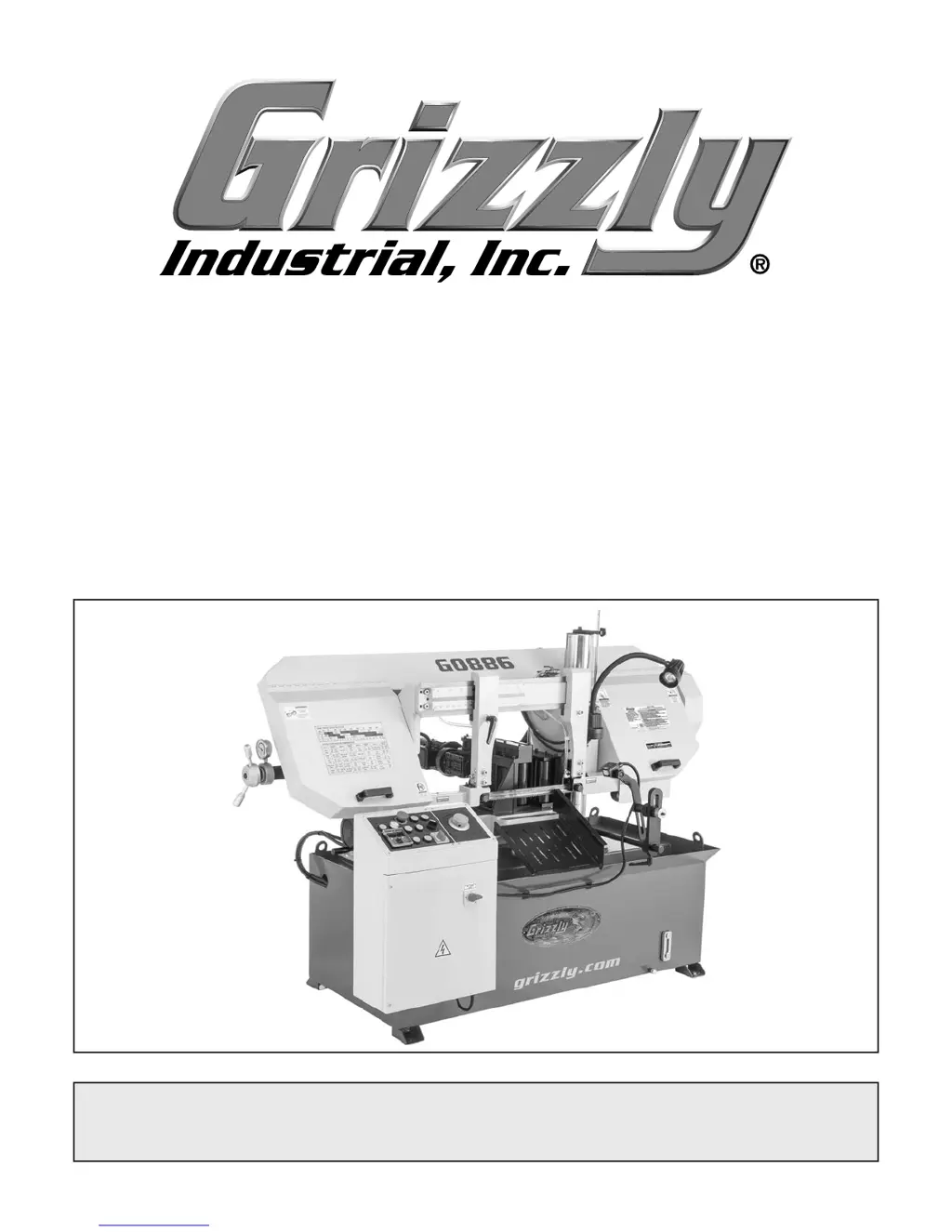
Grizzly G0886 - User Manual

Grizzly G0886
80 pages
Print Icon
To Next Page IconTo Next Page
Loading...
COPYRIGHT © APRIL, 2019 BY GRIZZLY INDUSTRIAL, INC.
WARNING: NO PORTION OF THIS MANUAL MAY BE REPRODUCED IN ANY SHAPE
OR FORM WITHOUT THE WRITTEN APPROVAL OF GRIZZLY INDUSTRIAL, INC.
#ES20255 PRINTED IN TAIWAN
V1.04.19
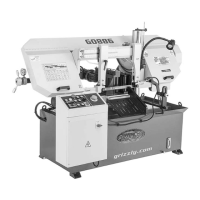
MODEL G0886
12" X 14" 3 HP AUTO
METAL-CUTTING BANDSAW
OWNER'S MANUAL
(For models manufactured since 01/19)

Questions and Answers

  • L
    Laura ClarkeAug 18, 2025
    How to fix a Grizzly Saw blade that tracks incorrectly?
    • M
      Mark FletcherAug 18, 2025
      If the blade on your Grizzly Saw is tracking incorrectly or coming off the wheels, it could be due to: * A feed rate that is too fast or the wrong TPI. * Blade tension or tracking needing adjustment. * Blade guides needing adjustment. * The blade being bell-mouthed. To address this, reduce the feed rate or decrease the blade TPI, adjust the blade tracking and tension, adjust the blade guides, or replace the blade.
  • N
    Nathan MorenoAug 21, 2025
    Why does my Grizzly Saw blade dull prematurely?
    • D
      Danny MartinezAug 21, 2025
      Premature dulling of the Grizzly Saw blade, or metal sticking to the blade, can be caused by: * A blade that was improperly broken in. * Blade gullets loading up with chips. * Blade TPI being too fine, causing teeth to load up and overheat. * An incorrect coolant mixture for the workpiece or cut. To resolve this, replace the blade and complete the blade break-in procedure, use a blade with larger gullets, use a coarser-tooth blade and adjust the feed rate and blade speed, or use the correct coolant mixture.
  • D
    donald01Aug 23, 2025
    Why is my Grizzly G0886 Saw vibrating when operating?
    • C
      Christian HansenAug 23, 2025
      Vibration during operation or cutting with your Grizzly Saw can stem from several issues: * A loose or damaged blade. * Worn wheel bearing. * A bent or dull blade. * Loose machine components. * Wheels that are worn or incorrectly installed. * A bent wheel. * A faulty gearbox. To resolve this, check and tension or replace the blade, inspect and replace the wheel bearing, replace the blade, inspect and re-tighten any loose components, replace the wheels or adjust the blade tracking, check and replace the wheel or wheel bearing, or rebuild the gearbox and replace any faulty gears or bearings.
  • N
    Nicholas WangAug 27, 2025
    How to troubleshoot a Grizzly G0886 that cuts crooked?
    • M
      masonkarenAug 27, 2025
      Crooked cuts with your Grizzly Saw can arise from: * A feed rate that is too fast or a blade speed that is too low. * The blade not being supported. * Carbide blade guides or roller bearings being out of adjustment. To fix this, reduce the feed rate, increase the blade speed, move the left blade guide arm closer to the workpiece, or adjust the carbide blade guides or roller bearings.
  • G
    gwilsonAug 30, 2025
    What causes a ticking sound when my Grizzly G0886 Saw is running?
    • A
      Amanda BerryAug 30, 2025
      A ticking sound while your Grizzly Saw is running can be attributed to: * The blade weld contacting the blade guides. * The blade weld failing. * Missing or broken blade teeth. To address this, grind the weld down flush with the blade, cut and reweld the blade or replace it, or inspect and replace the blade.
  • M
    Matthew LongSep 1, 2025
    Why is the Grizzly Saw blade wearing on one side?
    • M
      marissawebsterSep 1, 2025
      Uneven wear or overheating of your Grizzly Saw blade can be due to: * Worn or mis-adjusted blade guides. * The blade not being supported. * A dull or incorrect blade. * An incorrect coolant mixture for the workpiece or cut. * The blade being bell-mouthed. To correct this, re-adjust or replace the blade guides, move the left blade guide arm closer to the workpiece, replace the blade, use the correct coolant mixture, or replace the blade if it is bell-mouthed.
  • K
    keithpearsonSep 3, 2025
    What to do if my Grizzly G0886 Saw hydraulics are not functioning?
    • J
      Jonathan ShawSep 3, 2025
      If the hydraulics on your Grizzly Saw are not functioning, check for: * Low hydraulic fluid level. * Leaks in the hydraulic system. * Blocked or impeded flow. * Faulty control panel wiring. * A faulty hydraulic pump. Address these issues by checking and filling the hydraulic fluid level, inspecting and testing for leaks and repairing them, ensuring hydraulic lines are not pinched or damaged, checking that the hydraulic pump motor is running and solenoids are activating and repairing or replacing if faulty, or testing, repairing, or replacing the hydraulic pump.
  • E
    Elizabeth FranklinSep 6, 2025
    What causes a Grizzly Saw vise to not open or close?
    • D
      David BarnettSep 6, 2025
      A Grizzly Saw vise that won't open or close may be caused by: * Faulty vise valve solenoids. * Bad connections at the vise valve solenoids. * Leaks in the vise hydraulic system. * Faulty control panel wiring. * A faulty hydraulic pump. To troubleshoot, test, repair, or replace the vise valve solenoids, check the solenoid plugs, test for leaks and repair them, check that the hydraulic pump motor is running and that the solenoids are activating, or test, repair, or replace the hydraulic pump.
  • C
    Carol WilliamsSep 8, 2025
    Why won't the headstock raise to desired height on my Grizzly Saw?
    • S
      Susan PaulSep 8, 2025
      The headstock not raising to the desired height on your Grizzly Saw can be due to: * The upper limit switch not being engaged or being faulty. To resolve this, adjust the headstock height adjustment rod or test and replace the upper limit switch if it is faulty.
  • J
    Jeffrey BennettSep 12, 2025
    Why does my Grizzly G0886 blade keep moving after the cut?
    • D
      Dana JonesSep 12, 2025
      The Grizzly Saw blade continuing to move or the headstock not raising after a cut can be caused by: * The lower limit switch not being engaged or being faulty. To fix this, adjust the lower limit stop bolt or test and replace the lower limit switch if it is faulty.

Summary

Introduction and Manual Information

Contact Information

Provides contact details for Grizzly Technical Support and feedback channels for the manual.

Manual Accuracy and Updates

Explains manual accuracy and directs users to the website for the latest versions and updates.

Machine Identification and Controls

Machine Identification

Visual guide to identify key components and features of the machine.

Front View Controls

Identifies controls and features visible from the front of the machine.

Rear View Components

Identifies components visible from the rear of the machine.

Controls and Components Overview

Details the machine's controls, including the control panel and power switch.

Headstock Controls and Components

Describes components and controls related to the machine's headstock.

Vise Table Controls

Details controls and components associated with the machine's vise table.

Proximity Sensor Components

Identifies the components of the proximity sensor system for automated operations.

Machine Data Sheet

Safety Instructions and Guidelines

Safety Symbols and Signal Words

Explains the meaning of safety symbols and signal words used throughout the manual.

General Machinery Safety Instructions

Provides essential safety guidelines for operating machinery safely and preventing injury.

Specific Safety Precautions

Details crucial safety advice for apparel, dust, hearing, tools, and operational practices.

Additional Safety for Horizontal Metal Bandsaws

Offers specific safety guidance relevant to horizontal metal bandsaw operation.

Power Supply Requirements

Power Supply Availability

Discusses requirements and considerations for the machine's power supply circuit.

Full-Load Current Rating

Explains the machine's full-load current draw and its implications for circuit sizing.

Grounding Instructions

Details the critical importance and procedure for proper machine grounding to prevent shock.

Extension Cord Usage

Provides guidelines and recommendations for using extension cords with the machine.

Setup Procedures

Items Needed for Setup

Lists all necessary items for lifting, moving, power connection, and assembly.

Unpacking Procedures

Provides instructions for safely unpacking the machine and checking for shipping damage.

Inventory Check

Lists shipped items and instructs users to verify the inventory before setup.

Hardware Recognition Chart

A chart to identify and match hardware during inventory and assembly processes.

Cleanup Instructions

Provides steps and precautions for cleaning rust preventative from the machine.

Site Considerations

Details factors for machine placement: weight, space, environment, and lighting.

Lifting and Placing the Machine

Provides instructions and warnings for safely lifting and positioning the heavy machine.

Anchoring to Floor

Explains the importance and methods for anchoring the machine to the floor.

Machine Assembly

Proximity Sensor Bar Attachment

Instructions for attaching the proximity sensor bar to the fixed vise jaw.

Proximity Sensor Bracket Assembly

Instructions for attaching the proximity sensor bracket to the sensor bar.

Cutoff Chute Positioning

Guide for correctly positioning the cutoff chute.

Drip Tray Positioning

Instructions for placing the drip tray on the machine's base edge.

Machine Lubrication and Test Run

Lubricating Machine

Details on the importance of lubricating the gearbox before operation.

Test Run Overview

Purpose and overview of the test run procedure to verify machine functions.

Test Run: Control Panel Reference

Identifies controls on the panel for use during the machine's test run.

Test Run Procedures

Test Run Procedure - Part 1

Steps 1-7 for initiating the machine's test run and power connection checks.

Test Run Procedure - Part 2

Steps 8-12 for testing hydraulic functions and power supply polarity.

Test Run Procedure - Part 3

Steps 13-24 for testing feed system, headstock, vise, coolant, and safety features.

Test Run Procedure - Part 4

Final steps 25-27 to complete the test run and verify safety features.

Adjustments and Safety Features

Recommended Adjustments

Lists factory adjustments that should be verified for accurate cutting results.

Disabling & Locking Switch

Explains how to disable and lock the master power switch for safety.

Section 4: Operations

Operation Overview

Provides a basic understanding of machine operation for novice users.

Blade Selection and Handling

Blade Selection Guide

Guide on selecting the appropriate bandsaw blade based on material and cut requirements.

Blade Terminology

Defines key terms related to bandsaw blades like kerf, tooth set, width, and pitch.

Blade Length and Width

Specifies blade length and width requirements for the Model G0886 bandsaw.

Tooth Types

Describes common bandsaw blade tooth types: Standard and Variable Pitch.

Blade Pitch (TPI) Selection

Provides guidelines for selecting blade pitch (TPI) based on material thickness and shape.

Changing and Tensioning Blades

Changing Blades

Step-by-step instructions for removing the old blade and installing a new one.

Signs of Incorrect Blade Tension

Lists common indicators of improper blade tension, such as stalling or breakage.

Tensioning Bandsaw Blade

Detailed steps to properly tension the bandsaw blade using the tension gauge.

Blade Breakage, Care, and Break-In

Blade Breakage Causes

Identifies common reasons for bandsaw blade breakage, both avoidable and unavoidable.

Blade Care Guidelines

Tips for prolonging blade life through proper selection, maintenance, and cleaning.

New Blade Break-In Procedure

Steps to properly break in a new blade to ensure longevity and sharpness.

Chip Inspection and Blade Speed

Chip Inspection Chart

Evaluates chip characteristics to determine optimal cutting speed and feed rate.

Changing Blade Speed

Explains the four speed settings and how to change them via belt position.

Blade Speed Chart

Provides recommended blade speeds for various materials.

Vise Operation and Blade Guides

Using the Vise

Steps for clamping and adjusting the vise for cutting operations.

Vise Components

Identifies the components of the machine's vise, including jaws and rollers.

Workpiece Holding Options

Illustrates recommended and not recommended methods for holding workpieces.

Blade Guides Adjustment

Instructions for adjusting the left blade guide arm for optimal cutting.

Headstock Height and Feed Rate Settings

Setting Headstock Height

Steps to set the headstock height to match workpiece size for efficient cutting.

Setting Blade Feed Rate

Steps to adjust the blade feed rate for optimal cutting performance.

Feed System and Proximity Sensor

Feed System Operation

Explains how the feed system works in manual and auto modes for repetitive cuts.

Proximity Sensor Functionality

Explains the role of the proximity sensor in manual and auto modes as a work stop.

Manual Operation with Proximity Sensor

Steps for setting up and using the proximity sensor in manual mode.

Auto Operation and Coolant System

Auto Operation with Proximity Sensor

Steps for setting up and using the proximity sensor in auto mode for repetitive cuts.

Coolant System Overview

Explains the function and components of the built-in coolant system.

Coolant Types and Selection

Guidance on choosing the appropriate coolant for different metal types.

Coolant System Hazards

Details hazards associated with coolant use and necessary PPE.

Adding Coolant Procedure

Step-by-step guide for safely adding coolant to the machine's reservoir.

Coolant and V-Belt Maintenance

Changing Coolant

Procedure for draining and refilling the coolant reservoir.

Inspecting V-Belt

Guidance on checking V-belt tension and wear for proper operation.

Machine Storage Procedures

Preparing Machine for Storage

Steps to prepare the machine for storage to prevent rust and corrosion.

Bringing Machine Out of Storage

Procedure for safely returning the machine to operation after storage.

Section 7: Service and Troubleshooting

Troubleshooting Motor & Electrical Issues

Diagnoses and solves motor and electrical problems with the machine.

Troubleshooting Operational Issues

Addresses common operational problems like vibration, bogging, and crooked cuts.

Troubleshooting Hydraulic System

Diagnoses and resolves issues related to the machine's hydraulic system.

Component Adjustments and Calibration

Adjusting Lower Limit Stop Bolt

Steps to adjust the lower limit stop bolt for proper cut completion.

Adjusting Blade Tracking

Steps to adjust blade tracking to ensure it runs correctly on the idler wheel.

Adjusting Blade Brush

Instructions for adjusting the blade brush for proper contact with the blade.

Adjusting Blade Guides

Steps to adjust the carbide blade guides for optimal blade support.

Adjusting Roller Bearings

Instructions for adjusting roller bearings for proper blade guidance.

Squaring Blade to Table

Steps to ensure the blade is square to the vise table for accurate cuts.

Section 8: Wiring and Electrical Schematics

Wiring Safety Instructions

Crucial safety guidelines for working with the machine's electrical wiring.

Electrical Schematics Overview

Introduces the electrical schematic diagrams for the machine.

Motor Wiring Diagrams

Diagrams illustrating the wiring connections for the main, hydraulic, and feed motors.

Hydraulic Valve Schematics

Diagrams detailing the electrical connections for hydraulic valves.

Electrical Photos and Component Details

Electrical Cabinet Components

Photographs showing the layout of components within the electrical cabinet.

Control Panel Wiring

Photographs illustrating wiring connections for the control panel.

Limit Switch Wiring

Photos showing wiring connections for upper and lower limit switches.

Motor Wiring Connections

Photos of wiring connections for main, feed, hydraulic, and coolant motors.

Hydraulic Unit Solenoids

Photographs showing the hydraulic unit solenoids.

Section 9: Parts Identification

Base Parts Diagram

Exploded view diagram of the base assembly with numbered parts.

Base Parts List

List of part numbers and descriptions for the base assembly.

Headstock Parts Diagram

Exploded view diagram of the headstock assembly with numbered parts.

Headstock Parts List

List of part numbers and descriptions for the headstock assembly.

Headstock Parts List (Continued)

Continuation of the parts list for the headstock assembly.

Feed System Parts Diagram

Exploded view diagram of the feed system with numbered parts.

Feed System Parts List

List of part numbers and descriptions for the feed system.

Electrical Parts Diagram

Diagram showing the locations of various electrical components.

Electrical Parts List

List of part numbers and descriptions for the electrical components.

Labels and Cosmetics

Safety and Operational Labels

Identifies various labels on the machine for safety warnings and operational information.

Warranty and Returns Information

Warranty Terms and Conditions

Outlines the product warranty period, coverage, and limitations.

Warranty Registration and Contact

Provides information on how to register the warranty and contact Grizzly for support.

Grizzly G0886 Specifications

General IconGeneral
ModelG0886
Arbor Size5/8"
Bevel Angle Range0-45°
Voltage120V
Blade Diameter/Size10 inch
Miter Angle Range0° to 60°
Max Cut Depth at 90°3-1/8 inch

Related product manuals