Ocus® User Guide version 5.0
Hermiankatu 6-8G, 33720 Tampere, Finland
©2019 Grundium. All rights reserved.
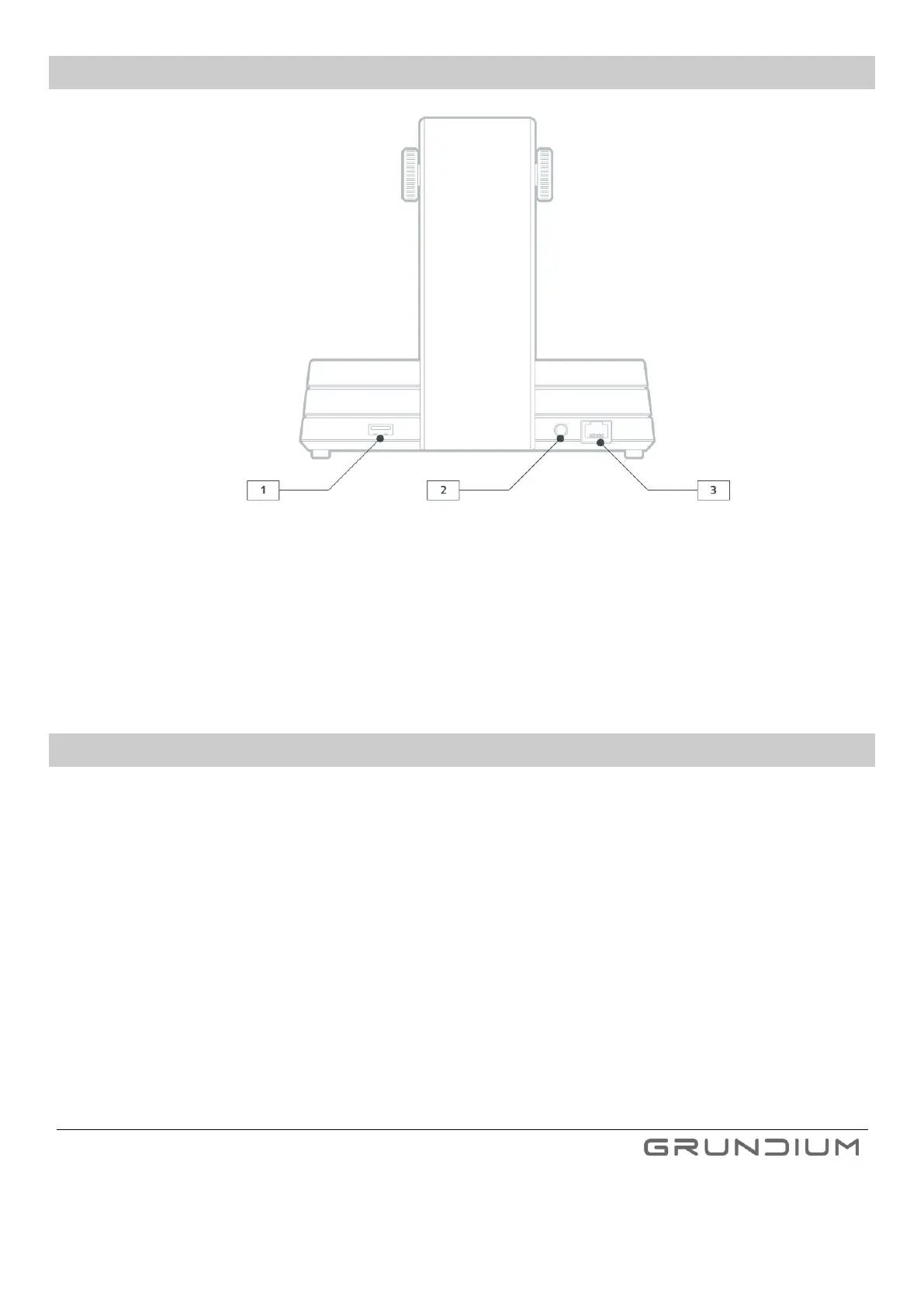
6.1 SCANNER CONNECTORS
Image 3 Scanner connectors
1. USB connector
2. Power supply connector. Use only the power supply delivered with the scanner.
Important notice: In case there are any damages in the mains cable or the power supply, do not use the
device.
3. Network cable connector
6.2 POWER BUTTON LIGHTS
Scanner is switched off. Power cable is connected.
Scanner is connected to the Internet.
Scanner is in live view mode, scanning or exporting.
Scanner is connected to the Internet, but remote use is disabled.
Scanner is in error state (see Troubleshooting).
Scanner is powering up or shutting down.
Scanner’s WLAN access point is on.
Scanner’s first start-up is ongoing.
Scanner’s software update is in progress.


 To Next Page