recording images and occupies less HDD capacity.
Bit Rate Type: Set whether recording stream changes automatically according to image changes
Quality: Adjust the video quality, six kinds of grade are optional.
Bit Rate (Kb/S): Set recording stream statics under fixed stream state; The Higher Stream statics, the better
recording quality and occupies more HDD capacity. Conversely, the lower Stream statics, the
worse recording stream statics quality and occupies less HDD capacity.
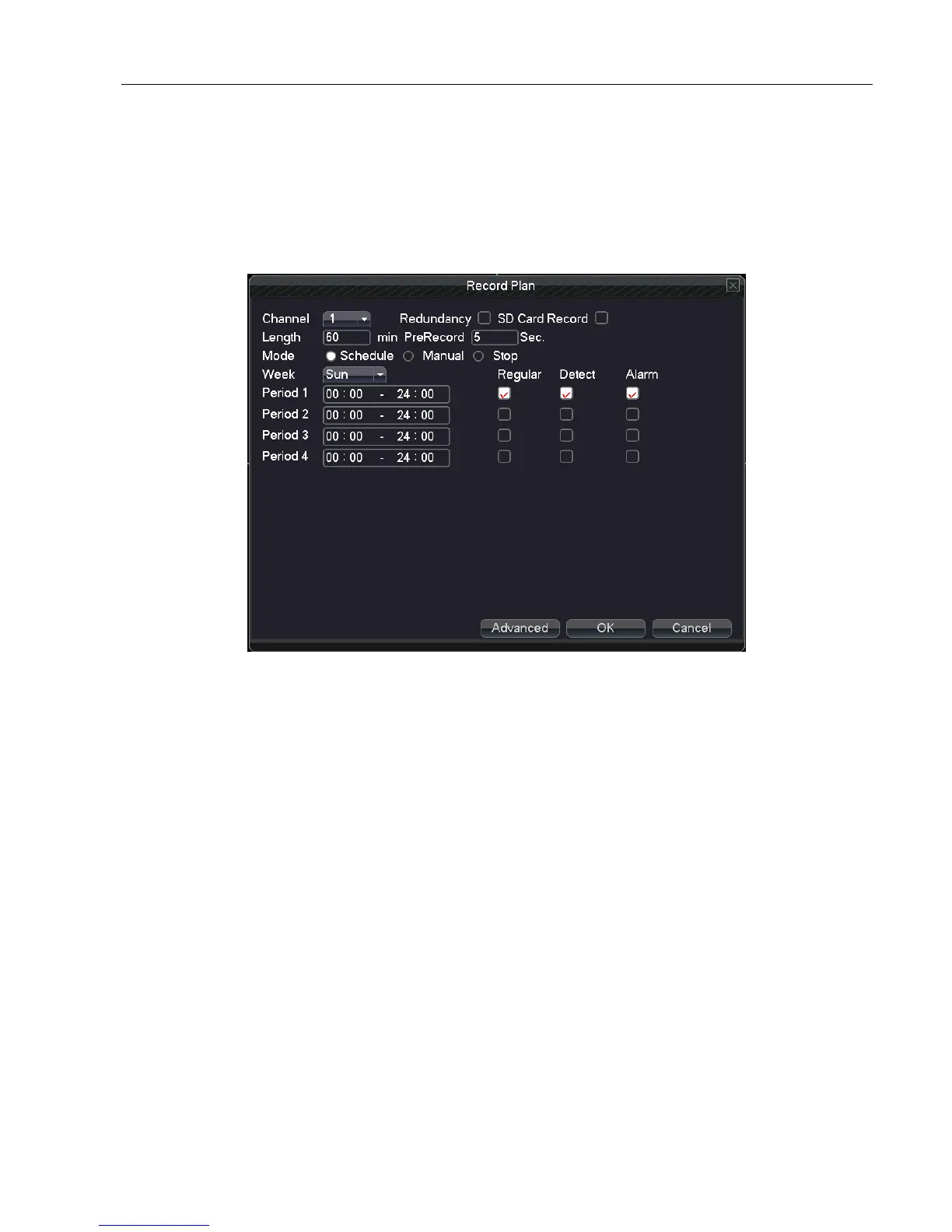
Recording plan: Set DVR’s recording plan and triggering method
Channel: Choose the corresponding channel number to set the channel. Choose “ all” option to set the entire
channels.
Redundancy: Choose the redundancy function option to implement the file double backup function. Double
backup is writing the video files in two hard disks. When you do the double backup, make sure that
there are two hard disks installed. One is read-write disk and the other is redundant disk. (please
refer 4.7.1 HDD manage to know setting details)
Length: Set the time length of each video file. 60minutes is default value (A maximum of 120 minutes).
Pre Record: Record 1-30 seconds before the action occurs. (Time length is decided by the code stream)
Mode: Set video state: configuration, all or stop.
Schedule:Record according to the setted video type (regular, detection and alarm)and time section.
Manual: After choosing manual button, the related channel will do the regular recording whatever the state
of current channel is.
Stop:Click the stop button and the channel stops recording whatever the state of current channel is..
Week: Set (Monday to Sunday) or full week to record, it will just record in setted days.
Period: Set the time section of regular recording, the recording will start only in the set range.
Recording type: Set recording type: regular, detection or alarm.
Regular:Perform the regular recording in the set time section. The video file type is “R”.
Detect:Trigger the “motion detect”, “video blind” or “video loss” signal. The above alarm



 To Next Page