3 Connect DVR
3.1 Installing the Hard Disk Drive
Note: please don't remove the hard disk when the DVR power is turned on
Hard disk installation:
(1) Loosen the screws on the left, right, and rear sides When is DVR power is turned off,and then remove the top cover.
(2) Connect the data and power cables of hard disk with the DVR motherboard. Attach the HDD to the bracket using 4
screws.
(3) Install the top cover.
Noted:If the user has high demand on HDD, we suggest to use the special hard disk for security and protection .
3.2 Connecting the cameras and monitors
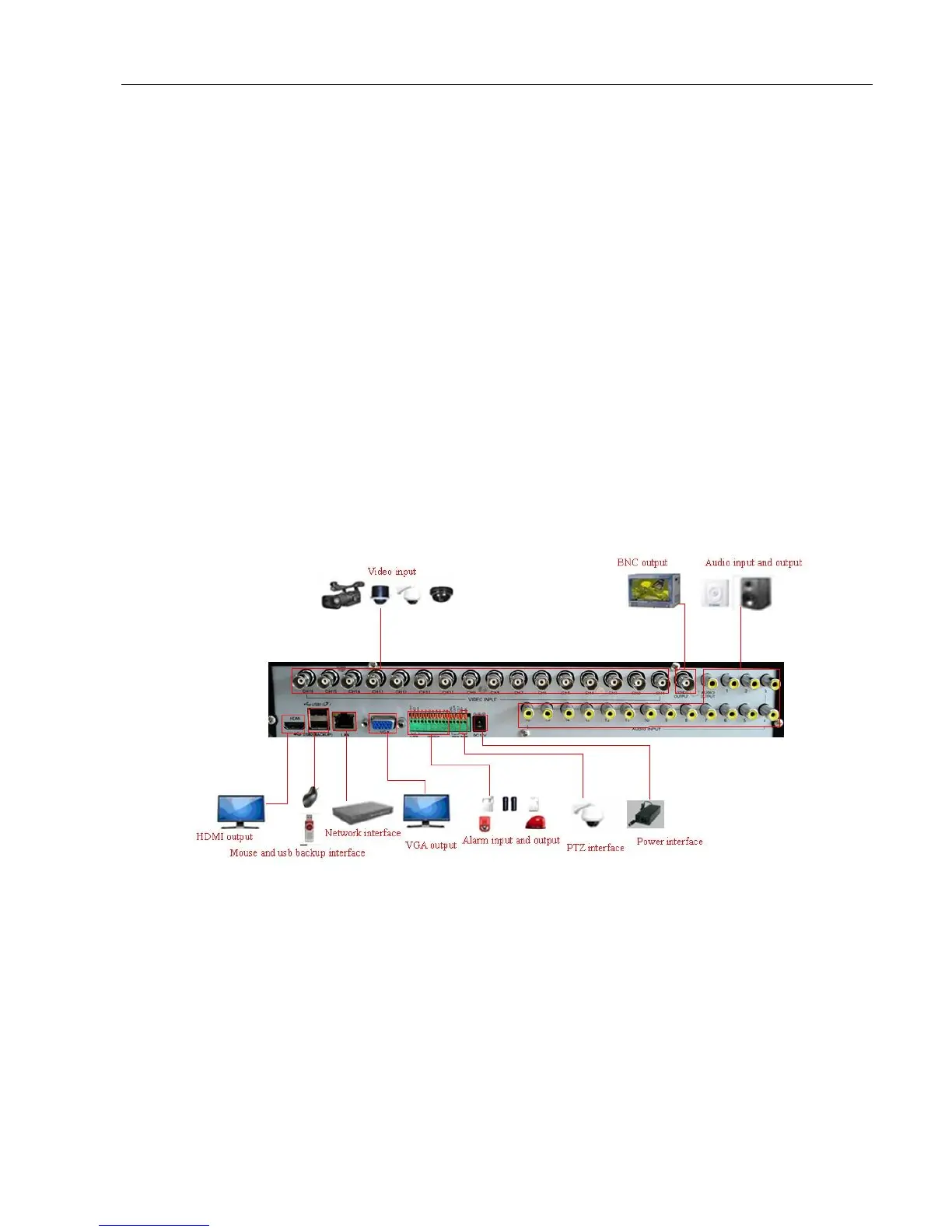
Connect the camera signal to the DVR video input via BNC Cable, then Connect the DVR video output to the
monitor via VGA. If the camera support PTZ control, connect the camera cable to the DVR video input via RS-485
interface.
System connection diagram,For example 16CH DVR connection as follows:
.
Picture 2.1 System connection diagram
3.3 Connecting the Power
Please use the power adapter connected to the DVR that came with the DVR. After connection,please check to
make sure that the audio and video input/output interface are well connected.



 To Next Page