
 Need help?
Do you have a question about the hager TJA670 domovea Basic and is the answer not in the manual?
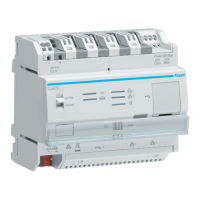
The Hager TJA670 (domovea Basic) and TJA470 (domovea Expert) are server devices designed for command and display in KNX and IoT installations. They provide access to home automation functions from various computer terminals (smartphones, tablets, PCs) and introduce new comfort and security features such as triggering sequences, adapting house configurations based on events or periods, and visualizing commands with images.
The domovea system consists of three main modules:
KNX Installation Overview: A KNX installation involves products communicating via wired bus or radio to send/receive commands. Products are classified by their connection to the KNX bus and their function:
domovea Solution Features: The TJA670 (domovea Basic) and TJA470 (domovea Expert) offer different feature sets:
| Function | TJA670 (domovea Basic) | TJA470 (domovea Expert) |
|---|---|---|
| Integrated KNX Easytool | Yes | Yes |
| Max. KNX and IoT appliances | 500 | 500 |
| Max. IP cameras | 5 | 50 |
| Google, Alexa, IFTTT services | Yes | Yes |
| User sequences (client) | 50 | 50 |
| Advanced sequences (configurator) | No | 100 |
| User rights management | Yes | Yes |
| User personalisation | Yes | Yes |
| Installer and client remote access | Yes | Yes |
| KNX / IP bridge | Local access only | Local and remote access |
| Regulation - Number of Thermostat | No | 10 |
| Doorphone integration | No | Yes |
The KNX / IP bridge allows parameterization of the KNX installation with ETS software over an IP connection.
Server Configuration: The server links an IP environment and KNX bus systems. It uses the Hager Pilot configuration application and the domovea application for end-users. The product connects via a KNX bus connector (13) and a local IP network via one of two Ethernet ports (15, 16). OS compatibility for Hager Pilot and domovea requires iOS 11 or Android 6 or later.
Ethernet Port Behavior (Auto/Router functionality): The two Ethernet ports are interchangeable and connected to the same logical interface (switch).
| Switches COM② SEL | Ethernet Port 1 / Ethernet Port 2 Behavior

 To Next Page
 General