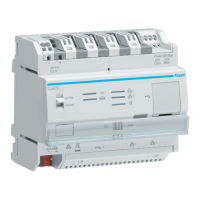
TJA670 domovea Basic
TJA470 domovea Expert
2.5 Software installation
2.5.1 Installing the Hager Pilot application
• On a mobile device:
o find and download the hager Pilot application from the
App Store
®
or Google Play Store
®
,
o install the hager Pilot application; an icon will appear on
the screen.
• On Windows PC:
o find and download the hager Pilot application from the
Hager website,
o install the hager Pilot application; an icon will appear on
the screen.
2.5.2 Launching the Hager Pilot application
Locally connect the mobile or stationary equipment to the network on which the server is connected
• launch the hager Pilot application. A selection window of servers is displayed,
• select server TJA670-XXXXX or TJA470-XXXXX.
If the server does not appear on the list,
• click Add a server,
• add the server by entering either:
o The IP address
o The name of the server (TJAxxx-xxxxxx)
o The serial number
To add a remote server (not connected to the local network), you must enter the serial number of the
device. This is visible in the Remote Access menu where the serial number is contained in the address (For
example: https://kj4f6s8kvcywvd.domovea.com, the serial number will be kj4f6s8kvcywvd).
You are connected to the server.
For more information, please see tutorial 1 - Start and set up a domovea installation with Hager
TJA670-TJA470 at www.hager.com/domovea.
2.5.3 Accessing the configurator without using hager Pilot
In some cases, the configurator must be accessed directly without using the hager Pilot application.
• Using the web browser
To connect in this way, the server IP address must be known: it is the address given by the local DHCP server if the
switch is set to “auto” (if the switch is set to “PC”, launch the web browser and enter the default gateway IP
address: 192.168.0.253).
• Using the file browser
The server supports the UPnP function. UPnP devices are displayed in Windows under the Network section. Double-
clicking on the TJA670 or TJA470 icon opens the configuration interface in the web browser.
2.5.4 Logging onto the server
At this stage of installation, you can only log on with the administrator profile as only this account is active. The
administrator access information is as follows:
• User name: admin
• Password: 1234
• Click Login


 To Next Page