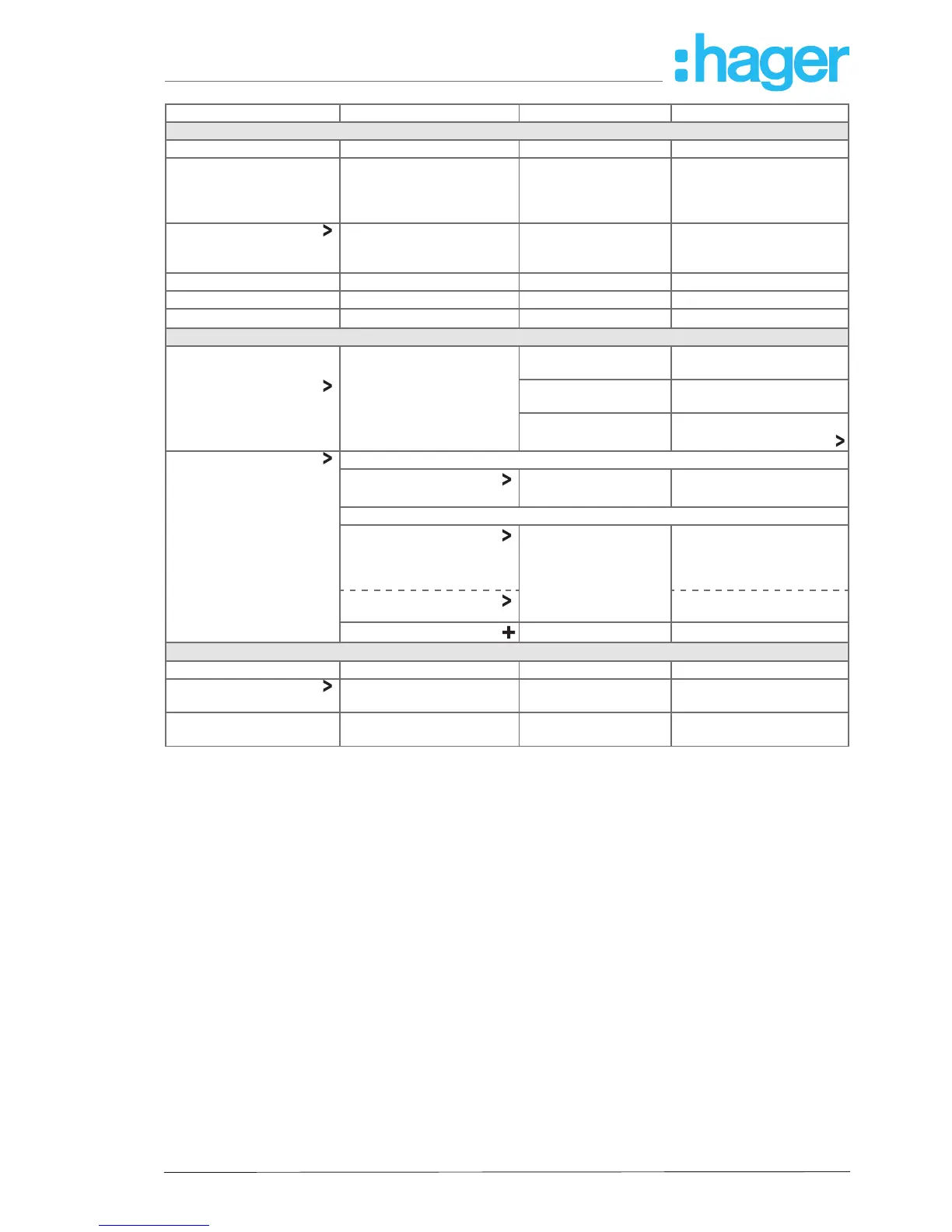
Setting Selection Information Format/Detail/Action
coviva smartbox
coviva ID 123456789012
Date/time
Time zone
Time period
Country
DD.MM.JJJJ, hh:mm
CET
Summer time
Germany
Language
2)
English, French,
Italian, German,
Swedish, Dutch, …
coviva Version 2.6.7 (cc24680)
KNX Version 1.1.13
Alarm Version 1.0.6
User (see also Add user)
My account Name First name
Last name
Installer
Contact E-mail
Phone
Prole E-mail (user name) rights
Change password?
All users I
Installer
all prole data
(see above)
only display, not changeable
Other
Administrator
all prole data
(see above)
only display, not changeable
access for installers for
remote maintenance (de)
activatable
unlimited
all prole data changeable
Add user
see Add user
Network (see Congure access for (mobile) end device)
IP address 192.168.178.23
WLAN coviva Hotspot function activa-
ted
Name coviva - 123456789012
Hotspot function deacti-
vated
Display of all WLAN
networks
- Select WLAN network.
- Enter WLAN password.
2)
The app generally uses the language set in the relevant end device. This setting only denes the language for
emails and push messages.
Table 3: Settings and system information



 To Next Page