EasyManua.ls Logo

hager TKP100A - Page 36

hager TKP100A
45 pages
Print Icon
To Next Page IconTo Next Page
To Previous Page IconTo Previous Page
Loading...
Page 36/45
installer_07-2017
My Account
Referent
Me
Others
Users
Settings
Peter
Meier
Max
Installer
Classic
Classic
coviva ID
0024C6F21834
Date/Time
09.11.16, 00:00
coviva Language English
coviva Vers.
2.6.7(cc24680)
KNX Version
1.1.13
Alarm Version
1.0.6
Users
My account Installer
All Users
Settings
Network
App Version {{version}}
Copyright Hager Group 2015
All rights reserved
The status LED of your coviva
controller will turn on when a
compliant wifi extension is installed.
The IP adress will show here, as soon
as you connect your coviva controller
via LAN to a router (DHCP)
The IP adress will show here, as soon
as you connnect your coviva controller
via LAN to a router (DHCP)

IP adress
192.168.178.23
cov.0024C6F21834Wifi
i
coviva
Devices
Groups
Covigrams
Favorites
Logout and Handover
O
O
O
i
my devices
my groups
my covigrams
my favorites
Add User
Save
English
Français
Italiano
Deutsch
Swedish
Dutch
Settings
Settings Wifi settings
Activate the Hotspot mode if want
your coviva controller to open up its
own Wifi network.
FRITZ-Box
Hotspot mode
CHOOSE NETWORK…
...
...
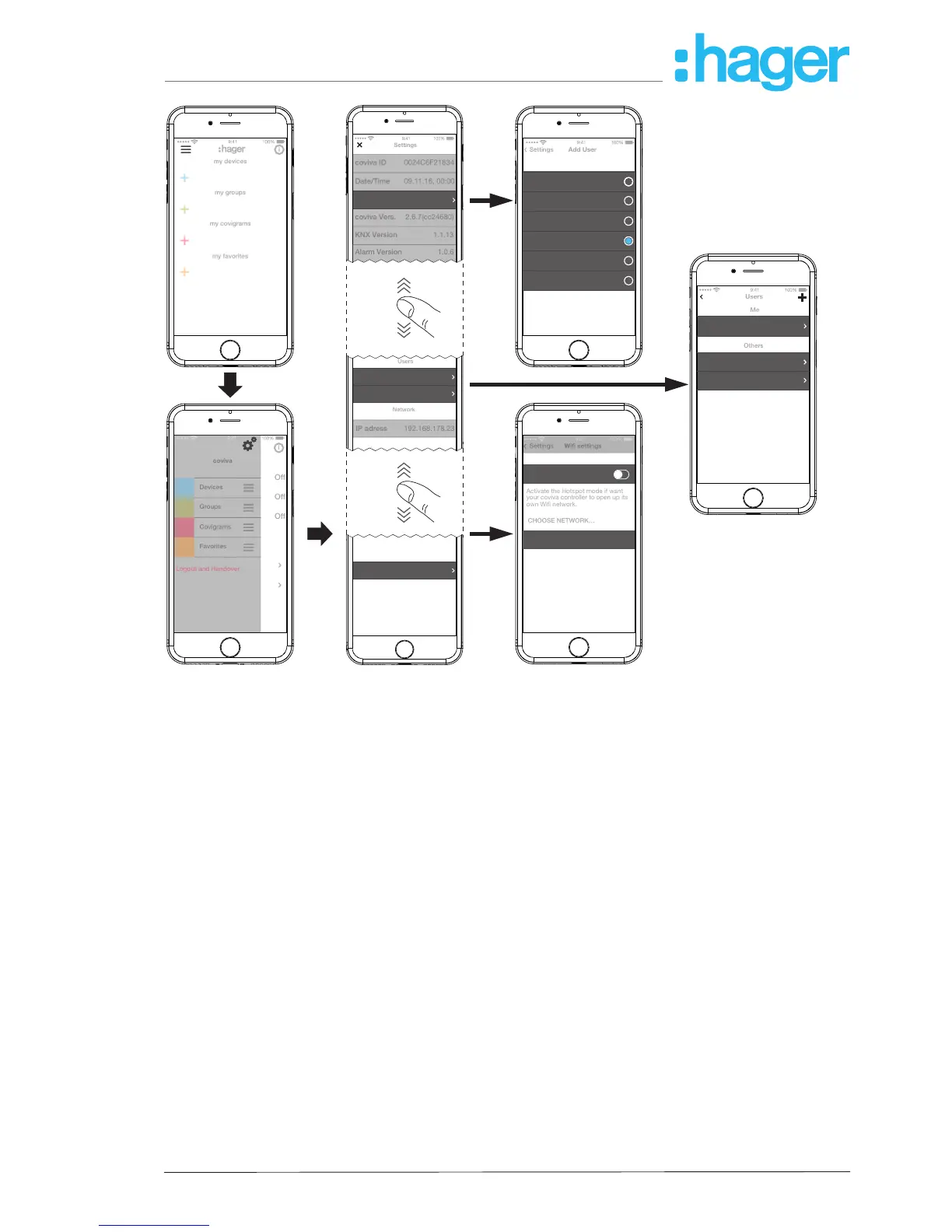
Figure 29: Call up/change settings
hager.com
coviva smartbox

Other manuals for hager TKP100A