Microlab
®
STAR User Manual
Page 80 of 225 610766/02
60$576WHS/RDG8QORDG
This SMART Step is used to automatically load the instrument deck with all labware
necessary for the run. These commands work with autoload and manual load instruments.
For a manual load instrument, the user is requested to load/unload the carriers by hand.
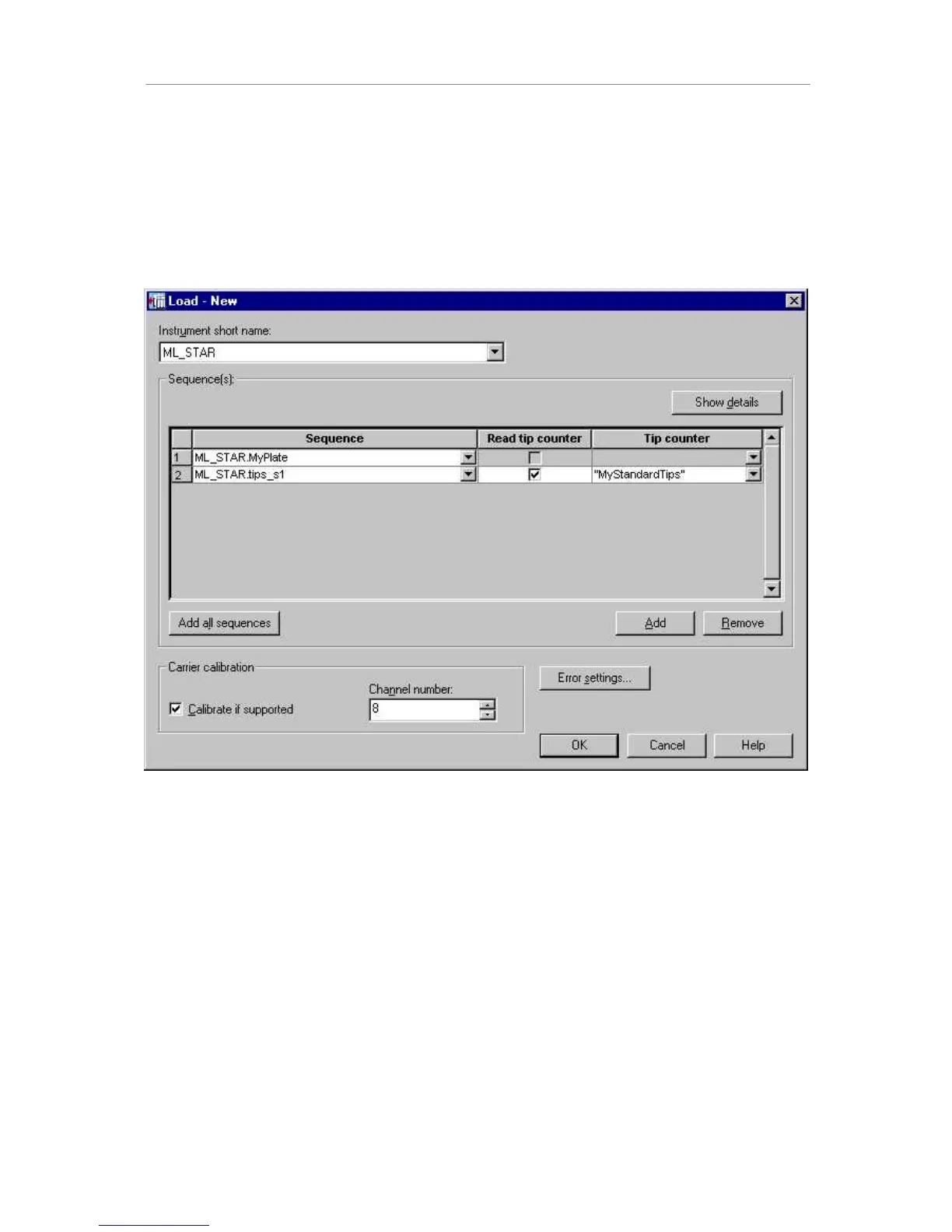
Dragging the ORDGcommand to the method tree opens up a dialog box:
The procedure for loading the instrument follows logically from our concept of sequences.
Whatever carriers have to be loaded to ensure that the sequence which is used within the
method is available ZLOO be loaded. If, for example, a sequence of samples spans 3 tube
carriers, all 3 carriers will be loaded automatically to their locations (tracks) as defined in the
deck layout.
The dialog box has three main buttons. Their functions are:
- to load all sequences to the deck,
- to add a specific sequence which can be selected from the dropdown field, and
- to remove a selected sequence.
In the case of a tip sequence, the SMART Step gives you the option to read the current
position of a tip counter, which has to be specified. In this example, the tip counter
“MyStandardTips” is read and the current position of the sequence is set to the value of the
tip counter.
In addition, sequences may be reduced on loading (click on “show details”). If a carrier for
1536-well microplates is being loaded, it may be calibrated using the channel selected in the
dropdown field.



 To Next Page