22 | Pro‑Stcher Lite for the HQ Simply Sixteen www.ProStcher.com
Replace the 8‑Wheel Track with the 4‑Wheel Track
1. Remove the 8‑wheel track supports
already installed on the table top.
Remove the three large ange head
screws holding each of the front and
rear eight‑wheel track supports in
place from the boom side of the
table top.
NOTE: The 4mm hex wrench
that is required to remove these
screws was provided in the
original frame kit. These track
supports will not be needed for
the four‑wheel carriage and may
be discarded. The six ange head
screws will be reused; DO NOT
DISCARD THEM.
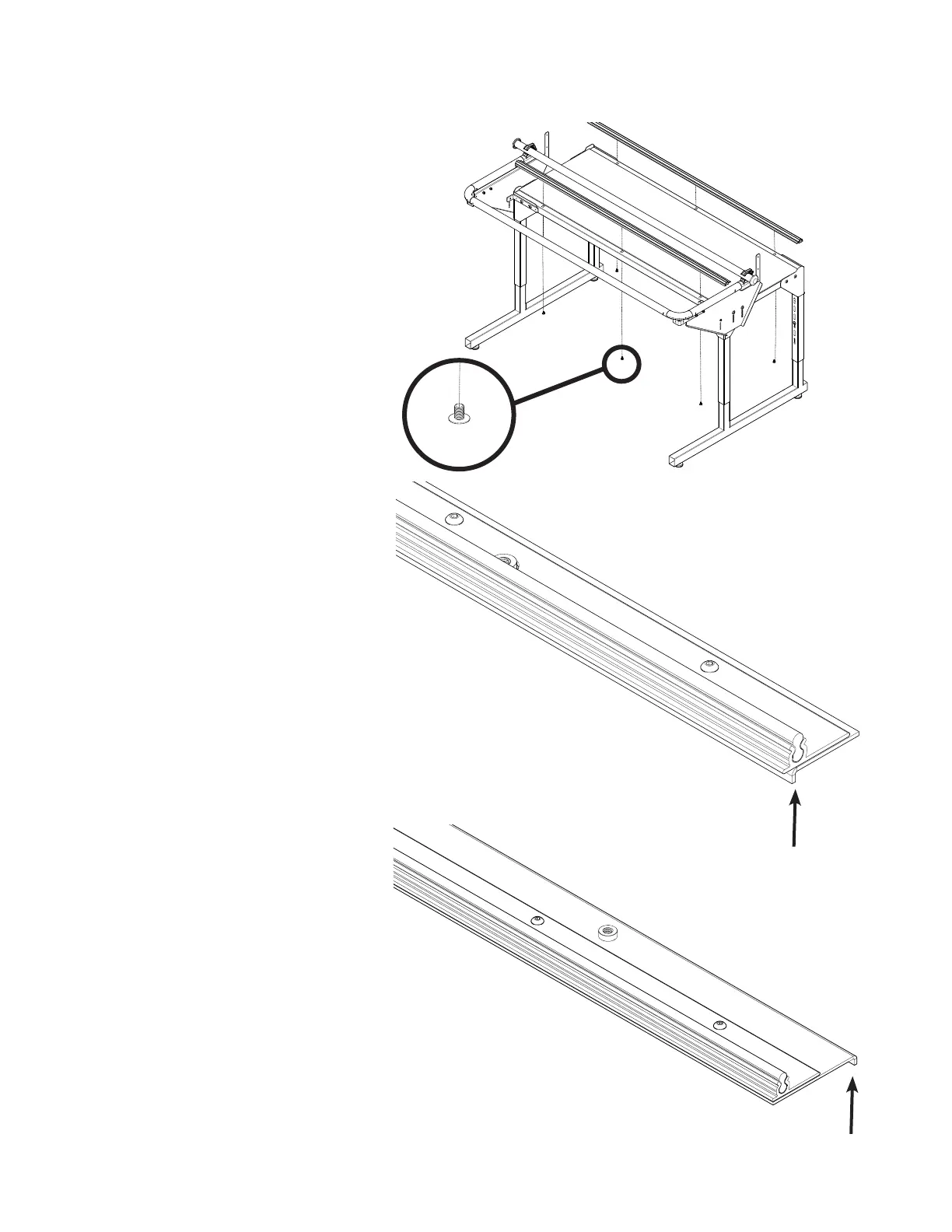
2. Install the front and rear four‑wheel
track assemblies, using the ange
head screws saved in step 1 from the
underside of the table. Leave the six
screws loose for now.
NOTE: The front four‑wheel track
assembly is narrower than the
rear four‑wheel track assembly.
The bent lip goes to the outside
of the table top on each of the
assemblies.
track assemby (four‑wheel ‑ front)
track assemby (four‑wheel ‑ rear)
bent lip
bent lip


 To Next Page