30 | Pro‑Stcher Lite for the HQ Simply Sixteen www.ProStcher.com
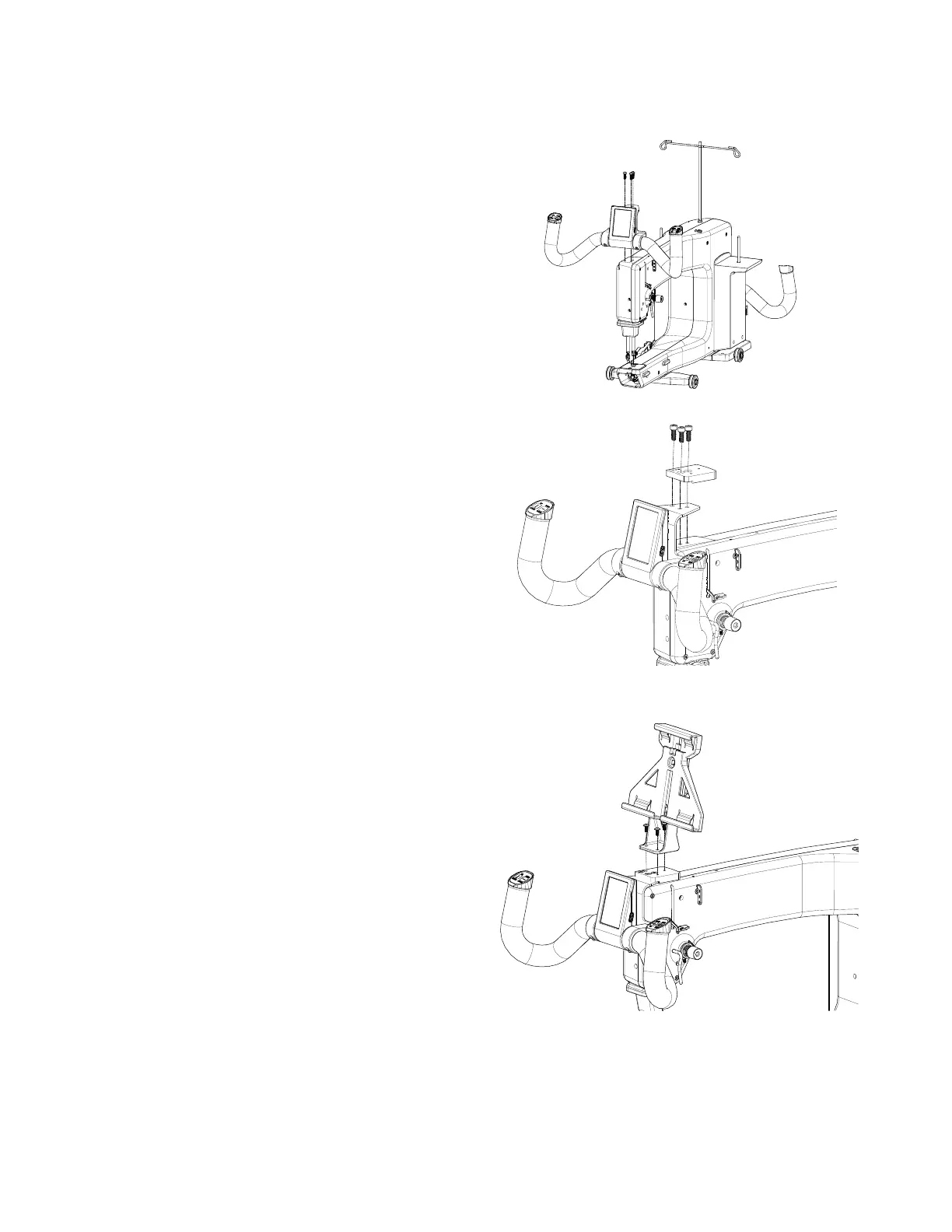
Aach the Tablet to the Machine
Aach the tablet bracket
1. Remove the 3 front handlebar screws. These
screws will be reused, so make sure you do
not lose or discard them.
2. Install the special adapter (see Parts List,
item R) to the front of the machine where
you removed the front handlebar using the
three screws you removed in step 1 above.
Place the screws through the adapter, through
the handlebar bracket, and into the machine.
Tighten the screws rmly with a hex wrench.
3. Fasten the tablet bracket assembly (see Parts
List, item F) to the adapter with three anged
buon head screws (see Parts List, item S) and
ghten rmly with a 2.5mm hex tool.


 To Next Page