Pro-Stcher Lite for the HQ Simply Sixteen Installaon Instrucons | 29
Set Up Pro‑Stcher Lite
 IMPORTANT: If necessary, use your hand
to engage the black gears so they engage
before placing the machine on the carriage.
(See page 25 for more informaon.)
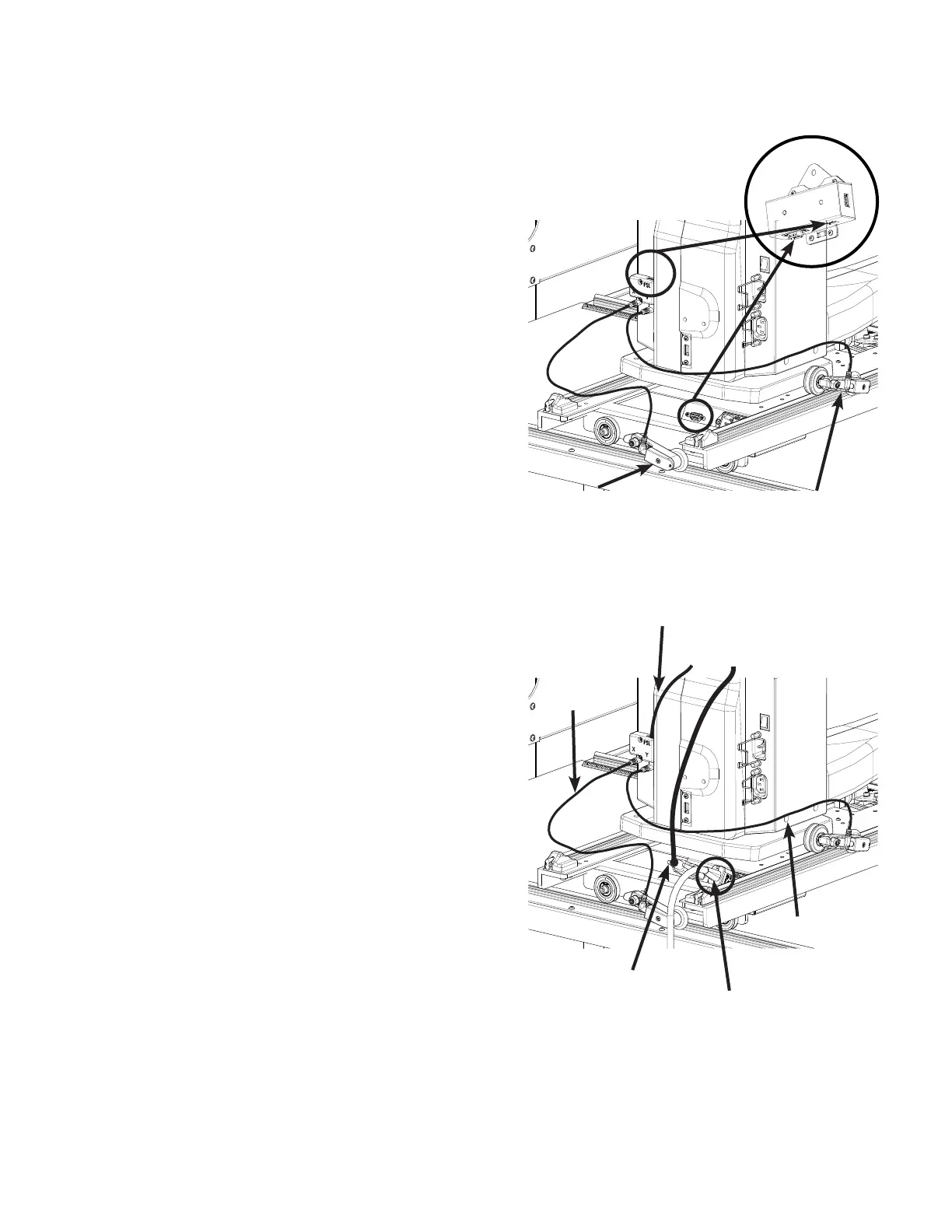
1. Place the Pro‑Stcher Lite carriage on the frame
with the power cord connecon and encoder
toward the back of the frame. Carefully li the
HQ Simply Sixteen quilng machine and place
it on the carriage so the wheels engage the
black carriage tracks, making sure not to set
the wheels on top of the encoder cables. This is
easier to do with two people, one at each end
of the quilng machine.
2. Plug one end of the machine encoder (Y) cable
into the connector on the back of the machine
marked Y and the other into the machine
encoder.
3. Plug one end of the carriage encoder (X) cable
into the connector at the back of the machine
marked X and the other end into the carriage
encoder.
4. Plug the small special connector machine
communicaon cable (see Parts List, item U)
into the top of the cover labeled PSL at the
back of the machine. The other end will plug
into the boom of the transion box (see Parts
List, item V) at the front of the machine aer
aaching the bracket.
5. Plug the communicaon cable (see Parts
List, item T) connector into the back of the
Pro‑Stcher Lite carriage and the other end into
the boom of the transion box at the front of
the machine.
6. Plug the power cord into the back of the
Pro‑Stcher Lite carriage.
 IMPORTANT: Do not plug the power cord
into the wall outlet unl all connecons are
completed.
machine encoder
transion box
communicaons
cable (U)
communicaons
cable (T)
power
Y encoder cable
carriage encoder
X encoder cable


 To Next Page