36 | Pro‑Stcher Lite for the HQ Simply Sixteen www.ProStcher.com
Updang Pro‑Stcher Lite on the Tablet
1. Insert the USB drive into the USB port on the
Pro‑Stcher tablet. On the Pro‑Stcher screen,
select File and then Update.
2. Pro‑Stcher will automacally show all updates
saved on the USB drive. Select the update you
wish to install, and then select Run.
Installed Version: [Version#]
Restore Version: [Version#]
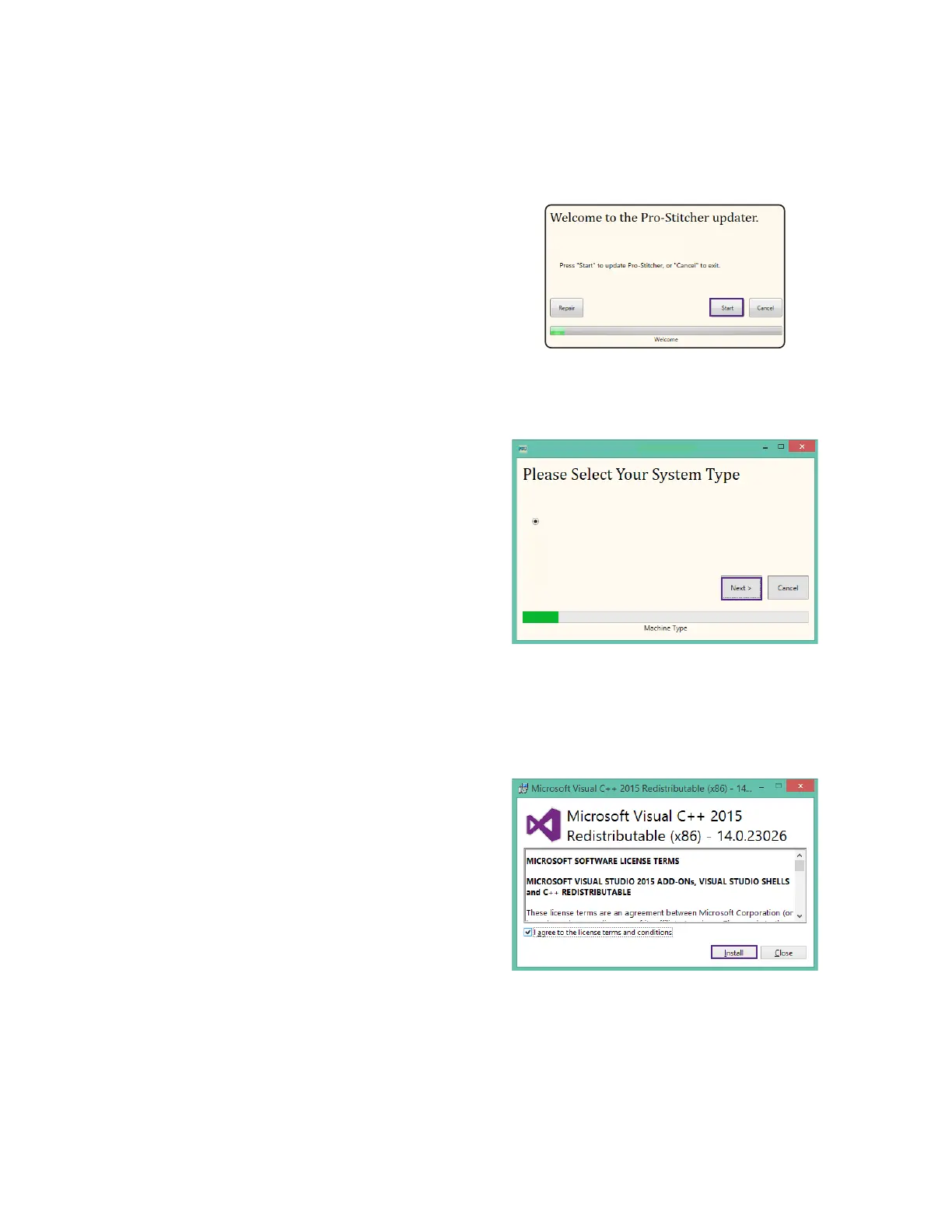
3. Select Start when the Pro‑Stcher update
screen appears.
4. If prompted, select the type of Handi Quilter
machine you have and press Next.
HQ Simply Sixteen
HQ Simply Sixteen
5. Select Conrm to connue.
NOTE: If prompted, follow steps 6 through
13.Otherwise, proceed to step 14.
6. When the Visual C++ Redistributable installer
appears, select the “I agree” box and then
select Install.


 To Next Page