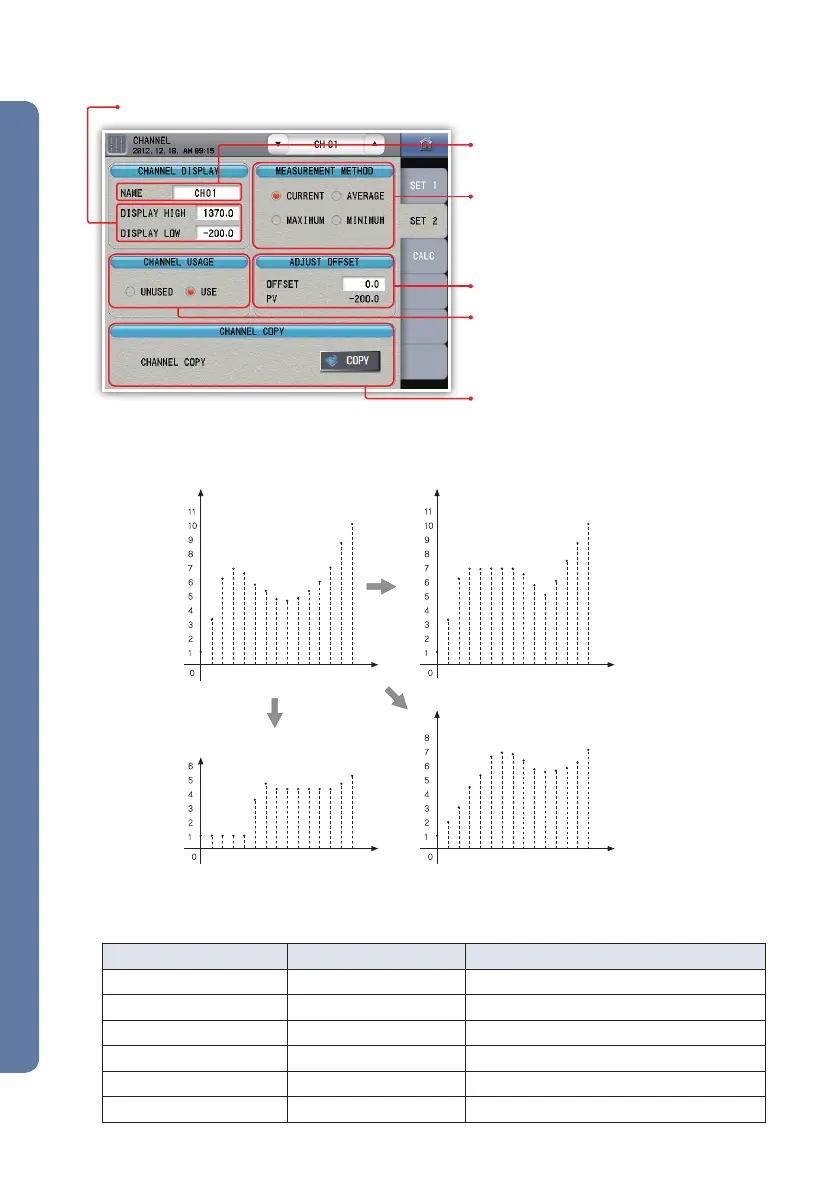
maximum (5 sec)current
minimum (5 sec) average (5 sec)
time time
time time
▶ Additional configuration
Fig. 38) Additional configuration screen
Fig. 39) Example of data collection (current, maximum, minimum, average)
Configure the channel name.
It may not be changed during recording.
Enter the range to be displayed on the operating screen (trend, digital).
Configure how to measure the data. The average,
minimum and maximum calculation times of the
measurement value are the same with the recording
period. It may not be changed during recording.
Copy the parameter currently configured to one
channel and apply the parameter to another
channel. The copy affects the following current
channel but does not affect the previous
channel. Here, the channel name is not copied.
In addition, it does not work during recording.
Calibrate the error during the measurement.
Configure use / not use the channel. The data are
not saved to the internal memory or the SD card if
not used. It may not be changed during recording.
( nn : Channel number )
Parameter Initial value Configuration range
Name CHnn Enter the text (up to 8 characters)
Display high Use range (100 %) Use range (0 ~ 100 %)
Display low Use range (0 %) Use range (0 ~ 100 %)
Measurement method Current Current, average, maximum, minimum
Channel usage Use Unused, Use
Adjust offset Use range (0 %) Use range (-100 ~ 100 %)
[ Basic channel configuration parameter ]


 To Next Page
 Loading...