Chapter 3 Operating the Encoder Using the Front Panel
© 2015 Harmonic Inc. All rights reserved. 24 Electra 9200, Rev O
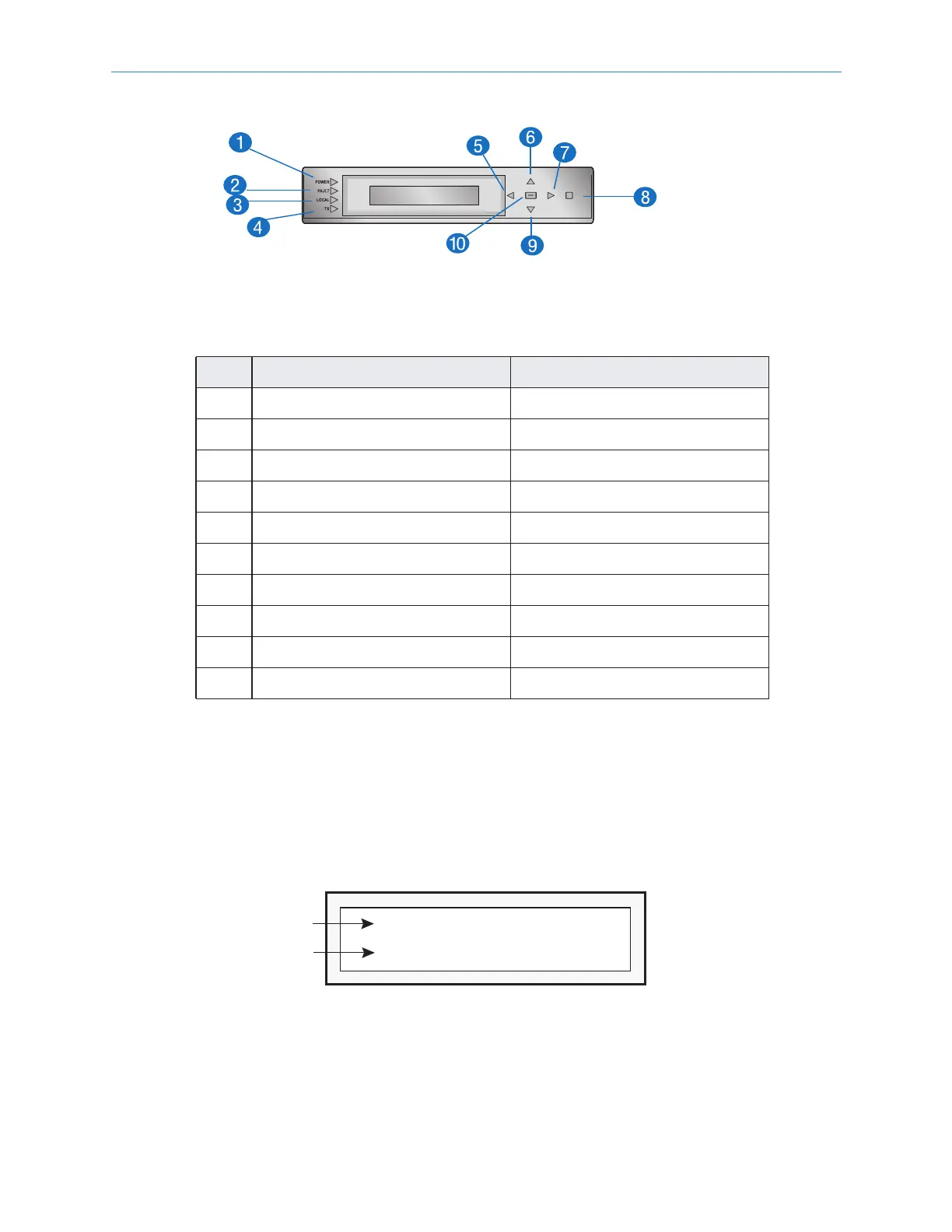
Figure 3–1 shows the keypad.
Figure 3–1: Front Panel Keypad
Table 3–1: Front Panel Keypad
Item Feature Function
1 LED—Power Power indicator
2 LED—Fault Fault indicator
3 LED—Focal Local Control indicator
4 LED—TX Transmitting indicator
5 Left key Menu left
6 Up key Menu up
7 Right key Menu right
8 ESC key Menu escape
9 Down key Menu down
10 ENTER key Menu select
Front Panel Display
The four-line, 28-character vacuum fluorescent display (VFD) shows the Electra™ 9200
menus, parameters, and options. As illustrated in Figure 3–2, line 1 of the local control panel
display shows the menu path for the currently selected option. To represent a path, the VFD
displays each submenu as two or more letters and a colon.
Line 2 of the display shows the second line of a help message or a parameter value. To
change this value, you must enter the new value using the keypad.
Figure 3–2: Setting a Value in the Front Panel Display
A blinking cursor shows the current value. A steady cursor shows the value being edited.
(RN-07)
NTWK: Control IP
Parameter Requires
Value to be Edited
Value Setting
192.168.24.101



 To Next Page