Chapter 5 Maintenance and Troubleshooting Input/Output Modules
© 2015 Harmonic Inc. All rights reserved. 46 Electra 9200, Rev O
NOTE: The FLEX-1 Module must be installed in slot 4 (and an optional second module can be
installed in slot 5) of the encoder. The IOM-RAC2 must be installed in slot 3. Refer to the encoder
guide or online help for information about accommodating the new FLEX-1 Module in the encoder’s
configuration.
CAUTION: Wear an ESD wrist strap when unpacking a module from its antistatic protective packing
material. Unpack and handle the module away from electric motors, transformers, and other similar
machinery.
Removing and Replacing an Input/Output(I/O) Module
NOTE: The encoder needs to be turned off when removing and replacing an I/O module.
To remove an I/O module:
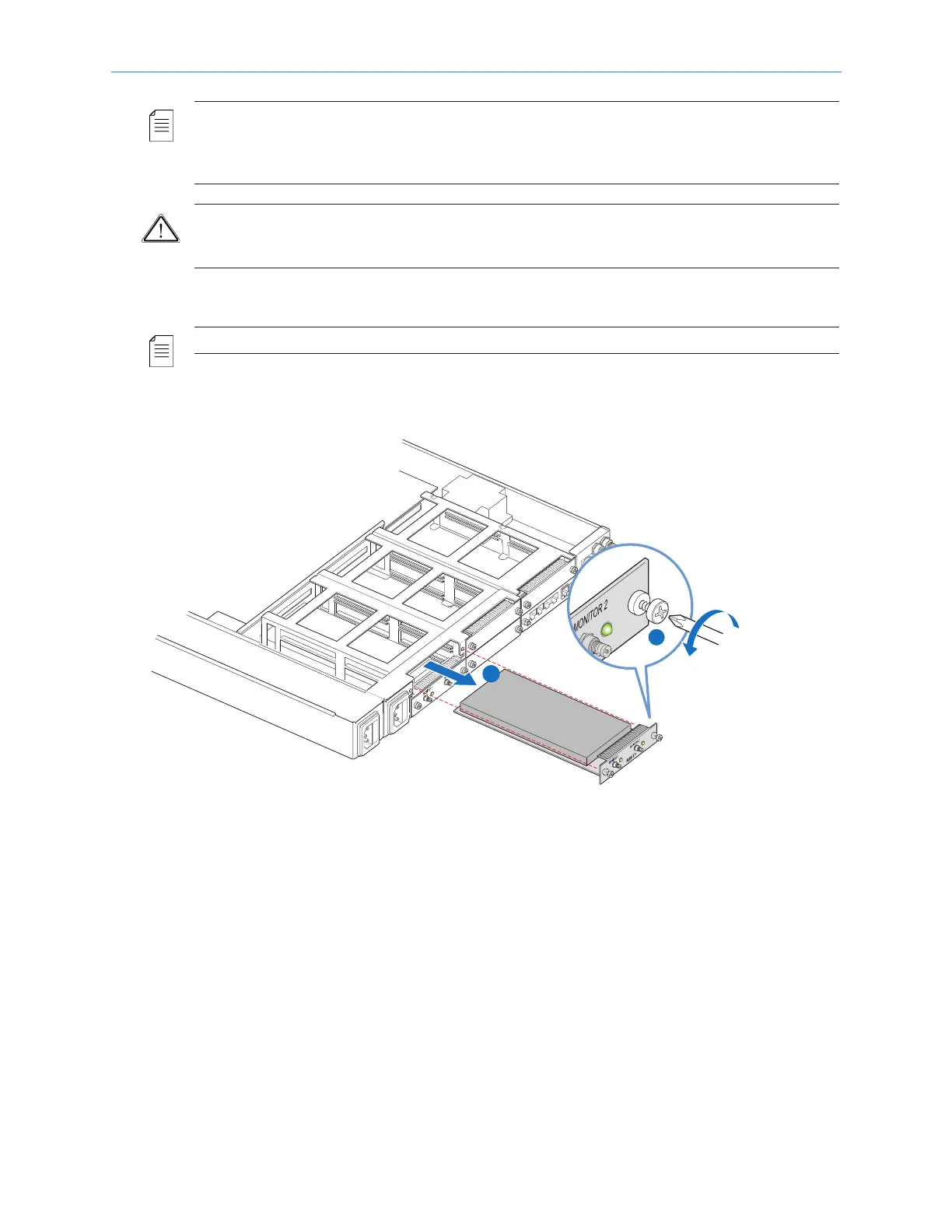
1. With a Phillips-head screwdriver, remove the two screws attaching the module to the back
of the chassis, as shown in step 1, Figure 5–10.
Figure 5–10: Removing an I/O module
2. Pull firmly on the module to remove it from the chassis, as shown in step 2, Figure 5–10.
2
1
(RN-16)



 To Next Page