Chapter 5 Maintenance and Troubleshooting Audio Video Processing Modules (AVPM)
© 2015 Harmonic Inc. All rights reserved. 47 Electra 9200, Rev O
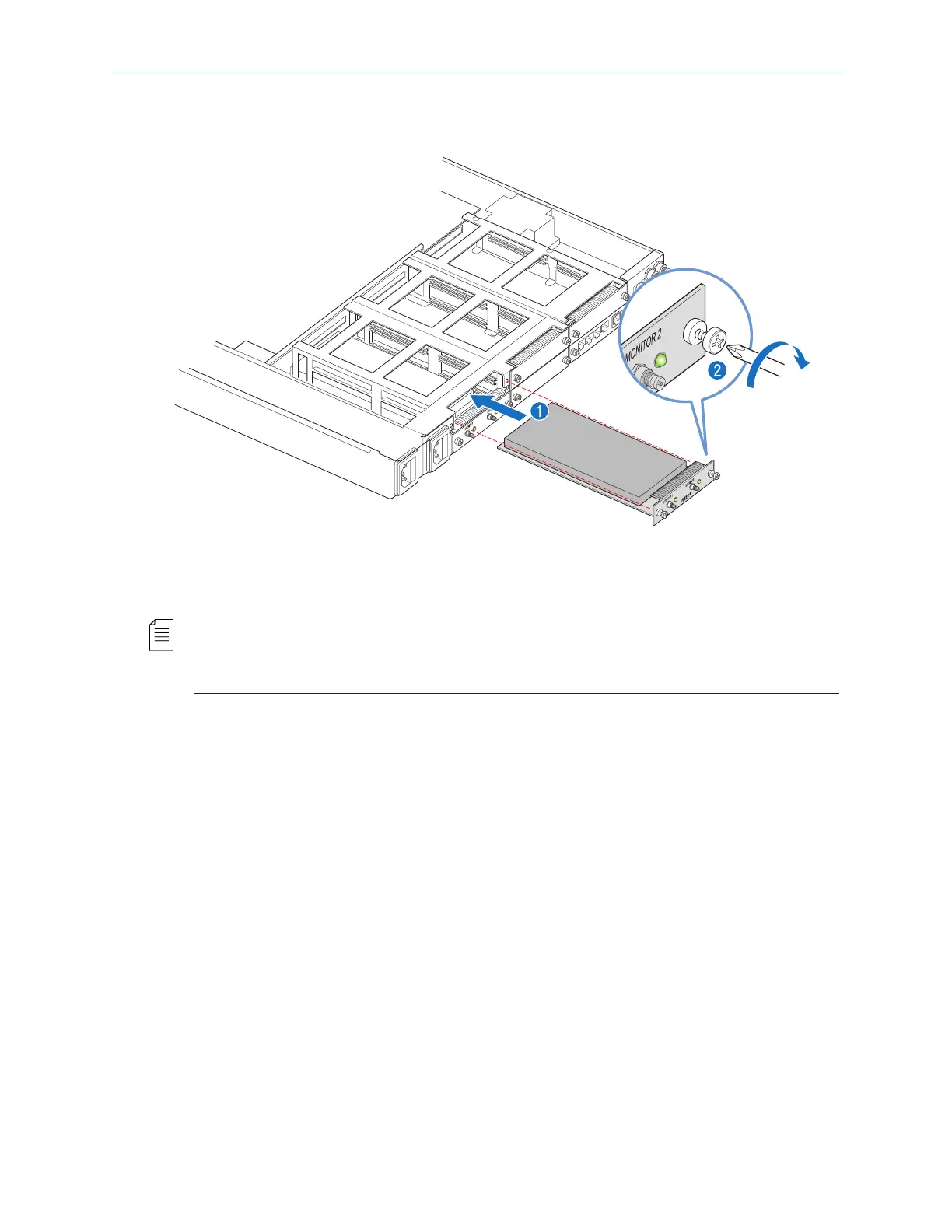
To replace an I/O module:
1. Insert the module into an empty slot on the back of the chassis, as shown in step 1,
Figure 5–11.
Figure 5–11: Replacing an I/O module
IMPO RTANT: Make sure that the module is level and goes into the encoder smoothly without
binding or scraping other modules. The module should slide easily until you feel the module engage
the internal connector, and you see that the module is flush with the back of the encoder. Do not force
the module.
2. Secure the module to the chassis using a Phillips-head screwdriver, as shown in step 2,
Figure 5–11.
Audio Video Processing Modules (AVPM)
An Electra 9200 can be ordered with 1 to 4 Audio/Video Processing Modules (AVPM) and
additional modules can be added in the field up to a maximum of 4.
Removing and Replacing an Audio/Video Processing Module (AVPM)
To remove an AVPM:
1. Turn off the encoder.
2. Remove the bezel from the chassis, as described in Removing and Replacing the Bezel.
3. Remove the fan tray assembly from the chassis, as described in Removing and Replacing the
Fan Tray.
(RN-17)



 To Next Page