Installation instructions, only for experts p. 24/48
Setting the heating period limit
The maximum heating period is set to 6 hours
as standard. The sauna control unit shuts down
automatically after the maximum heating period
for safety reasons.
The function selection switch in the low-voltage
connection area allows the maximum heat-
ing period to be set to 12 hours,18 hours or
24 hours. The required positions of the func-
tion selection switch can be found in the table
on the right.
8. Starting up
8.1. Function selection switch settings
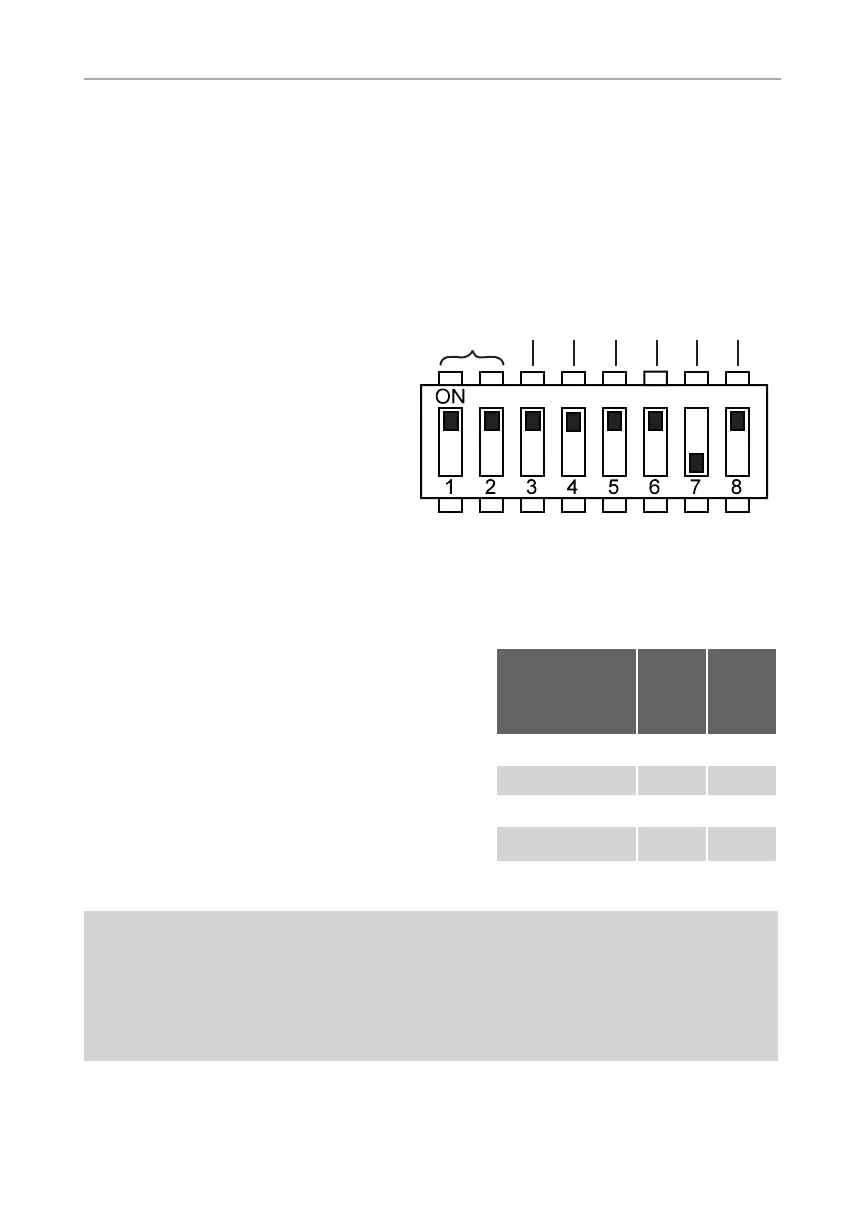
Fig. 5 Function selection switch –
Standard setting
The EN 60335-2-53 species a maximum heating period limit of 6 hours
for private saunas. For saunas in hotels, apartment blocks and similar
locations, a maximum heating period limit of 12 hours is permissible.
Extending the heating period limit to 18 hours or 24 hours is only per-
mitted in public saunas.
!
Function
selection
switch
1 2
6 hours ON ON
12 hours OFF ON
18 hours ON OFF
24 hours OFF OFF
The function selection switch in the
low-voltage connection area allows
a variety of product functions to be
activated. The figure at the right
shows the standard setting for the
function selection switch.
Note that the control unit needs to
be switched off for 10 seconds after
making changes so that the settings
are saved.
OFF
Heating period
limit
Phase
alignment
Not assigned
Status output
Light mode
Not assigned
Additional output
mode


 To Next Page