Email: service@haskris.com
XI. Controller Display
Main Display
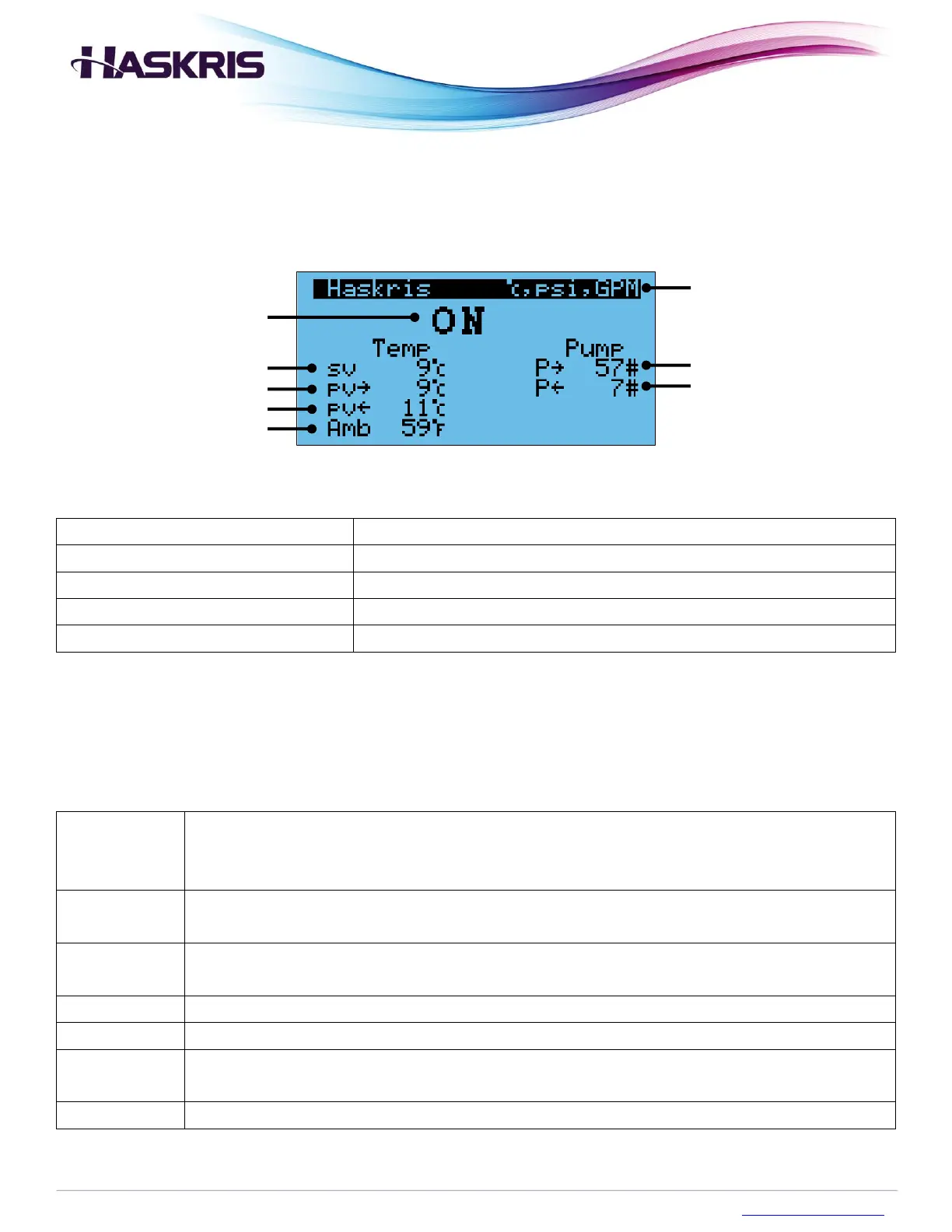
Indicates the state of the chiller
The desired temperature for the water/glycol mixture
Present Value - Supply/Return
Measured supply and return temperatures
Measured supply and return pressures (if applicable)
Measured value of the air temperature around the chiller
Description of main display data
Status Modes
The ON/OFF switch is in the ON position
Indicates the chiller is beginning operation. Appears while the chiller is initially
working to control temperature.
The ON/OFF switch is in the ON position
Indicates the normal running of the chiller once sv is achieved
The ON/OFF switch is in the ON position
Indicates less cooling is required so fewer refrigeration circuits are running
The physical ON/OFF switch is in the OFF position
An alarm or fault occurred and stopped the chiller
A virtual ON/OFF switch on a controller screen is in the OFF position. This is only
accessible in the service menu access.
The site’s BMS is connected to the chiller and sending it a signal to be OFF
Description of status modes



 To Next Page