GR SG901
1865000000000
Safety
confidential
A.1.7
1000
h
10
11
12
13
14
15
16
17
18
19
20
21
22
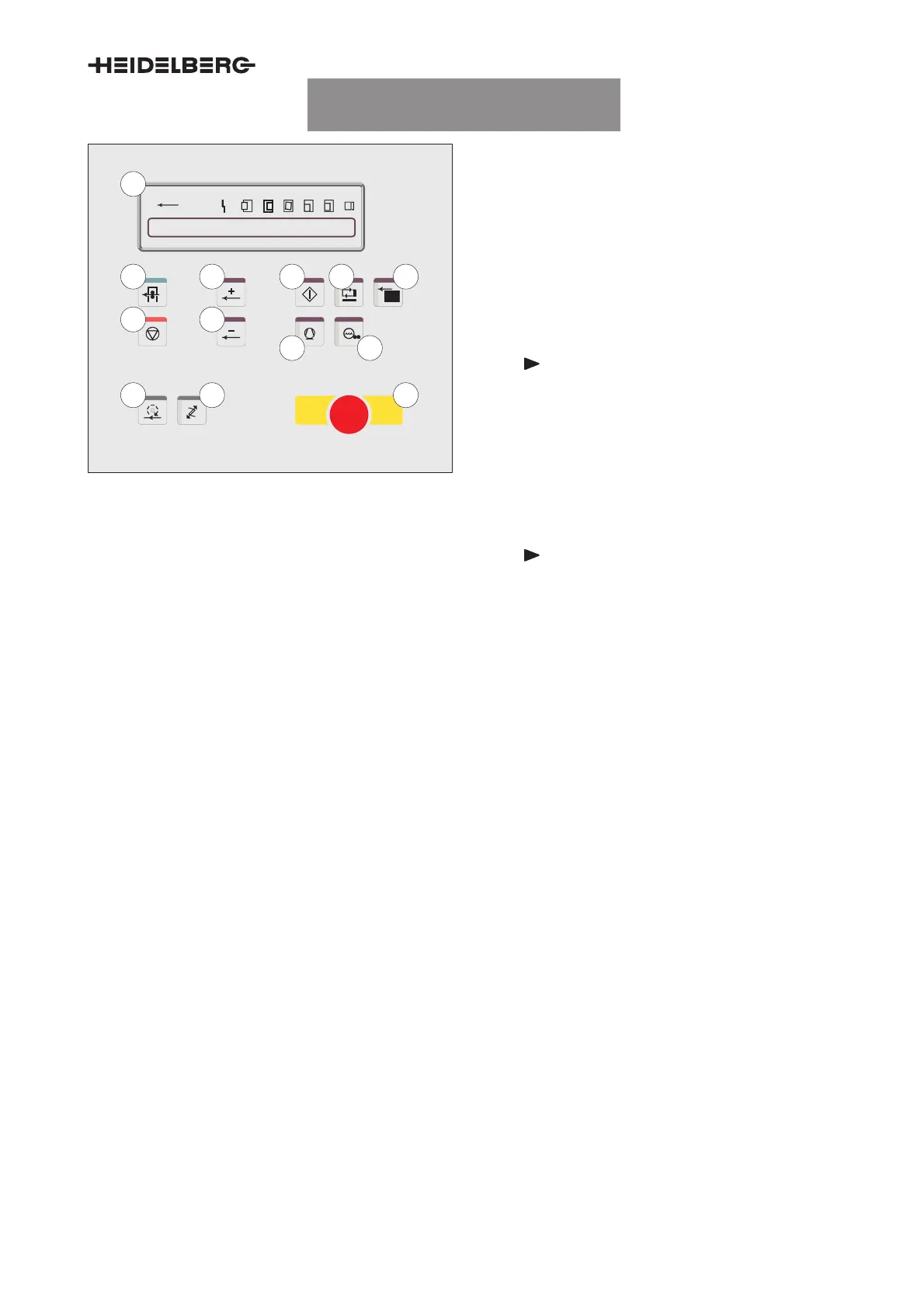
Fig. 6 Feeder control panel, detail
10
Press display
Displays the current press data (number of im-
pressions, degree value), monitoring of the feed
gripper, general malfunctions, etc.
11
Production
Press in operation: The press automatically
transitions to production mode.
If the press is not in operation: the start-up
warning sounds. If pressed again, the press
automatically goes into production mode.
Note
For presses with central air supply,
press the
Compressor
button before-
hand.
12
Halt
Stops the press. Actuation during the produc-
tion run: switches off all functions for the pro-
duction run (except for the compressor).
Note
The
Halt
button is not an
Emergency
stop button
!
13
Increase print speed
Increases the press speed continuously.
14
Reduce printing speed
Reduces the press speed continuously.
15
Inch forward
The start-up warning signal sounds before the
press is inched forwards. Condition: The
Con-
trol panel selection
button on the feeder has
been pressed.
16
Select control panel
Press the button twice: From this control panel,
the press can only be moved in inching mode
(LED is ON).
To cancel the selection: Press the button again
(LED is OFF).
17
Operation
The start-up warning signal sounds.
The press starts up at minimum speed when
the button is actuated again.
18
Compressor
Switches the compressor ON (LED is ON) and
OFF.
19
Feeder ON
Switches the feeder automatically ON (LED is
ON) and OFF.
20
Dampening form rollers ON/OFF
Throws all preselects dampening form rollers
manually ON (LED is ON) or OFF.



 To Next Page