GR SG901
1866000000000
Safety
confidential
A.1.8
21
Paper ON
Switches the sheet travel ON (LED is ON) and
OFF.
22
EMERGENCY ST
OP
The press stops immediately and the palm but-
ton is locked.
Turn: the lock is released.
23
2925 27
26
24
28 30
31
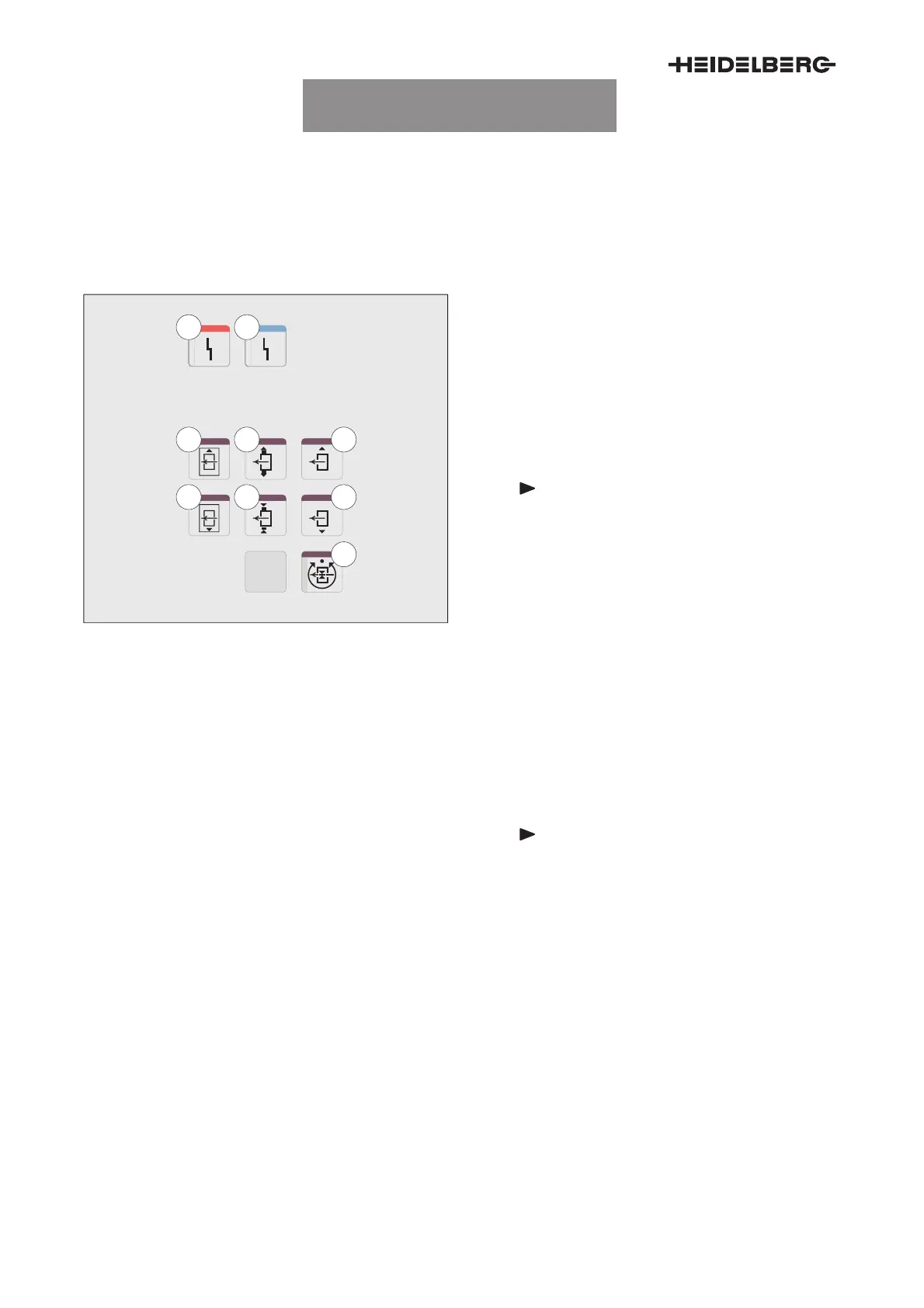
Fig. 7 Feeder control panel, detail
23
Malfunction button
red
Due to a fault, the press cannot be put into op-
eration.
24
Malfunction button
blue
Due to a fault, the press cannot be put into op-
eration.
25
Pull distance correction towards D.S.
26
Pull distance correction towards O.S.
Note
The feeder display shows the current
format width during adjustment or
when the
Pull distance correction
but-
tons (Fig. 7/25 and 26) are pressed at
the same time.
27
Increase lateral sheet separation blower sheet
size
Moves the opposite lateral sheet separation
blower away from the pile. The lateral sheet
separation blower on the pull side remains.
28
Reduce lateral sheet separation blower sheet
size
Moves the opposite lateral sheet separation
blower towards the pile. The lateral sheet sepa-
ration blower on the pull side remains.
Note
The feeder display shows the current
format width during adjustment or
when the
Lateral sheet separation
blower sheet size
buttons (Fig. 7/27
and 28) are pressed at the same time.
29
Pile to D.S.
Moves the active pile to D.S.
30
Pile to O.S.
Moves the active pile to O.S.
31
Pile alignment automatic ON/OFF
Selects the pile alignment operating mode.
The LED is ON: ”Automatic”
The LED is OFF: ”Manual” mode


 To Next Page
 Loading...