GBDE
Operating instructions • M-BOSS Compact • 06-2020 • v02 • 544-12020
Initial operation
11
1
1 USB cable
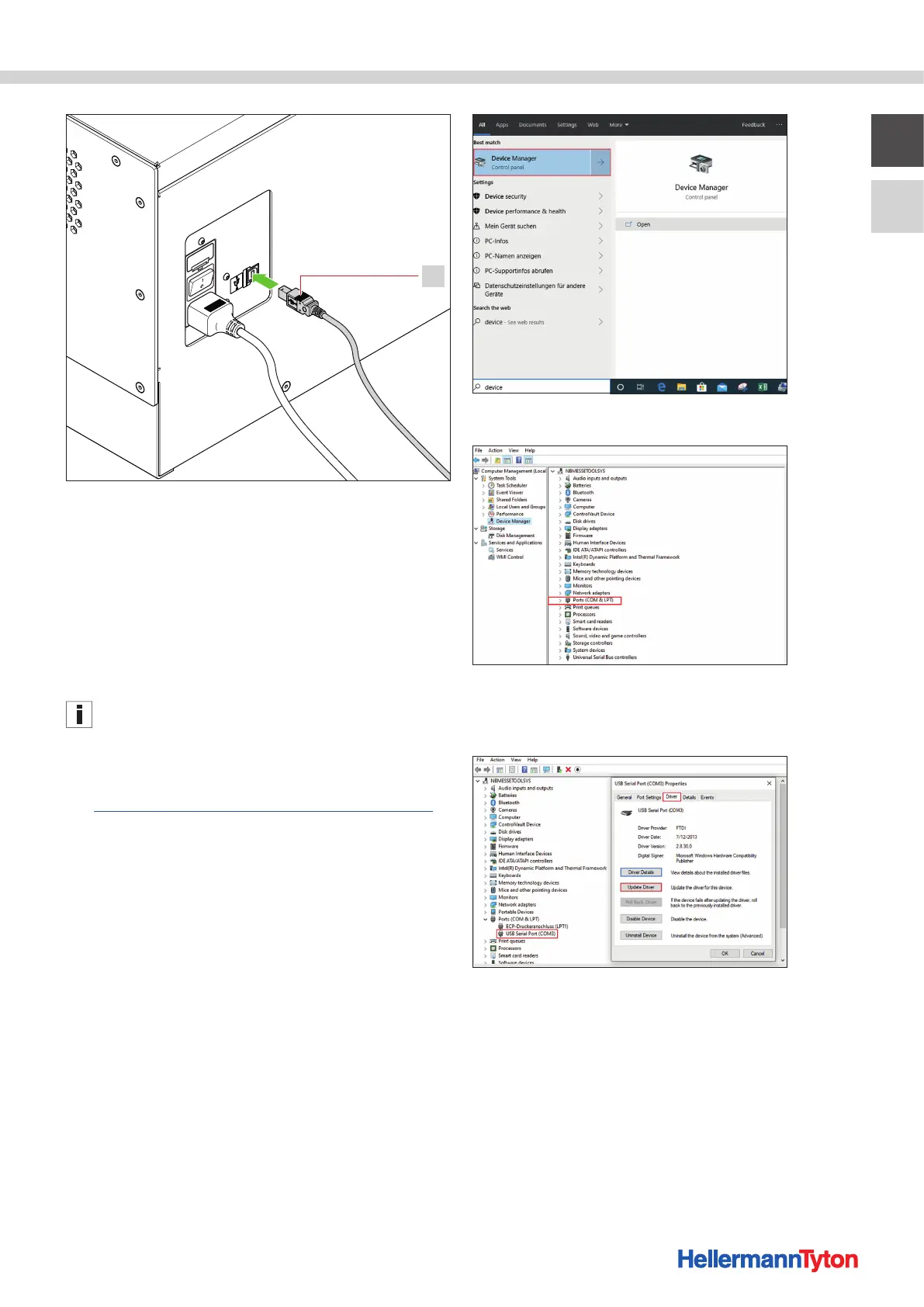
3 Connect the USB cable of the device to the PC or
notebook.
4 Connect the power cable of the device to a power
socket.
5 Switch on the device using the main switch.
; The device is connected.
5.3 Installing the device software
The screen displays shown serve for orientation. The
designation of the buttons and menus is explained in the
instruction texts.
Proceed as follows:
1 Download the required files
(https://www.hellermanntyton.de/downloads/software).
2 Create a folder on the desktop or in a suitable location.
3 If necessary, unzip the files with a suitable program.
5.3.1 Installing the drivers
Proceed as follows:
1 Connect the device to a PC or notebook with a USB
cable.
2 Open the device manager.
3 Open the Ports (COM & LPT) tab.
4 Double-click on USB Serial Port
(in this case COM3).
Select Driver and click Update Driver.


 To Next Page