Operating instructions • M-BOSS Compact • 06-2020 • v02 • 544-12020
Layout and function
8
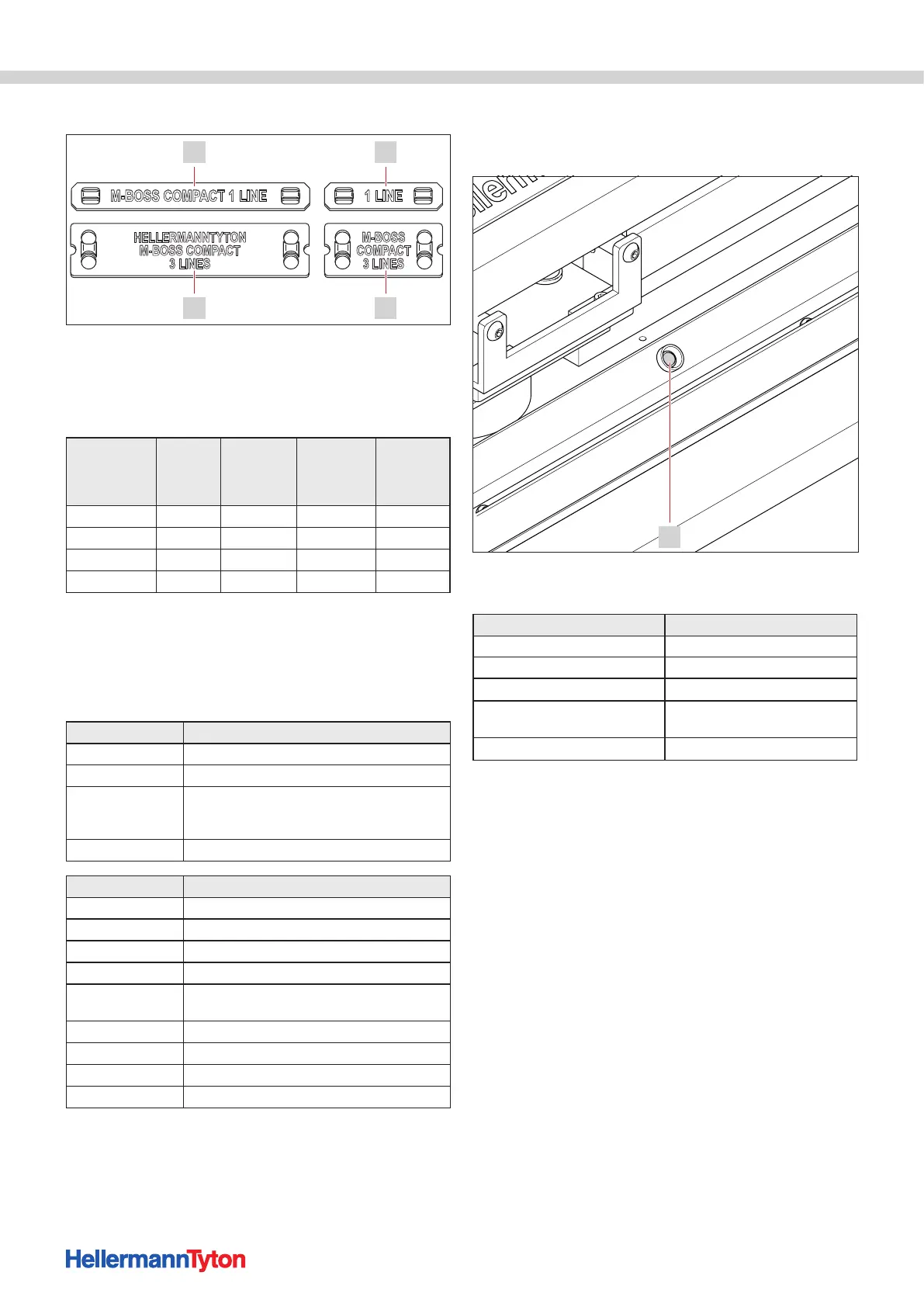
The following markers are available:
4 1
23
Stainless steel marker (marker).
1 MBML10X45
2 MBML20X45
3 MBML20X90
4 MBML10X90
TYPE
Size
(mm)
Max.
number of
lines
Max.
number of
characters
per line Article no.
MBML10X45 10x45 1 8 544-80101
MBML10X90 10x90 1 23 544-80102
MBML20X45 20x45 3 8 544-80201
MBML20X90 20x90 3 23 544-80202
4.6 Control elements
4.6.1 Metal Printer Monitor
The device can be operated on a PC or notebook using
the function fields of the Metal Printer Monitor software.
The display fields shown the status of the device.
Function field Meaning
Pause Pause the device and embossing job
Continue Resume the embossing job
Del_Job
Delete the current embossing job (embossed
marker will be provided in the discharge chute;
continue with "Restore")
Restore Move to the basic position
Display field Meaning
Counter Job counter / unit counter
Ready The device is ready to create an embossing job
Loading Card Load the marker
Load complete Marker is loaded
Personalizing
Card
Execution of embossing
Ejecting Card Eject the marker
Eject complete Marker in the discharge chute
Restoring Restoring the starting position
Restore complete Starting position restored
4.6.2 Organiser unit status lamp
The status lamp indicates the status of the organiser
unit.
1
Organiser unit status lamp.
1 Status lamp
Colour Meaning
green Ready for operation
Red-green flashing alternately Box 9 is being filled
Red flashing slowly Box 10 is being filled
Red flashing rapidly
Organiser unit is in movement or
the organiser unit is blocked
red Box 10 is full


 To Next Page