GBDE
Operating instructions • M-BOSS Compact • 06-2020 • v02 • 544-12020
Operation
19
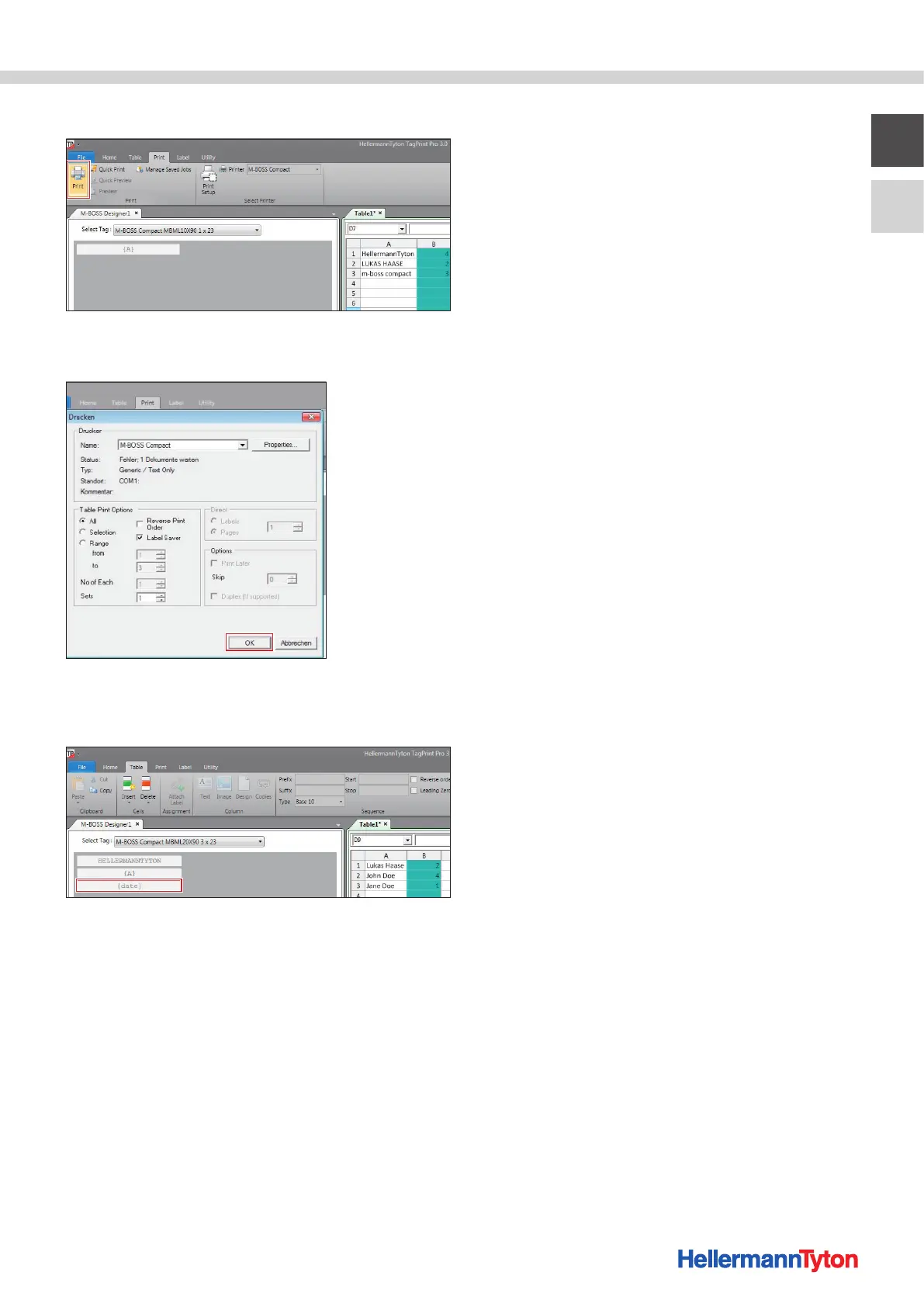
7 Activate Print in the menu bar.
8 Select "M-Boss Compact" as the printer and confirm
with OK.
; The serial embossing process starts.
With serial embossing, you can also enter other informa-
tion and combinations in the table (e.g., date).
6.5 Removing the marker
f Remove the embossed marker by opening the drawer
and taking the box and emptying it.
f Pay attention to the version of the device.
6.5.1 Emptying the drawer
(Device article no. 544-20000)
The drawer should not be opened during operation.
Proceed as follows:
1 Wait until it comes to a standstill or select the "Pause"
function field in the Metal Printer Monitor.
2 Carefully pull out the drawer.
3 Empty the drawer.
4 Reinsert the drawer.
5 Select the "Continue" function field in the Metal Printer
Monitor.
; Operation will be resumed.
6.5.2 Emptying the organiser unit
(Device article no. 544-21000)
The drawer can be pulled out and emptied during opera-
tion.
Proceed as follows:
1 Carefully pull out the drawer.
; The device goes into "PAUSE" operating mode.
2 Empty the drawer.
3 Reinsert the drawer.
; Operation will be resumed.


 To Next Page