Operating instructions • M-BOSS Compact • 06-2020 • v02 • 544-12020
Initial operation
12
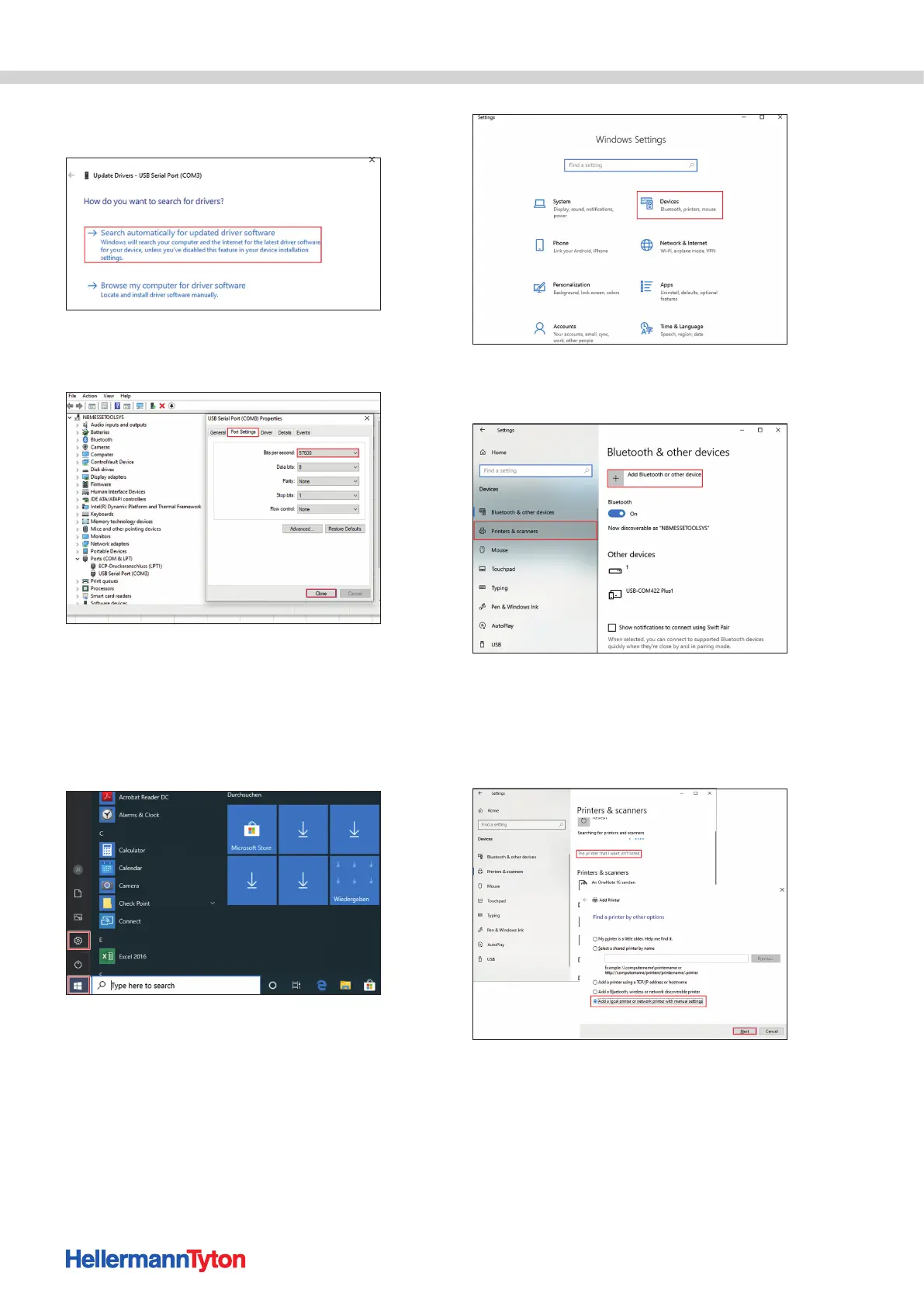
5 Select Search automatically for updated
driver software (if the right driver is not installed).
6 Select Port Settings.
Change the Bits per second to 57600. Confirm
with OK and close the Device Manager.
; The communication interface is installed.
5.3.2 Installing the device in the operating system
The M-BOSS Compact must be installed and set up in
the PC or notebook operating system.
Proceed as follows:
1 Click on the Windows icon and select Settings.
2 In the settings, select Devices.
3 Open the Printers & scanners menu.
4 Select Add a printer or scanner.
5 Select the entry The printer that I want
isn't listed.
6 Select Add a local printer or network
printer with manual settings and confirm
with Next.


 To Next Page