GBDE
Operating instructions • M-BOSS Compact • 06-2020 • v02 • 544-12020
Operation
15
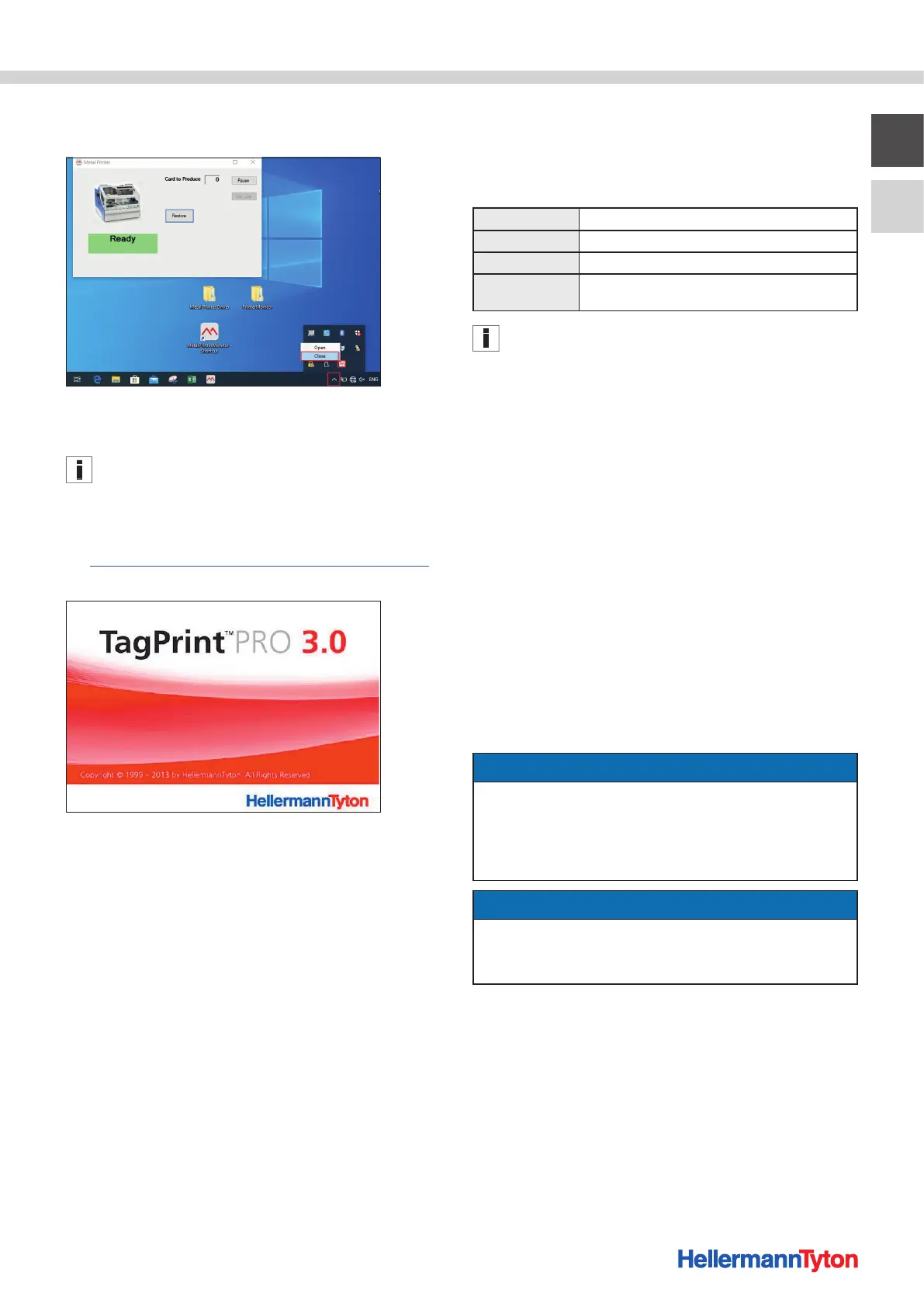
9 Select the arrow. Right-click on the icon and close the
Metal Printer Monitor.
; The Metal Printer Monitor is installed.
5.4 Installing the TagPrint Pro software
The screen displays shown serve for orientation. The
designation of the buttons and menus is explained in the
instruction texts.
Proceed as follows:
1 Call up the download link:
https://www.hellermanntyton.de/downloads/software.
2 Install TagPrint Pro.
; TagPrint Pro has been installed and can be used.
6 Operation
The markers are designed with the TagPrintPro software
and embossed with the M-BOSS Compact.
The following 42 characters can be used for labelling:
Letters A B C D E F G H I J K L M N O P Q R S T U V W X Y Z
Numbers 0 1 2 3 4 5 6 7 8 9
Symbols & - / . , ’
Special charac-
ters
Available upon request
(Device article no. 544-20500 and 544-21500)
The letter O and the number 0 have the same character for
labelling.
Operation is carried out in the prescribed sequence:
1. Switch on the device.
2. Fill and insert the magazine.
3. Connect the device.
4. Perform single or serial embossing.
5. Remove the marker.
Æ Section 6.1-6.5
6.1 Switch on the device
Proceed as follows:
1 Switch on the device with the main switch.
2 Start the Metal Printer Monitor.
3 Select the "Restore" function field.
; The device moves to its basic position and the status
message READY appears on the Metal Printer Monitor.
6.2 Filling and inserting the magazine
NOTE
Possible malfunction!
The device operation is stopped and the embossing is
interrupted when the folding cover is opened.
f Only open the folding cover when the device is at a
standstill.
NOTE
Material damage caused by false markers!
The device can be damaged by using the wrong markers.
f Only use stainless steels markers from HellermannTyton.
The magazine must be filled with markers and inserted.
Proceed as follows:
1 Open the folding cover.


 To Next Page