Operating instructions • M-BOSS Compact • 06-2020 • v02 • 544-12020
Initial operation
14
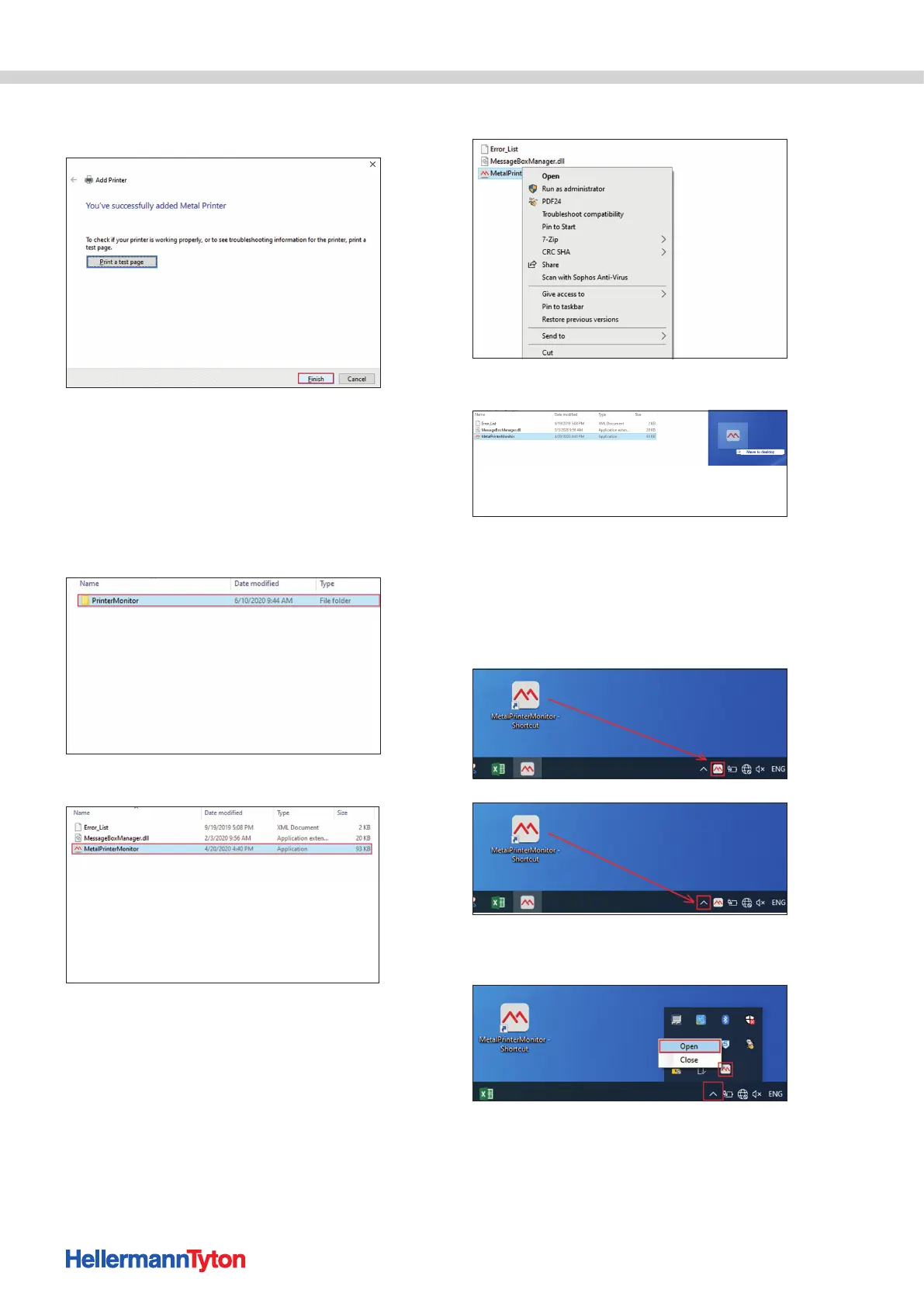
16 If necessary, define the device as the default printer and
confirm all of the settings with Finish.
; The device is installed and set up in the operating
system.
5.3.3 Installing the Metal Printer Monitor
Proceed as follows:
1 Open the created folder with the downloaded M-BOSS
files (in this case the "M-BOSSfiles" folder).
2 Double-click on the "Printer Monitor" folder.
3 Right-click on the MetalPrinterMonitor icon.
4 Select Create link.
5 Left-click on the link, hold it and drag to the desktop.
6 Make sure that the M-BOSS is connected to the power
supply and is switched on.
7 Double-click on the link.
; The MetalPrinterMonitor icon is located on the
right in the task bar or in an expansion field that can be
opened using the arrow.
8 Select the arrow. Right-click on the icon and open the
Metal Printer Monitor.
; The Metal Printer Monitor is opened and ready
for operation.


 To Next Page