Battery removal
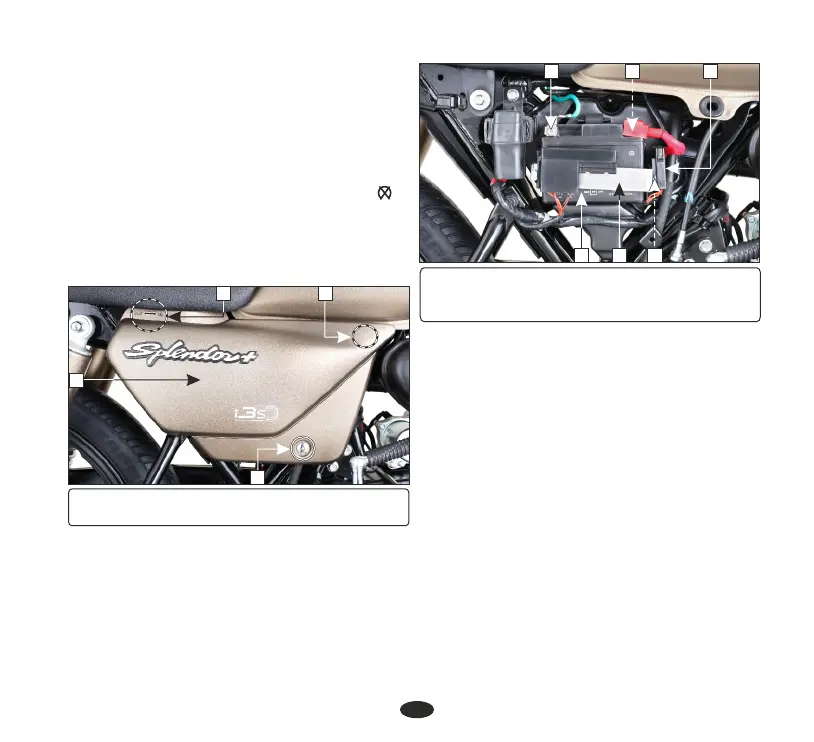
• Remove the right side cover (1) by
removing side cover screw (2). Pull out lug
(3) from the grommet and slide the cover as
per direction indicator (4).
•
Always ensure the battery is fully charged
before installation.
• FF” ( ). Make sure the ignition switch is “O
•
Ensure the battery leads are properly
connected to the battery terminals during
installation.
1
(1) Right side cover (2) Side cover screw
(3) Lug (4) Direction indicator
34
• Remove the fuse box (B).
• Remove the battery clamp bolt (5) and the
battery clamp (6).
8
9
6
(B) Fuse box (5) Bolt
(6) Battery clamp (7) (-)ve terminal
(8) (+)ve terminal (9) Battery
7
• Disconnect the (-)ve terminal lead (7)
from the battery first, then disconnect the
(+)ve terminal lead (8).
• Pullout the battery (9) from the battery box.
Battery installation
•
Reinstall in the reverse order of removal. Be
sure to connect the (+) terminal first, then ve
the (-) terminal.ve
•
Check all fasteners are secured properly.
FUSE REPLACEMENT
Fuse box : (A) Mounted on the battery
clamp (1).
Fuse ype: t Blade fuse
Circuit fuse (2) : 15A, 10A
Spare fuse (3) : 15A, 10A
B
51
2
5












 To Next Page