49
CAUTION
!!
Do not operate front brake lever when the
wheel is removed.
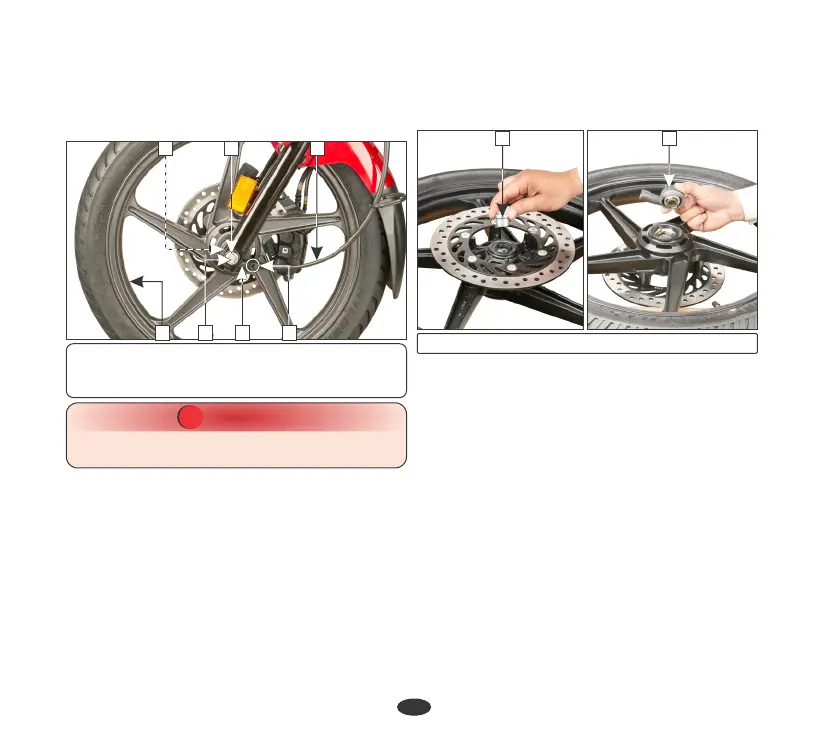
(1) Speedometer cable (2) Tab
(3) Speedometer gear (4) Axle nut
(5) Axle (6) Wheel (7) Side collar
147
Ÿ Remove the side collar (7) from the right
side of the wheel hub.
Ÿ Remove the speedometer gear from the left
side of the wheel hub.
TORQUE : 5.2 kgf-m
• After installing the wheel apply the brake
several times and then check if the wheel
rotates freely. Recheck the wheel if the
brake drags or if the wheel does not rotate
freely.
(1) Side collar (2) Speedometer gear
2
•
Position the front wheel between the fork
legs by aligning the slot on the speedometer
gear with the lug on the fork leg and the disc
between the brake pads to avoid damage to
the pads. Insert the axle from the right side
through the fork legs and wheel hub.
Installation
•
Install the side collar (1) to the right side of
the wheel hub and then install the
speedometer gear (2) on the left side of the
wheel hub.
Ÿ Tighten the front axle nut to the specified
torque.
Removal
• Remove the speedometer cable (1) by
pressing the tab (2) & pulling cable out
from the speedometer gear box.
(b) Front wheel ( )Drum variant
• Support the vehicle securely on the main
stand and raise the front wheel off the
ground.
56 23
1






 To Next Page