17
4.2 Dot Indication for the Elevator
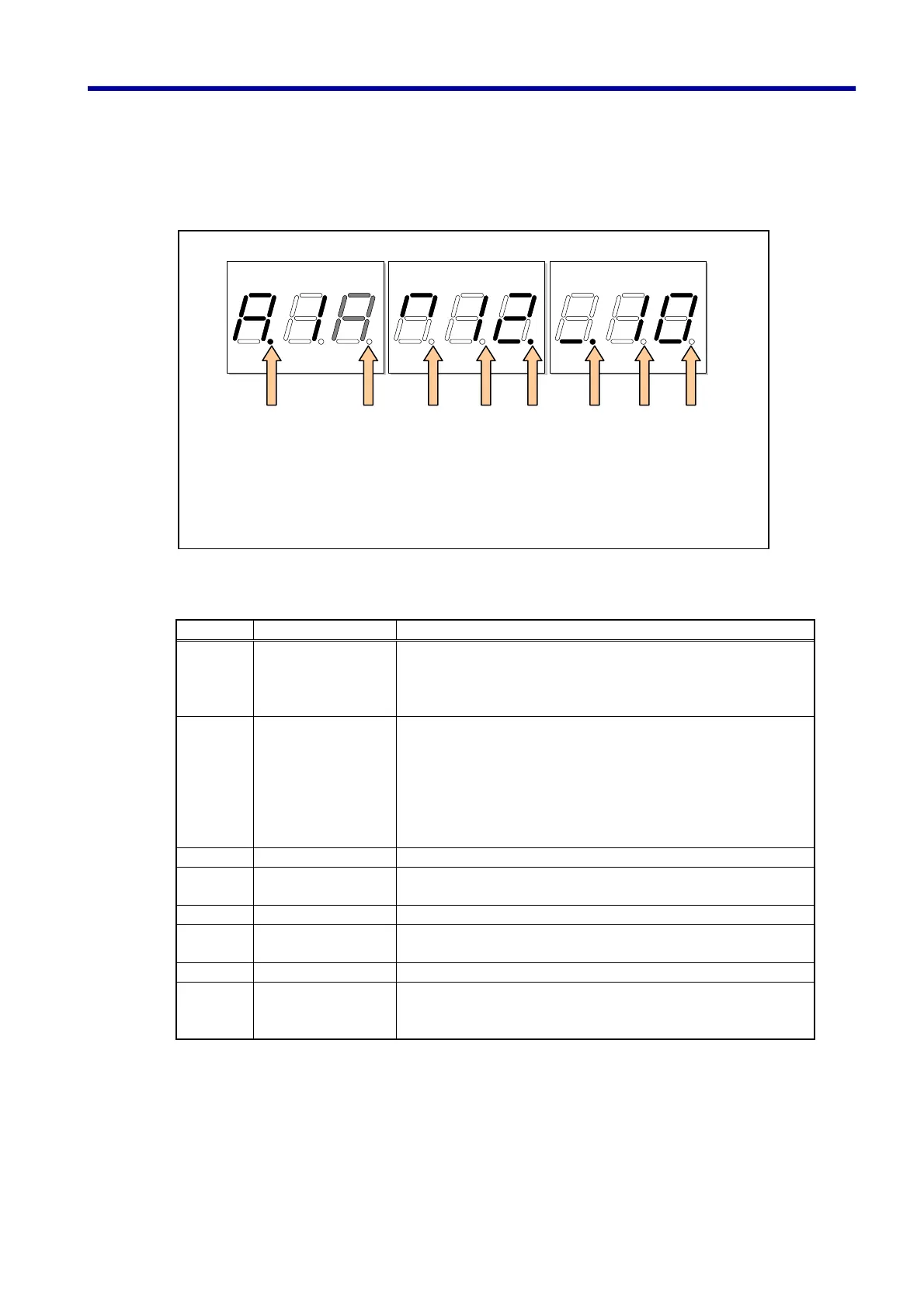
This sub-section describes the dot section (position lamp) in the indication of the elevator state of operation
using the following diagram and table:
Table of the contents of operating state indicated with the dot section in the display
Dot Name Content
Dot 1 Door stop lamp Lights up when Door Stop Button is depressed on the
Maintenance Console. Then the door is set to stop condition.
Depressing the same button again resets the setting and the
lamp turns out.
Dot 2 Low speed lamp Lights up during low-speed operation. The followings are
included in the low-speed operation:
• Maintenance operation
• Rescue operation (operation to the nearest floor)
• Operation to the nearest floor during a power failure with the
automatic operation system (ALP)
• Operation for measuring the height of a story
Dot 3 Trouble lamp When ON, it indicates that trouble has occurred.
Dot 4 Open zone lamp Indicates that the car is at the position that enables the door
opening.
Dot 5 Deceleration lamp Lights up during deceleration of the car
Dot 6 Starting lamp Lights up when start command is received (immediately before
the car actually starts)
Dot 7 Key detection Lights up when a key is depressed.
Dot 9 Low-battery
detection
Flashes when the battery (UM-3 cells) power becomes low.
When flashing steadily, the remaining battery power is about
10%.
(Dot 9): Low-battery
detection
(Read Section 2.1)
(Dot 1): Door
stop lamp
(Dot 2): Low
speed lamp
(Dot 3): Trouble
lamp
(Dot 4): Open zone
lamp
(Dot 5):
Deceleration lamp
(Dot 6): Starting
lamp
(Dot 7): Key
detection
4. Elevator / Escalator Mode



 To Next Page