12
3. Connection Method. How to Turn the Power ON-OFF
This section describes how to use the Maintenance Console.
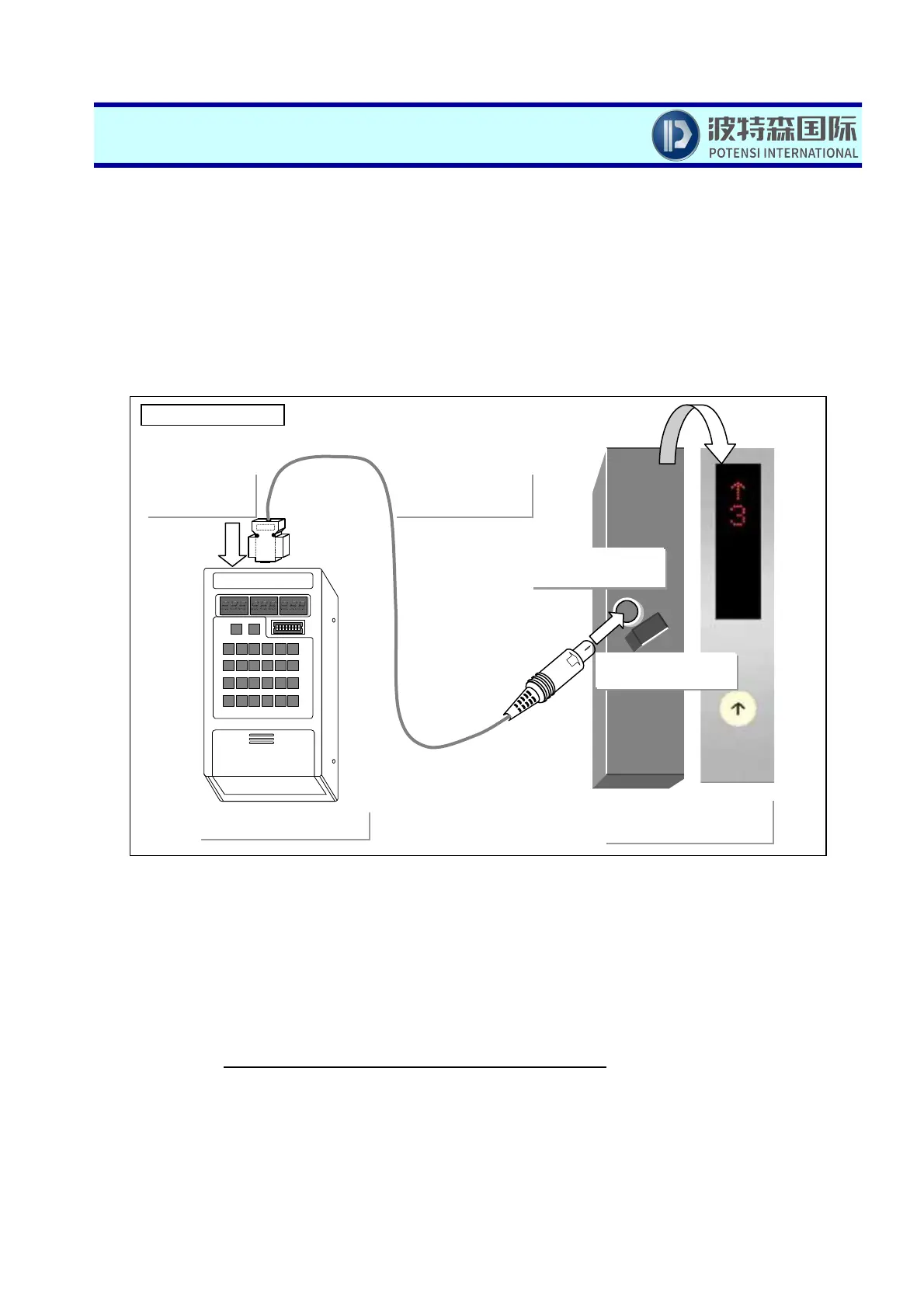
(1) Connect the Console with the elevator.
(a) In case of UAX Machine room less elevators
Remove the cover of the elevator car operating board on the bottom floor to find the terminal for the special
round connector FQ (8 pins). Connect the round connector of the special cable to this terminal.
For other machine room less elevator, please consult with Hitachi, engineer.
(b) In case of other types
Connect the round connector of the special cable to the special round connector (described as FQ, PC or
FG, etc.) packaged to the printed board in the control panel.
(2) Set the functional selector switch.
Set the functional selector switch as indicated in the table according to the machine type to be connected,
section, etc. Note that Group/Door mode is the setting only to EC4-605.
Remove
Operating board at the
bottom floor
Special connector
cable
Main unit of the console
Round connector
(FQ)
D-sub9 pin
connector
RESET
SET
MODE
A/D
INC
DEC
ドア止(DOOR)
START
3
2
1
0
7
6
5
4
B
A
9
8
F
E
D
C
OFF
ON
12345678
保守用コンソール
ON
8-pin connector
XY
In case of UAX



 To Next Page