EasyManua.ls Logo

Hitachi VM-2300A - Checking the Battery III Sci Cence Cieciiectie

Hitachi VM-2300A
47 pages
Print Icon
To Next Page IconTo Next Page
To Previous Page IconTo Previous Page
Loading...
@
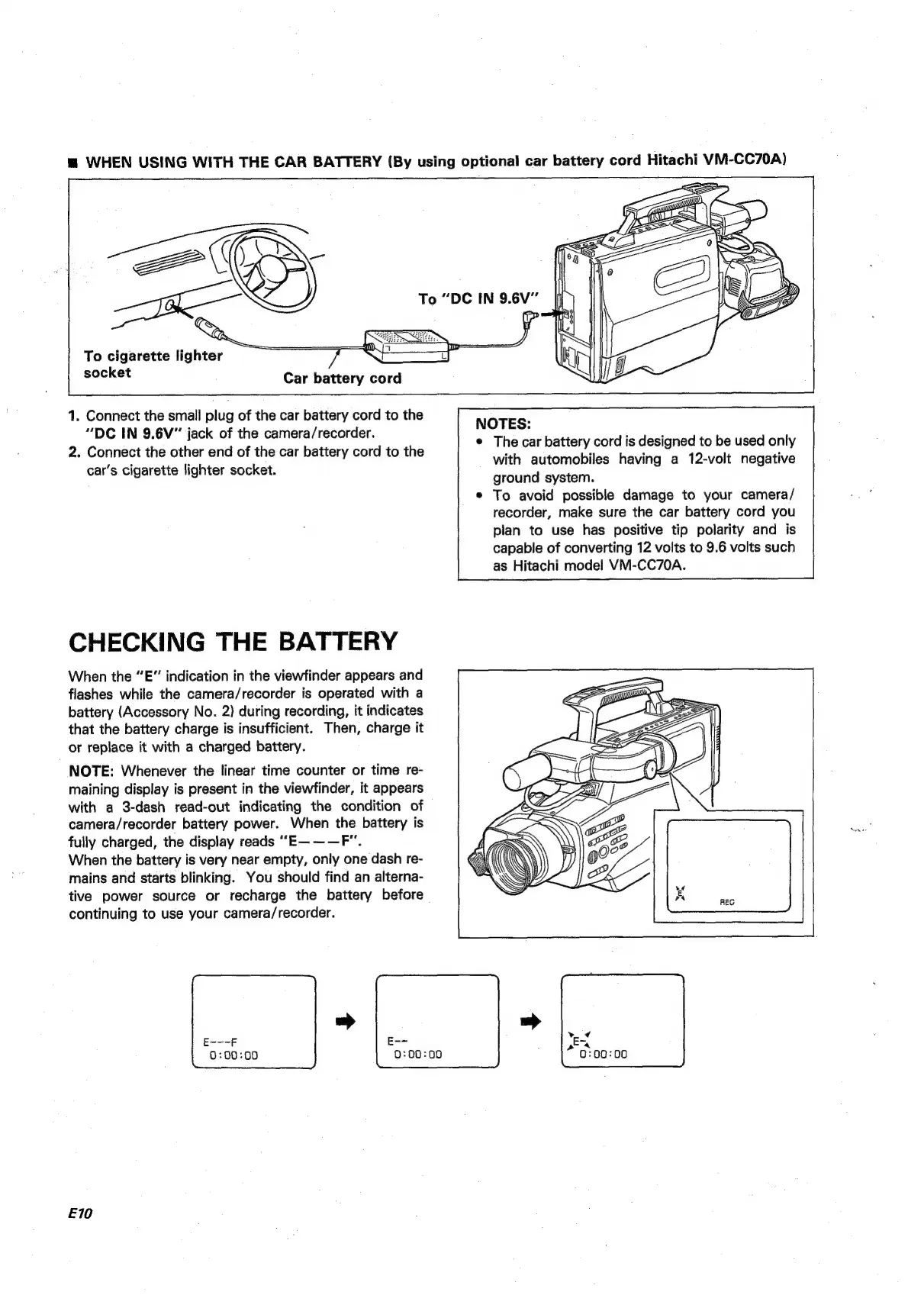
WHEN
USING
WITH
THE
CAR
BATTERY
(By
using
optional
car
battery
cord
Hitachi
VM-CC70A)
To
cigarette
lighter
socket
Car
battery
cord
1.
Connect
the
small
plug
of
the
car
battery
cord
to
the
“DC
IN
9.6V”
jack
of
the
camera/recorder.
2.
Connect
the
other
end
of
the
car
battery
cord
to
the
car’s
cigarette
lighter
socket.
CHECKING
THE
BATTERY
When
the
“E”
indication
in
the
viewfinder
appears
and
flashes
while
the
camera/recorder
is
operated
with
a
battery
(Accessory
No.
2)
during
recording,
it
indicates
that
the
battery
charge
is
insufficient.
Then,
charge
it
or
replace
it
with
a
charged
battery.
NOTE:
Whenever
the
linear
time
counter
or
time
re-
maining
display
is
present
in
the
viewfinder,
it
appears
with
a
3-dash
read-out
indicating
the
condition
of
camera/recorder
battery
power.
When
the
battery
is
fully
charged,
the
display
reads
““E———F".
When
the
battery
is
very
near
empty,
only
one
dash
re-
mains
and
starts
blinking.
You
should
find
an
alterna-
tive
power
source
or
recharge
the
battery
before
continuing
to
use
your
camera/recorder.
E10
NOTES:
e
The
car
battery
cord
is
designed
to
be
used
only
with
automobiles
having
a
12-volt
negative
ground
system.
To
avoid
possible
damage
to
your
camera/
recorder,
make
sure
the
car
battery
cord
you
plan
to
use
has
positive
tip
polarity
and
is
capable
of
converting
12
volts
to
9.6
volts
such
as
Hitachi
model
VM-CC70A.

Table of Contents

Related product manuals