EasyManua.ls Logo

Hitachi VM-2300A - Time Remaining; Sele THMGL CC. Aise Deanvecvecnersvievedssatanedanavateyereioouse; Negative;Positive Inversion

Hitachi VM-2300A
47 pages
Print Icon
To Next Page IconTo Next Page
To Previous Page IconTo Previous Page
Loading...
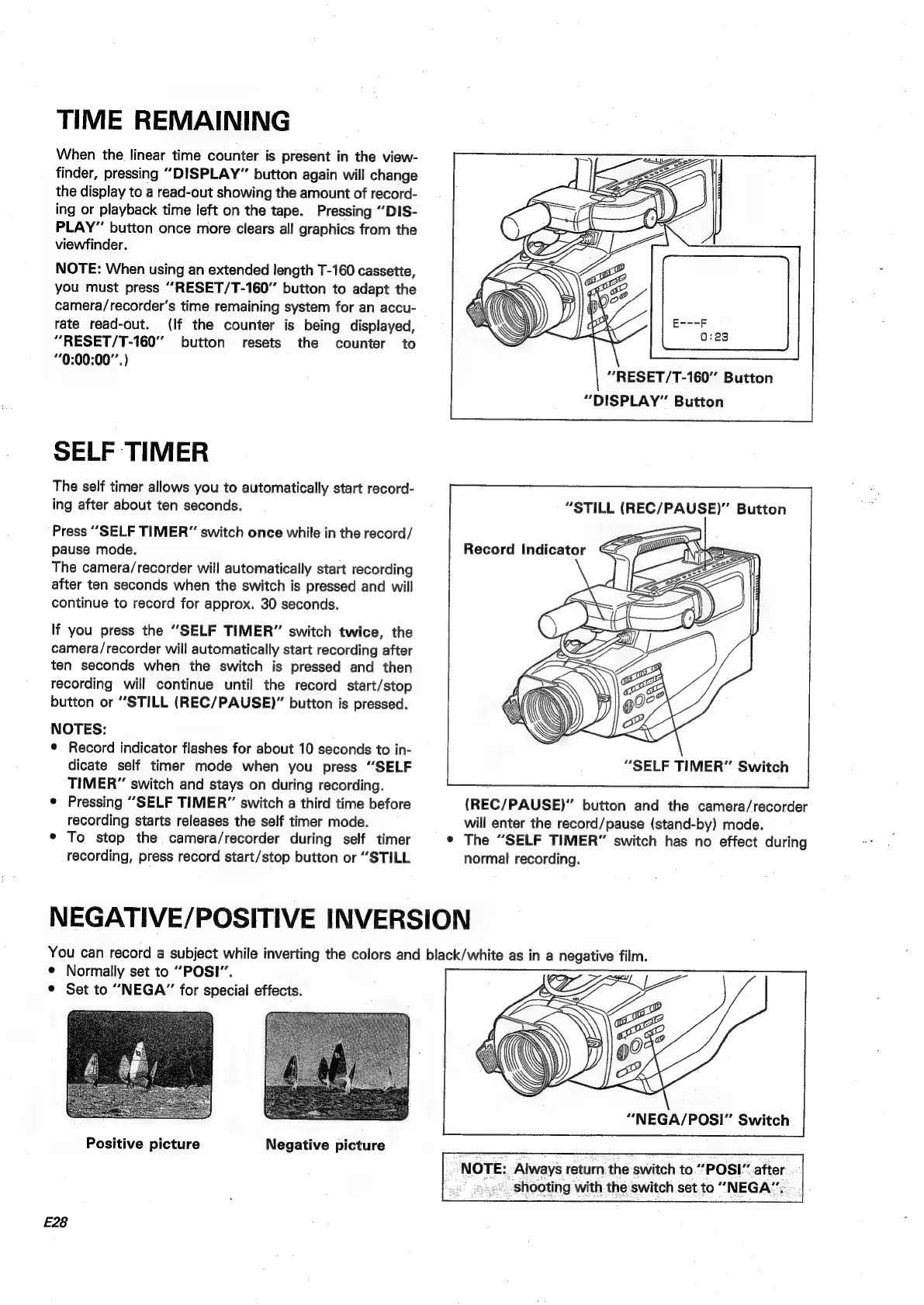
TIME
REMAINING
When
the
linear
time
counter
is
present
in
the
view-
finder,
pressing
“DISPLAY”
button
again
will
change
the
display
to
a
read-out
showing
the
amount
of
record-
ing
or
playback
time
left
on
the
tape.
Pressing
“‘DIS-
PLAY”
button
once
more
clears
all
graphics
from
the
viewfinder.
NOTE:
When
using
an
extended
length
T-160
cassette,
you
must
press
““RESET/T-160”
button
to
adapt
the
camera/recorder’s
time
remaining
system
for
an
accu-
rate
read-out.
(If
the
counter
is
being
displayed,
“RESET/T-160”
button
resets
the
counter
to
*0:00:00°'.)
SELF
TIMER
The
self
timer
allows
you
to
automatically
start
record-
ing
after
about
ten
seconds.
Press
“SELF
TIMER”
switch
once
while
in
the
record/
pause
mode.
The
camera/recorder
will
automatically
start
recording
after
ten
seconds
when
the
switch
is
pressed
and
will
continue
to
record
for
approx.
30
seconds.
If
you
press
the
“SELF
TIMER”
switch
twice,
the
camera/recorder
will
automatically
start
recording
after
ten
seconds
when
the
switch
is
pressed
and
then
recording
will
continue
until
the
record
start/stop
button
or
“STILL
(REC/PAUSE)”
button
is
pressed.
NOTES:
©
Record
indicator
flashes
for
about
10
seconds
to
in-
dicate
self
timer
mode
when
you
press
“SELF
TIMER”
switch
and
stays
on
during
recording.
¢
Pressing
“SELF
TIMER”
switch
a
third
time
before
recording
starts
releases
the
self
timer
mode.
*
To
stop
the
camera/recorder
during
self
timer
recording,
press
record
start/stop
button
or
“STILL
“RESET/T-160"
Button
“DISPLAY”
Button
“STILL
(REC/PAUSE)”
Button
“SELF
TIMER”
Switch
(REC/PAUSE)”
button
and
the
camera/recorder
will
enter
the
record/pause
(stand-by)
mode.
¢
The
“SELF
TIMER”
switch
has
no
effect
during
normal
recording.
NEGATIVE/POSITIVE
INVERSION
You
can
record
a
subject
while
inverting
the
colors
and
black/white
as
in
a
negative
film.
©
Normally
set
to
“POSI’’.
¢
Set
to
“NEGA”
for
special
effects.
Positive
picture
Negative
picture
E28
“NEGA/POSI”
Switch
;
NOTE:
Always
return
the
switch
to”"POSI"
after
«292°
shooting
with
the
switch
set
to
“NEGA’.

Table of Contents

Related product manuals