EasyManua.ls Logo

Hitachi VM-2300A - Synchro: Edit CI.icisdevicscceieuncoudsbevececcdace Doecceveaed

Hitachi VM-2300A
47 pages
Print Icon
To Next Page IconTo Next Page
To Previous Page IconTo Previous Page
Loading...
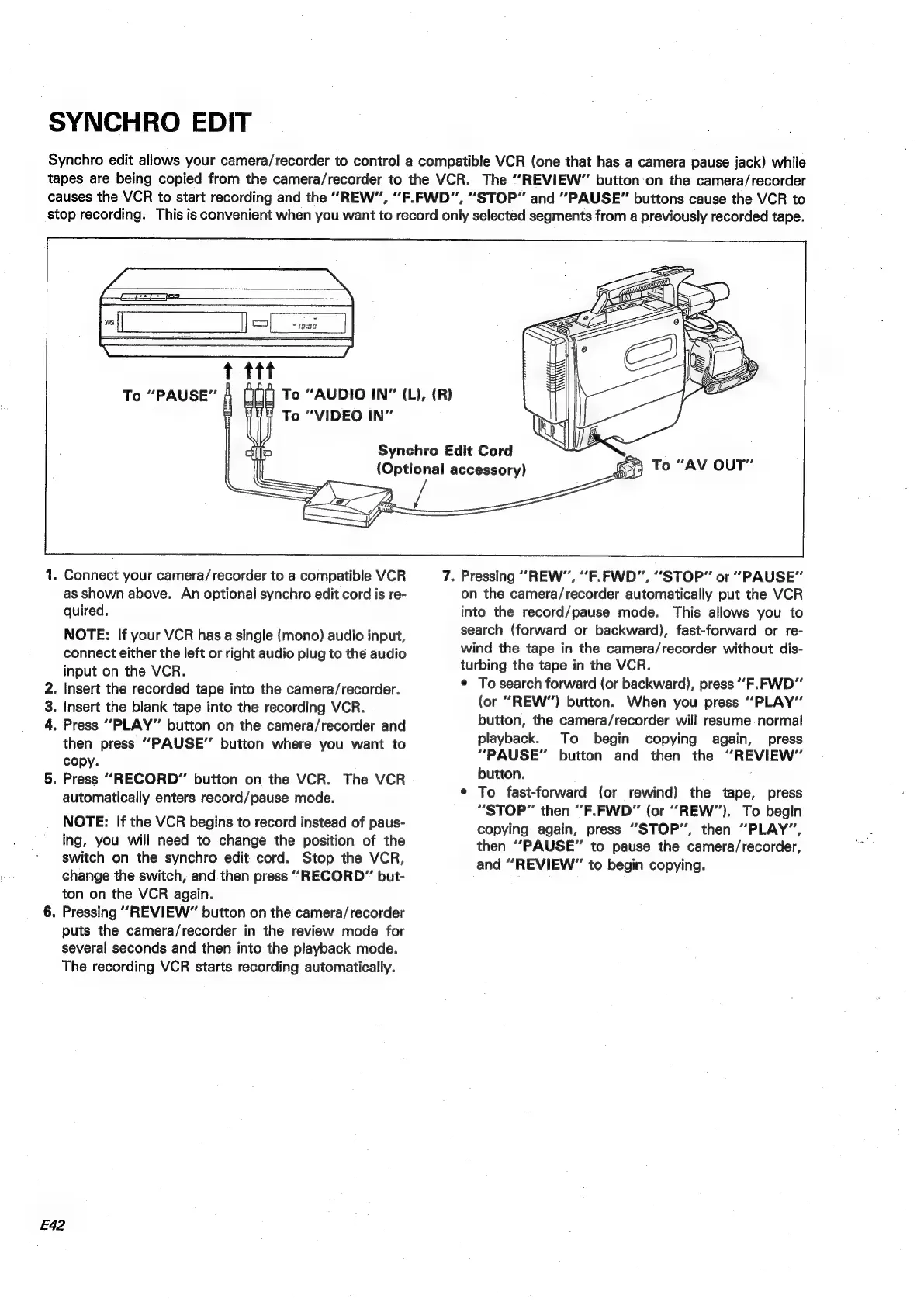
SYNCHRO
EDIT
Synchro
edit
allows
your
camera/recorder
to
control
a
compatible
VCR
(one
that
has
a
camera
pause
jack)
while
tapes
are
being
copied
from
the
camera/recorder
to
the
VCR.
The
“REVIEW”
button
on
the
camera/recorder
causes
the
VCR
to
start
recording
and
the
“REW”,
“F.FWD”,
“STOP”
and
“PAUSE”
buttons
cause
the
VCR
to
stop
recording.
This
is
convenient
when
you
want
to
record
only
selected
segments
from
a
previously
recorded
tape.
Bm
OND
o
“AUDIO
IN”
(L),
(R)
o
“VIDEO
IN”
Synchro
Edit
Cord
(Optional
accessory)
.
Connect
your
camera/recorder
to
a
compatible
VCR
as
shown
above.
An
optional
synchro
edit
cord
is
re-
quired,
NOTE:
If
your
VCR
has
a
single
(mono)
audio
input,
connect
either
the
left
or
right
audio
plug
to
the
audio
input
on
the
VCR.
.
Insert
the
recorded
tape
into
the
camera/recorder.
.
Insert
the
blank
tape
into
the
recording
VCR.
.
Press
“PLAY”
button
on
the
camera/recorder
and
then
press
“PAUSE”
button
where
you
want
to
copy.
.
Press
“RECORD”
button
on
the
VCR.
The
VCR
automatically
enters
record/pause
mode.
NOTE:
If
the
VCR
begins
to
record
instead
of
paus-
ing,
you
will
need
to
change
the
position
of
the
switch
on
the
synchro
edit
cord.
Stop
the
VCR,
change
the
switch,
and
then
press
““RECORD”
but-
ton
on
the
VCR
again.
.
Pressing
“REVIEW”
button
on
the
camera/recorder
puts
the
camera/recorder
in
the
review
mode
for
several
seconds
and
then
into
the
playback
mode.
The
recording
VCR
starts
recording
automatically.
E42
7.
Pressing
“REW”,
“F.FWD”,
“STOP”
or
“PAUSE”
on
the
camera/recorder
automatically
put
the
VCR
into
the
record/pause
mode.
This
allows
you
to
search
(forward
or
backward),
fast-forward
or
re-
wind
the
tape
in
the
camera/recorder
without
dis-
turbing
the
tape
in
the
VCR.
©
To
search
forward
(or
backward),
press
““F.FWD”
(or
“REW”)
button.
When
you
press
“PLAY”
button,
the
camera/recorder
will
resume.
normal
playback.
To
begin
copying
again,
press
“PAUSE”
button
and
then
the
“REVIEW”
button.
¢
To
fast-forward
(or
rewind)
the
tape,
press
“STOP”
then
“F.FWD”
(or
“REW”).
To
begin
copying
again,
press
“STOP”,
then
“PLAY”,
then
“PAUSE”
to
pause
the
camera/recorder,
and
“REVIEW”
to
begin
copying.

Table of Contents

Related product manuals