EasyManua.ls Logo

Hitachi VM-2300A - Page 37

Hitachi VM-2300A
47 pages
Print Icon
To Next Page IconTo Next Page
To Previous Page IconTo Previous Page
Loading...
.
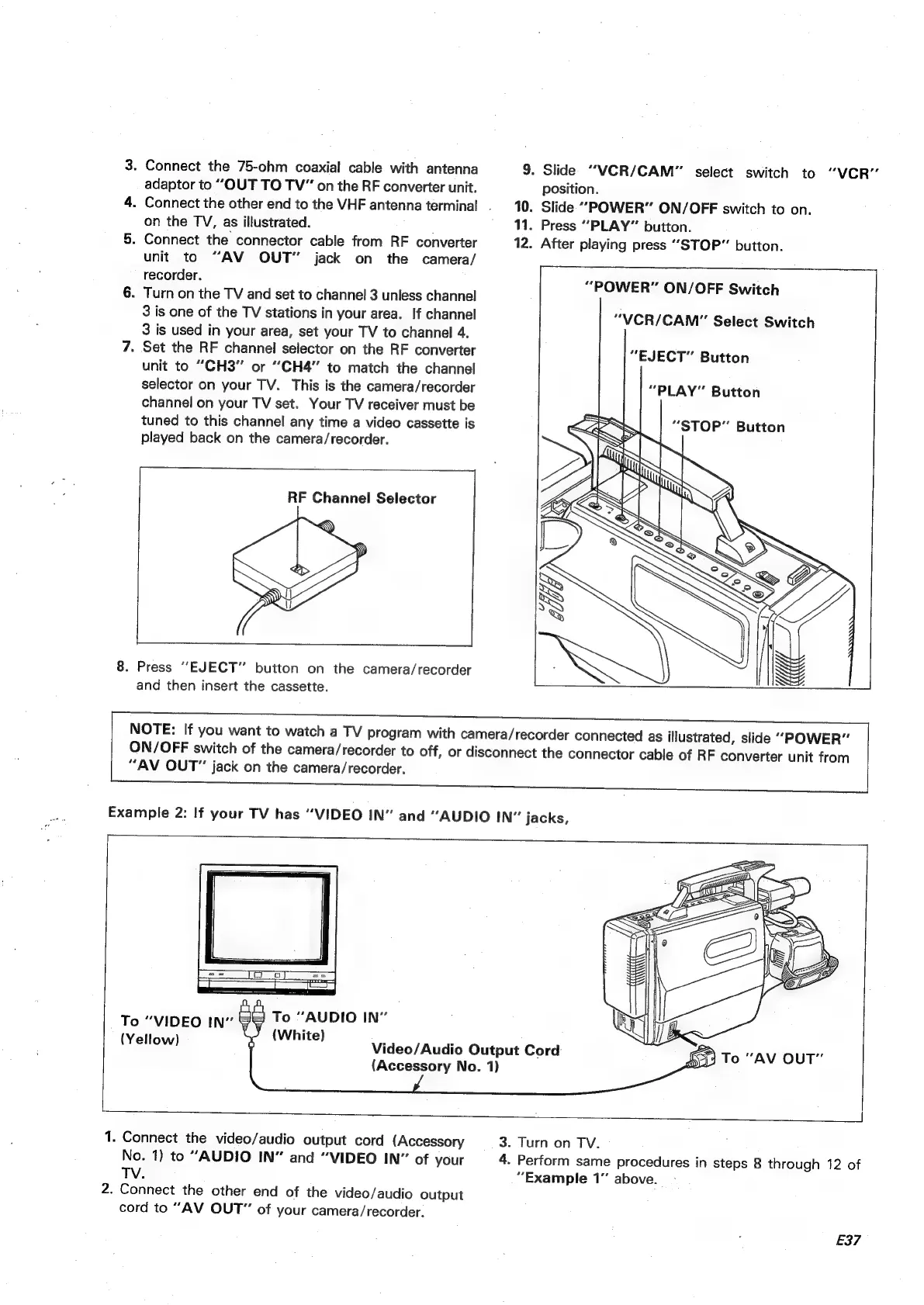
Connect
the
75-ohm
coaxial
cable
with
antenna
adaptor
to
“OUT
TO
TV”
on
the
RF
converter
unit.
.
Connect
the
other
end
to
the
VHF
antenna
terminal.
.
on
the
TV,
as
illustrated.
.
Connect
the
connector
cable
from
RF
converter
unit
to
“AV
OUT”
jack
on
the
camera/
recorder.
.
Turn
on
the
TV
and
set
to
channel
3
unless
channel
3
is
one
of
the
TV
stations
in
your
area.
If
channel
3
is
used
in
your
area,
set
your
TV
to
channel
4.
.
Set
the
RF
channel
selector
on
the
RF
converter
unit
to
“CH3"
or
“CH4”
to
match
the
channel
selector
on
your
TV.
This
is
the
camera/recorder
channel
on
your
TV
set.
Your
TV
receiver
must
be
tuned
to
this
channel
any
time
a
video
cassette
is
played
back
on
the
camera/recorder.
RF
Channel
Selector
8.
Press
“EJECT”
button
on
the
camera/recorder
and
then
insert
the
cassette.
NOTE:
If
you
want
to
watch
a
TV
program
with
camera/recorder
connected
as
illustrated,
slide
9.
Slide
“VCR/CAM”
select
switch
to
“VCR”
position.
10.
Slide
“POWER”
ON/OFF
switch
to
on.
11.
Press
‘‘PLAY”
button.
12.
After
playing
press
“STOP”
button.
-———_—
“POWER”
ON/OFF
Switch
“VCR/CAM”
Select
Switch
“EJECT”
Button
“PLAY”
Button
“POWER”
ON/OFF
switch
of
the
camera/recorder
to
off,
or
disconnect
the
connector
cable
of
RF
converter
unit
from
“AV
OUT”
jack
on
the
camera/recorder.
Example
2:
If
your
TV
has
“VIDEO
IN”
and
“AUDIO
IN”
jacks,
a
To
“AUDIO
IN”
To
“VIDEO
IN”
FF
(White)
(Yellow)
(Accessory
No.
1)
Video/Audio
Output
Cord:
et]
1.
Connect
the
video/audio
output
cord
(Accessory
No.
1)
to
“AUDIO
IN”
and
“VIDEO
IN”
of
your
TV.
2.
Connect
the
other
end
of
the
video/audio
output
cord
to
“AV
OUT”
of
your
camera/recorder.
3.
Turn
on
TV.
4.
Perform
same
procedures
in
steps
8
through
12
of
“Example
1”
above.
E37

Table of Contents

Related product manuals