Version 1.1, 08/2013. Copyright 2012 Hitron Technologies
42
Version 1.1, 08/2013. Copyright 2013 Hitron Technologies
42
Hitron CGN3 User’s Guide
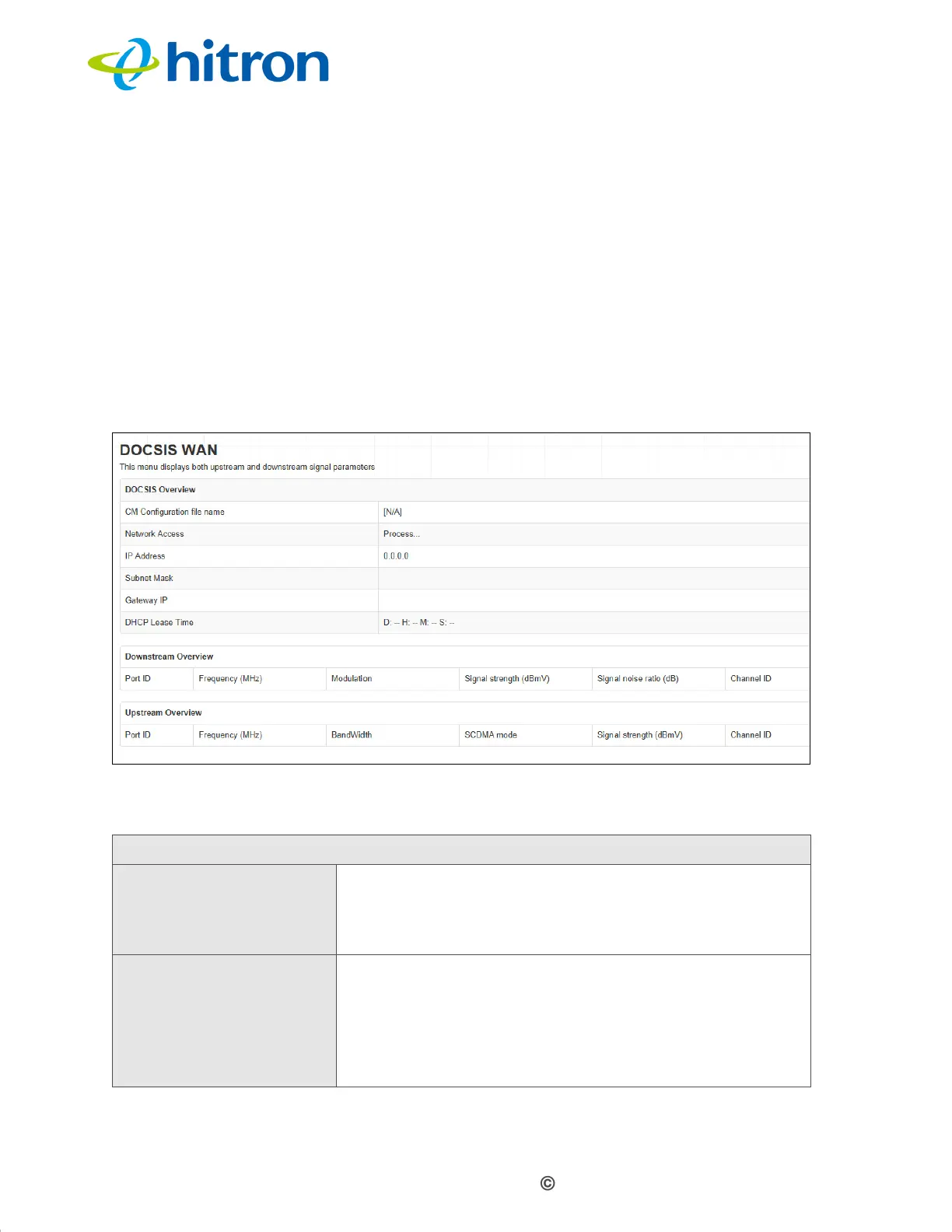
3.4 The DOCSIS WAN Screen
Use this screen to discover information about:
The nature of the upstream and downstream connection between the CGN3 and
the device to which it is connected through the CABLE interface.
IP details of the CGN3’s WAN connection.
Click Status > DOCSIS WAN. The following screen displays.
Figure 14: The Status: DOCSIS WAN Screen
The following table describes the labels in this screen.
Table 12: The Status: DOCSIS WAN Screen
DOCSIS Overview
CM Configurator file
name
This displays the name of the configuration file that the
CGN3 downloaded from your service provider. This file
provides the CGN3 with the service parameter data that
it needs to perform its functions correctly.
Network Access This displays whether or not your service provider
allows you to access the Internet over the CABLE
connection.
Permitted displays if you can access the Internet.
Denied displays if you cannot access the Internet.



 To Next Page